
Both apps got the main facts and CSV calculations right in our three-task comparison. The clearest differences appeared when we tried to use the results: ChatGPT supplied verified HTML downloads, while Kimi gave a more explicit warning about a small data sample. Both revised web tools had a keyboard usability problem.
For the research and data tasks we tested, there was no overall winner. If you need a downloadable web prototype, ChatGPT had the clearer delivery in this run. Kimi’s source was available in its code viewer, but its HTML download remained unverified. That distinction matters if your next step is to edit, share or host the file.
Tested: 24–25 September 2026. Editorial update: 13 October 2026. By China AI Chat Team.
We compared the official web apps using Kimi Moderato with K3 High and ChatGPT Pro in Chat, with Latest / Extra High shown. The accounts used different paid plans. ChatGPT’s underlying serving checkpoint was not exposed. These recorded conditions describe the September experiment; see current access and plans for today’s guidance.
ChinaAI.chat publishes independent guides about these services.
Jump to: Results at a glance · Research and writing · Data analysis · Building and revising · Which should you choose? · Plans and access · Method and downloads · FAQ
Results at a glance
| Job | Kimi result | ChatGPT Pro result | What it means for your work |
|---|---|---|---|
| Check six USB-C claims and rewrite an explainer | Passed seven predefined factual checks; rewrite within length | Passed the same seven checks; rewrite within length | Both handled this source-backed correction. You still need to inspect important citations and technical qualifications. |
| Reconcile support-ticket events into two CSV files | Correct counts, medians and exception; both files retrieved through a ZIP | Correct counts, medians and exception; both files downloaded directly | Both handled this small dataset’s traps. Check the exported files, not just a plausible summary. |
| Build a workshop planner, then add a duration filter | Core interactions worked; source recovered from code viewer; keyboard focus loss | Core interactions worked; original HTML downloads verified; a different keyboard focus loss | Both produced useful prototypes. Test export, revision behavior and keyboard use before publishing a generated tool. |
We kept the first completed answer for each task and one planned revision of each web tool. These examples are not reliability percentages or a general ranking. An earlier ChatGPT Free request failed without an answer; all completed ChatGPT results here came from Pro. The accounts had different paid plans, so this study cannot tell you whether paying more improves accuracy. Read the test conditions and retained interruptions.
Research: can either app correct a misleading explainer?
We supplied six draft claims about the EU common-charger rules, dated the question to 24 September 2026, and asked for a fact-check table with European Commission or EUR-Lex sources. Each app also had to rewrite the explanation in 180–240 words.
The draft mixed correct dates and a correct statement about buying without a charger with four misconceptions: that the rules cover all electronics, apply worldwide, require people to replace existing devices, or guarantee identical charging speeds. A useful answer had to keep the correct material while fixing the overstatements.
The corrections were right; the technical detail still needed checking
Both answers passed all seven checks set before the test. There were seven checks for six claims because device categories and wireless-only charging were assessed separately. Both kept the relevant dates, limited the scope to covered categories and wired charging in the EU market, and distinguished new market placement from devices people already own.
Both explained that sharing a connector does not guarantee the same maximum charging speed. They also preserved the option to buy without a charger without claiming that charger bundles are banned. Kimi’s rewrite was 220 words; ChatGPT’s was 209, excluding the heading and extracted citation labels.
Both simplified a supplementary USB Power Delivery condition to the power threshold above 15 W. For covered equipment capable of wired charging, the European Commission’s common-charger guidance also specifies voltage above 5 V or current above 3 A. Neither answer said power was the only trigger, so we recorded the incomplete detail without changing the main check results. Both original answers remain in the download.
For your own writing: ask for sources beside individual claims, then open the source behind any important date, exception or broad statement. Both apps were useful for this particular correction task. Seven passing checks do not establish general legal or research accuracy.
Data analysis: can you trust the exported report?
Each app received the same fictional 45-row support-event CSV and a data dictionary. We asked for a team summary, an exceptions CSV and a short explanation. We calculated the reference answer before uploading the files.
The difficult part was deciding which events counted. The data included a duplicate, different time-zone offsets, a reassigned ticket, a reopened ticket, an opening before the reporting window, a missing resolution timestamp and an event after the cutoff. The report needed each ticket’s latest eligible state, not a count of every event.
The completed ChatGPT analysis ran in Chat. An attachment/model problem blocked the attempted Work route before submission; it was not a completed Work analysis.
Both downloaded summaries matched the reference
| Team | Open tickets | Resolved tickets | Median resolution hours |
|---|---|---|---|
| Accounts | 2 | 4 | 8.50 |
| Billing | 2 | 5 | 7.00 |
| Technical | 2 | 5 | 4.00 |
Both exceptions files contained exactly T05 / E05-2. Its final state was resolved, but its resolution timestamp was missing. Both apps correctly included it in the resolved count and excluded it from the duration calculation.
We opened and parsed the files themselves. Kimi’s individual download route did not initially yield the files; Download all supplied both CSVs in a ZIP. ChatGPT supplied both directly. Kimi wrote the medians as 8.5, 7.0 and 4.0, while ChatGPT used two decimal places. The values were the same.
Kimi made the small-sample warning more explicit
Kimi pointed out that each team’s median rested on only four or five duration observations. ChatGPT explained the calculation and missing value correctly but did not repeat that warning in its final prose. With so few observations, one ticket can noticeably change the median. These fictional figures cannot establish which real support team performs better.
For your own report: supply the reporting rules and data dictionary, then check the exported headers, totals and exception rows. A missing value may belong in a count while being excluded from an average or median; make that rule explicit before asking either app to calculate.
Both answers described processing within the task environment. That is not proof of on-device processing or privacy: the files were uploaded to the providers. We used fictional data, and this comparison did not audit data handling.
Web tools: does the result survive a realistic revision?
We gave both apps six fictional community workshops and asked for one self-contained HTML file. It needed topic and availability filters, a match count, an empty state, reset controls and a shortlist with total duration. Full workshops still had to be selectable: this was a planning list, not a booking system.
Our planned follow-up added Any duration / up to 90 minutes / up to 120 minutes. The new filter had to work with the existing filters and preserve the shortlist when filters changed or reset. We retained the initial and revised versions separately and did not repair their code.
Both kept the shortlist and calculated the right results
In both revised tools, available workshops of up to 90 minutes returned W1, W3 and W4. Adding Craft returned no matches, but a shortlist of W1 and W4 still showed 165 minutes. Craft with any availability and a 120-minute limit included the full W2 workshop. Reset brought back all six workshops without clearing the shortlist.
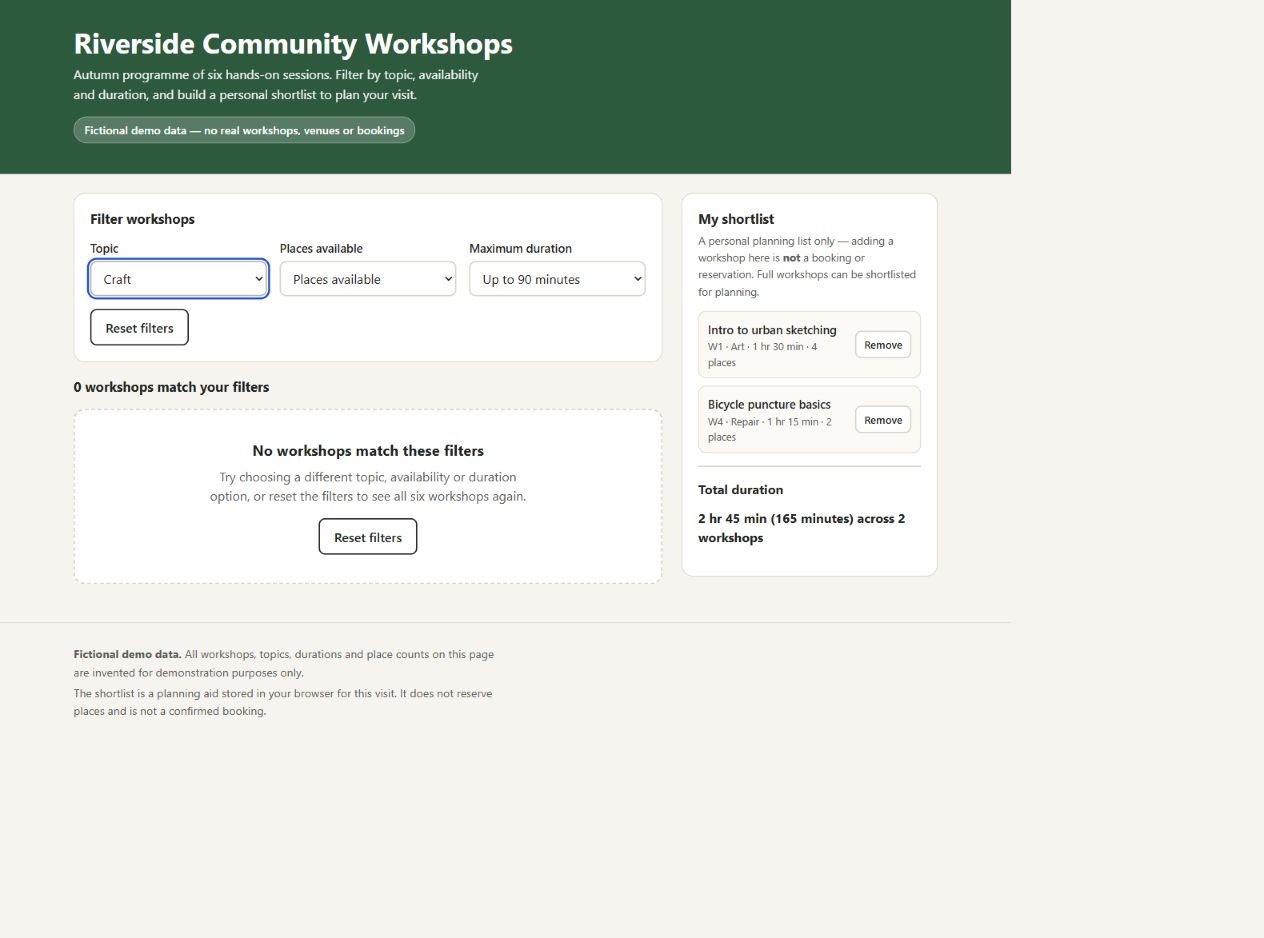
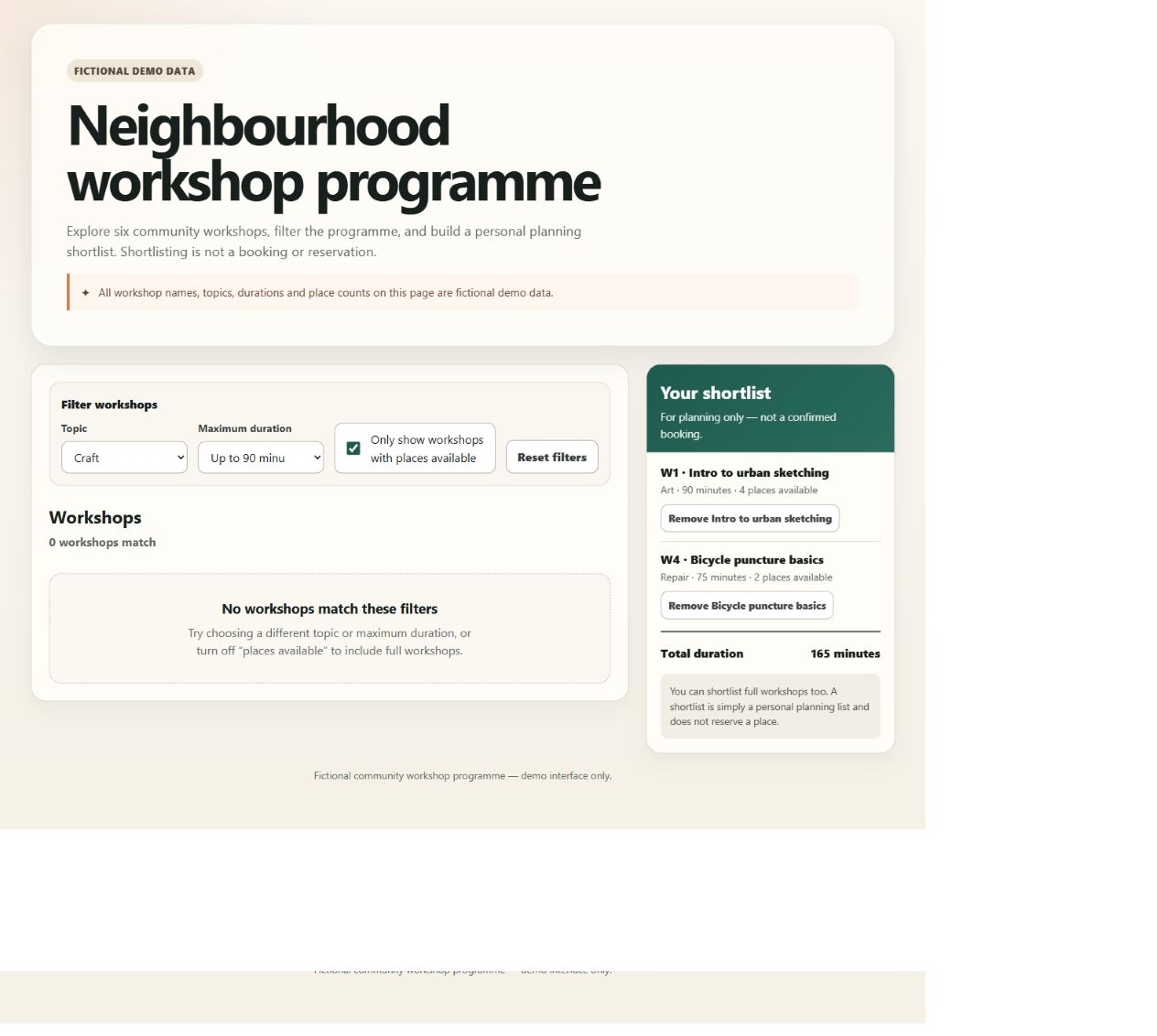
The keyboard problems would interrupt a user’s work
- Kimi: pressing Enter to add W1 moved keyboard focus from the control to the page body.
- ChatGPT: the same direct toggle kept focus. After the Art filter hid W2’s card, removing W2 from the shortlist moved focus to the page body.
In either case, someone navigating by keyboard could lose their place even though the filter and totals were correct. Both revised files fit the actual 390-pixel viewport checked during the original test without page-level horizontal scrolling. That was a narrow layout check, not a complete accessibility, screen-reader or cross-browser audit. The supplied files retain both focus defects.
ChatGPT delivered verified files; Kimi’s source required a different route
We downloaded ChatGPT’s original initial and revised HTML files. For Kimi, we recovered both versions verbatim from its visible code viewer. Its controls reported a successful download, but we could not verify a matching saved HTML file. Kimi’s initial hosted preview was usable; we checked the revised source locally, rather than treating the older preview as the updated tool.
Neither original tool had external dependencies in our source inspection. The hosted Kimi preview added scripts that were absent from its original source; those belong to the preview environment, not the generated HTML.
Before sharing a generated tool: obtain its source file, try a change that could break existing behavior, and navigate it with a keyboard. These two prototypes needed review before publication. This small HTML task does not establish either product’s ability to maintain production software.
Which should you choose for your task?
For a sourced explanation, start with the app you already use. Both corrected our draft and met its length requirement. This trial gives no reason to upgrade solely for that job. Your subject may be harder, so check a representative example against its sources.
For a small data report, compare the files and the explanation. Both supplied correct CSVs here. Kimi made the sample-size limitation clearer; ChatGPT’s shorter explanation still matched the verified outputs. Specify your cutoff, missing-data rules and expected format before uploading.
For a web prototype you need to download, ChatGPT had the stronger delivery evidence in this run. Both of its original HTML versions were downloaded. Kimi’s recovered code worked on the checked interactions, but its matching HTML download was unverified. That does not establish that Kimi cannot export websites.
Our guides to Kimi PDF reading, Kimi Sheets, Kimi Slides and Kimi Deep Research explain those workflows and what to verify in their outputs. They provide instructional guidance for those tasks. The tested findings on this page come from the three tasks and retained files described below.
Current access and plans
Current product guidance checked: 13 October 2026. The results above remain those collected on 24–25 September 2026. The following documentation helps you check today’s access and workflow options.
Choose the workflow for your files
Kimi documents dedicated Docs and Sheets tools for document and spreadsheet work. OpenAI describes Work for research, analysis and finished files involving multiple steps, and Chat for questions and conversation. See Kimi Docs and Sheets documentation and ChatGPT on the web. These are documented workflow descriptions; the completed ChatGPT tasks in this study used Chat.
Check the plan and usage allowance in your account
The completed tests used Kimi Moderato and ChatGPT Pro without matching their prices. They cannot establish which subscription offers better value or whether you need a paid upgrade. One unsuccessful ChatGPT Free request cannot establish the free plan’s normal capabilities or accuracy.
Kimi international memberships: the current new plans are Plus, Pro, Max and Ultra. Moderato, the plan recorded in this study, is now listed as a legacy plan; existing subscribers can retain and renew it. Membership features draw from a shared monthly credit pool, so using one feature affects the allowance available to others. Check the official membership overview, current pricing details and our Kimi pricing guide for the relevant service.
ChatGPT Work and Codex: OpenAI’s pricing and usage documentation says these share usage, with consumption affected by the model, task complexity, context and tool use. Those rules concern Work and Codex; check the allowance for the specific ChatGPT feature you intend to use.
Before paying, confirm that your account supports the file uploads, export format and usage allowance your task needs. Try a representative task and inspect the output before choosing a subscription for a larger workload.
Keep app results and API access separate
This comparison covers the web apps, including their search, file tools, account settings and download interfaces. ChatGPT displayed Latest, and its underlying checkpoint was not exposed. The results therefore cannot identify how K3 compares with a specific GPT checkpoint through an API.
For an integration, use our Kimi models guide and Kimi API access guide to identify the exact endpoint and evaluate it separately. Kimi membership benefits do not convert into Open Platform API balance, as explained in Kimi’s API documentation. OpenAI also separates API token prices from included subscription usage in its pricing documentation.
Test conditions, limitations and original files
We fixed the prompts and success criteria before testing. Research began on 24 September, and completed app tests and file checks span 24–25 September 2026. Each app supplied three first completed answers and one predefined tool revision: eight completed requests in total.
| Condition | Kimi | ChatGPT |
|---|---|---|
| Official app and observed plan | kimi.ai; Moderato | chatgpt.com; Pro for completed results |
| Visible setting | K3 High | Chat, Latest / Extra High observed before Task 1 and Task 3; Task 2 inherited the setting |
| Conversation context | Fresh task chats outside unrelated projects; existing account configuration preserved | Fresh Temporary chats marked Unpersonalized; UI said memory, plugins and custom instructions were ignored |
| Tools and unknowns | Search/fetch, file reading, Python and website/file activity observed; no custom-skill invocation observed in these tasks; hidden personalization not ruled out | Source retrieval and file creation used; underlying serving checkpoint not exposed |
| Extra interventions | CSV download-all resolved individual download friction; HTML source recovered through code viewer | Work attachment/model mismatch blocked Task 2 before submission; files were then submitted in Chat |
The earlier Free failure is separate from the completed Pro results. It returned a generation error without an answer; we did not use Retry to replace it. For the CSV task, the Work attachment/model problem occurred before submission, and the completed request used Chat. Preparatory attachment attempts were not counted as generated answers and do not establish that Work generally cannot process CSVs.
Attachment attempts and file-retrieval details
The Work problem persisted after reattaching the files and selecting a model before attachment. We then submitted the task in Chat. Kimi’s CSVs were retrieved through its download-all ZIP after the individual route was unproductive. Its initial and revised HTML source was recovered from the code viewer; a corresponding HTML download remained unverified. ChatGPT’s CSV and HTML files were downloaded directly. These interventions explain how we obtained the evidence; they were not requests to improve an answer.
We did not benchmark speed: account changes and browser/download interruptions would make elapsed-time comparisons misleading. We did not test large datasets, sensitive documents, long-term reliability, multilingual quality, image/video generation, research agents head to head, API performance or equal-price plans. No API requests, purchases or public deployment of the generated tools were part of this study.
Download the prompts, fictional inputs, original outputs and verification notes (ZIP). The package separates actual downloads from source recovered through Kimi’s code viewer. It includes both HTML versions, the CSV reference and outputs, and the original defects. Open the HTML examples locally; they are fictional demos, not booking services.
Article review was AI-assisted, and outputs were checked directly. See how we test for the evidence policy, or contact the team with a reproducible correction.
Frequently asked questions
Is Kimi better than ChatGPT?
Neither won across all three jobs. Both passed the factual and CSV checks; both web tools had a keyboard defect. ChatGPT had verified direct HTML downloads, while Kimi’s data explanation gave clearer sample-size warnings. Choose the workflow you can verify.
Can I use the free versions for the same tasks?
Do not assume these paid-account results establish free access or identical limits. Check file uploads, export tools and current allowances in your account. Our only preliminary Free ChatGPT request failed without an answer, which cannot establish its normal capabilities or accuracy.
Which is better for research and writing?
Both passed the seven predefined checks on our six-claim USB-C explainer and met the requested rewrite length. That supports this bounded editing workflow, not a general writing or research ranking. Try a source-backed task from your own subject and verify its most consequential claims.
Which is better for coding?
Both built and revised the small HTML planner correctly on the tested core interactions, with different focus problems and export experiences. We did not compare large repositories or coding agents. Use our Kimi Code guide for that separate workflow; this article does not benchmark Kimi Code against Codex.
Where should I try each app?
Use the official Kimi web app or ChatGPT. To compare other options, read Kimi vs Qwen, DeepSeek vs Kimi or the AI comparison directory.
Review and update history
An earlier version was reviewed by Ibrahim Ahmed and Ibrahim Abd Elhady. Previous editorial revision: 28 September 2026. See our review policy.
13 October 2026 editorial update: corrected the description of the linked Kimi guides, checked current product and membership documentation, and rechecked the retained numerical results and evidence files. The original September test dates, account settings, outputs and screenshots remain the basis of the comparison. No new app trials were conducted for this update; the earlier-version review credit above applies to that earlier version.