
Kimi pricing is split into three different things: the regular Kimi app membership, Kimi Code membership benefits, and the separate Kimi API platform for developers. The current international paid Kimi plans start at Plus for $19/month, while the API is billed separately by token usage and is not included as a normal consumer subscription.
The most important point is simple: do not compare Kimi only by its monthly subscription price. Check whether you need the web app, coding tools, Agent features, Extra Usage, or a developer API key, because each path is billed differently.
Kimi pricing at a glance
For international users, Kimi currently lists four paid membership tiers: Plus, Pro, Max, and Ultra. Annual billing is charged upfront, and the lower “monthly equivalent” is only a comparison figure, not a monthly payment.
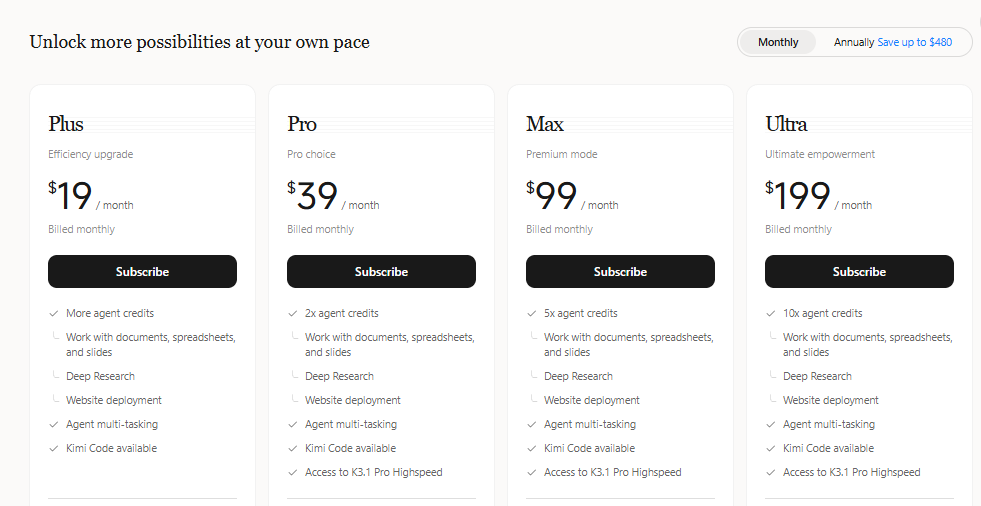
| Plan | Monthly billing | Annual total | Monthly equivalent if billed annually | Best for | Main caveat |
|---|---|---|---|---|---|
| Plus | $19/month | $180/year | $15/month | Most individual users who want Kimi Code, research, office tasks, and Agent Swarm | Credits are still shared across features |
| Pro | $39/month | $372/year | $31/month | Users who need more credits, Goal Mode, and a dedicated Kimi Claw | Only worth it if you actually use the extra workflow features |
| Max | $99/month | $948/year | $79/month | Heavy users running more intensive Agent tasks and higher concurrency | Can be overkill for normal chat and light coding |
| Ultra | $199/month | $1,908/year | $159/month | Very heavy users who need the largest credit pool among the international plans | High monthly cost; check usage first before upgrading |
These are the international membership prices shown by Kimi at the last verification date. Before paying, open the official Kimi pricing page from your own account and region because eligibility, currency, taxes, and app-store billing can vary.
Is Kimi free?
Yes, Kimi can be used for free for some experiences, and Kimi’s own K2.6 page states that Kimi K2.6 is free to use. Paid plans are for users who want more advanced features, broader workflow capacity, Kimi Code access, Agent Swarm, Deep Research, office-file workflows, or larger shared credit pools.
The free option is best for trying Kimi, asking normal questions, testing K2.6, and deciding whether the workflow fits you. It is not the same thing as API access, and it should not be treated as a guaranteed unlimited professional plan.
How Kimi credits work
Kimi membership features share one monthly credit pool. Agent tasks, Deep Research, Slides, Docs, Sheets, Kimi Code, Kimi Work, Kimi Claw, image generation, and other membership features can draw from the same pool.
That means a heavy coding session, a long research task, or several document-generation jobs can reduce the credits available for other features. Kimi says credits are consumed based on actual usage, including token volume, model choice, context length, tools, and the task itself.
Do Kimi credits roll over?
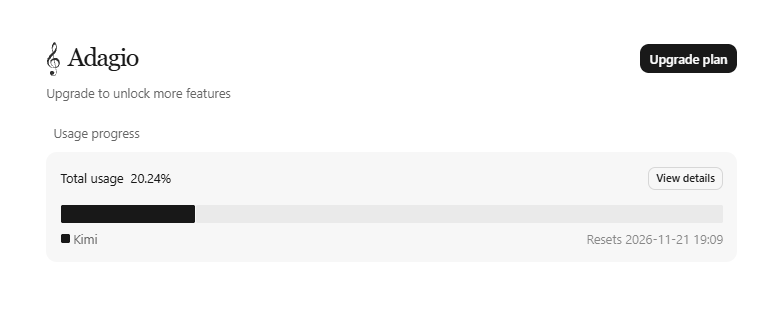
No. Kimi states that both monthly and annual subscribers receive credits on a monthly cycle, and unused credits expire at the end of each cycle. They do not roll over or convert to cash.
What happens when credits run out?
Tasks already in progress can finish normally, but new tasks may show an insufficient-credit prompt. At that point, your options are to wait for the next monthly refresh, upgrade to a higher plan, or use Extra Usage if it is available for your account. Review the spending controls before relying on paid overflow.
Monthly vs annual Kimi pricing
Annual billing is cheaper on a monthly-equivalent basis, but it is charged upfront. That matters if you are still testing Kimi or if your usage changes month to month.
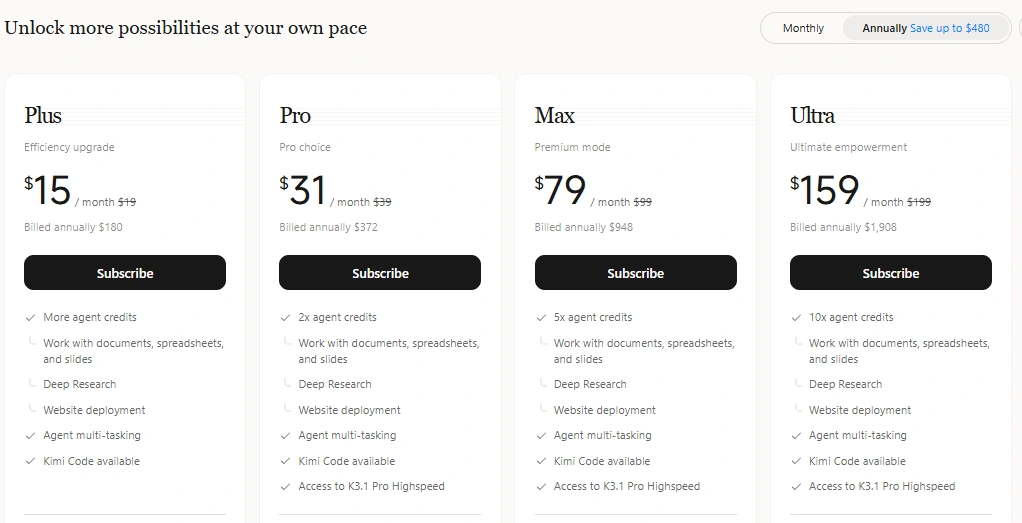
| Plan | Monthly cost for 12 months | Annual billing | Approximate annual saving |
|---|---|---|---|
| Plus | $228 | $180 | $48 |
| Pro | $468 | $372 | $96 |
| Max | $1,188 | $948 | $240 |
| Ultra | $2,388 | $1,908 | $480 |
Choose monthly billing if you are still testing Kimi. Choose annual billing only if you already use Kimi often enough to justify paying the full year upfront.
Which Kimi plan should you choose?
The best Kimi plan depends less on the plan name and more on how you use credits. A user who mainly chats and uploads occasional files does not need the same tier as someone running coding agents, Agent Swarm, Deep Research, websites, slides, and spreadsheets every week.
| User type | Recommended starting point | Why |
|---|---|---|
| Casual user | Free access first | Enough to test the interface, writing quality, and basic K2.6 usage before paying |
| Student or researcher | Plus | Good first paid tier for document work, Deep Research, office tasks, and general productivity |
| Solo developer | Plus | Includes Kimi Code access and is the lowest international paid tier |
| Power user | Pro | More credits plus Goal Mode and dedicated Kimi Claw access |
| Heavy Agent user | Max | Better fit for intensive Agent tasks and higher task concurrency |
| Very heavy professional user | Ultra | Largest international credit pool, but only sensible if your usage justifies $199/month |
| App developer or business integrating Kimi into a product | Kimi API, not a normal membership | API usage is token-based and managed through the Kimi API platform |
Kimi Code pricing and membership access
Kimi Code is included in Kimi membership benefits for eligible tiers. Kimi describes it as an intelligent programming service for developers, available through the desktop app, CLI, VS Code extension, and supported third-party tools.
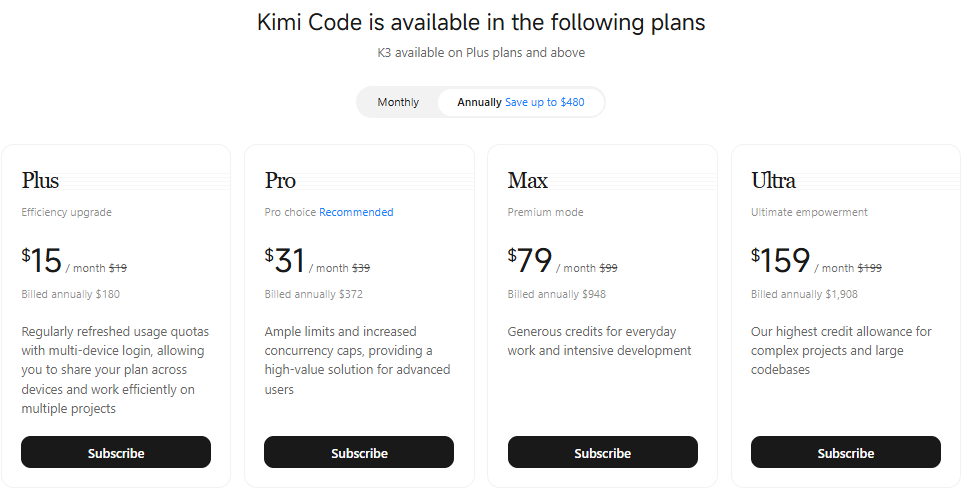
For normal Kimi Code usage, you sign in with your Kimi account and use your membership benefits. In the official Kimi Code client and CLI, you usually do not need to manage an API key manually. For third-party development tools, members can create API keys in the Kimi Code Console.
Do not confuse this with the Kimi Platform API. Kimi Code is tied to membership benefits and rate limits. Kimi Platform API is separate, pay-as-you-go, and better suited for product integrations, enterprise calls, and applications where you need usage management.
Kimi API pricing is separate from Kimi membership
Kimi API pricing works differently from the consumer subscription. The API is billed by token usage, with separate charges for input tokens, cached input, output tokens, and, for K3, cache writes. The API platform is pay-as-you-go and does not provide a normal subscription plan.
For the key, regional endpoint and first request, use our Kimi API setup guide.
Use the API if you are building a product, automating workflows, connecting Kimi to your backend, or comparing model costs by token. Use the regular membership if you mainly want the Kimi web app, Kimi Work, Kimi Code, Agent features, Docs, Sheets, Slides, and research tools.
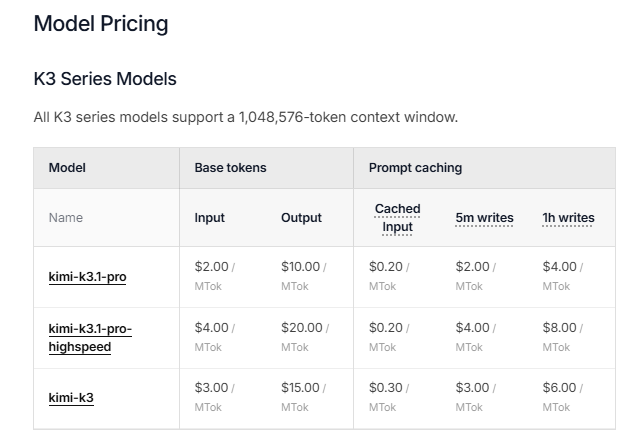
| Model | Cached input | Input | Output | Context window | Best use case |
|---|---|---|---|---|---|
| Kimi K3 | $0.30 / 1M tokens | $3.00 / 1M tokens | $15.00 / 1M tokens | 1,048,576 tokens | Large-context reasoning, difficult coding, long knowledge-work tasks |
| Kimi K2.7 Code | $0.19 / 1M tokens | $0.95 / 1M tokens | $4.00 / 1M tokens | 262,144 tokens | Cost-sensitive coding and agent workflows |
| Kimi K2.7 Code HighSpeed | $0.38 / 1M tokens | $1.90 / 1M tokens | $8.00 / 1M tokens | 262,144 tokens | Faster coding loops where latency matters |
| Kimi K2.6 | $0.16 / 1M tokens | $0.95 / 1M tokens | $4.00 / 1M tokens | 262,144 tokens | General-purpose API use with text, vision, and agent tasks |
API prices can change and may exclude taxes. Always verify the live Kimi API pricing page before budgeting production usage.
Simple API cost example
Across multiple requests totaling 1 million uncached input tokens and 500,000 output tokens with Kimi K2.6, the rough API cost would be $0.95 for input plus $2.00 for output, or about $2.95 before taxes and any other feature charges.
With Kimi K3, the same aggregate usage across multiple requests would cost $3.00 for input plus $7.50 for output, or about $10.50 before taxes and cache-write details. If much of your repeated context hits the cache, your input cost can be lower, but output tokens usually remain the main cost driver in long responses.
These are billing totals, not sizes for one API request. Each request must still fit the selected model’s context and output limits, including its input, history, reasoning, and generated output. The listed context is 256K for K2.6 and 1M for K3; it is not permission to combine all the example’s tokens into one call.
Extra Usage: what it means
Extra Usage is Kimi’s pay-as-you-go supplement for subscribers. It is designed for cases where your subscription credits are exhausted but you want to continue using Kimi instead of waiting for the next refresh.
Kimi uses subscription credits first. Once those are exhausted or rate-limited, overflow usage can be deducted from your Extra Usage balance if you have enabled it. Extra Usage is shared across Kimi clients, including web, browser extension, desktop, and mobile.
- Minimum single recharge: $10.
- Maximum 10 recharges per day.
- Daily cumulative recharge limit: $1,000.
- Balance cap: $2,000.
- Unused Extra Usage balance does not expire.
- Extra Usage recharges are generally non-refundable and non-transferable, except where required by law.
Extra Usage is useful for occasional spikes. If you often need it, upgrading your plan may be more cost-effective than repeatedly topping up.
How to control Extra Usage spending
The monthly spending cap is off by default. Enable a cap above $10; once reached, it pauses Extra Usage spending for the rest of that month. Recharge limits and the wallet balance cap are not a monthly spending limit.
On the web, open Settings → Subscription Management → Extra Usage to review your balance and recent usage. Switch Extra Usage off there to pause deductions; your balance stays in the account. The desktop and mobile apps do not currently support this toggle, although they share the balance.
Check the official Extra Usage guide before enabling paid overflow.
International pricing vs China pricing
Kimi pricing is not the same everywhere. The international pricing page uses Plus, Pro, Max, and Ultra in USD. The China pricing page uses Go, Plus, Pro, and Max in CNY. Do not mix the two tables when writing budgets or comparisons.
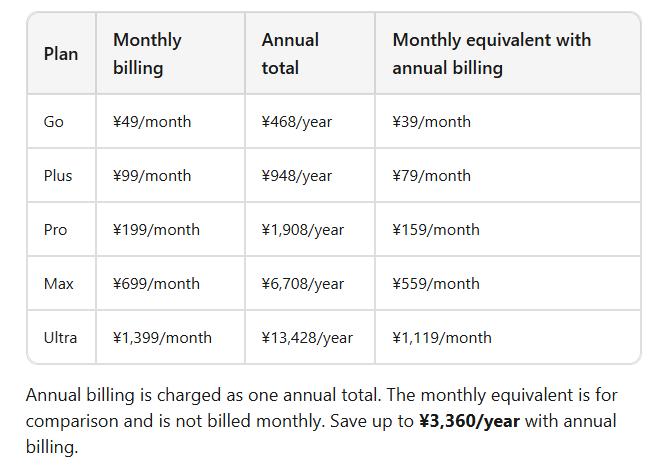
| Region | Plans shown | Starting paid monthly price | Currency | Important note |
|---|---|---|---|---|
| International | Plus, Pro, Max, Ultra | $19/month | USD | All four international paid plans include Kimi Code |
| China | Go, Plus, Pro, Max | ¥49/month | CNY | Go does not include Kimi Code; Plus and higher do |
If you are reading pricing from screenshots, social posts, or third-party comparison pages, check which region they refer to. A China-only price should not be converted and presented as the international subscription price.
Kimi membership vs Kimi API vs Kimi Code
The easiest way to avoid billing mistakes is to separate the three main products before choosing a plan.
| Product path | Billing model | Best for | Not ideal for |
|---|---|---|---|
| Kimi membership | Monthly or annual subscription with shared credits | People using the Kimi web app, files, research, slides, docs, sheets, Agent features, and general productivity | Developers who need API billing, usage logs, and production integration |
| Kimi Code membership benefits | Membership subscription with rate limits and shared credit rules | Developers using Kimi Code Desktop, CLI, VS Code, or supported coding-agent tools | Building your own customer-facing product on top of Kimi |
| Kimi Platform API | Pay-as-you-go token billing | Apps, backend integrations, product features, enterprise usage, and controlled API calls | Users who only want the Kimi chat interface or office tools |
Is Kimi worth paying for?
Kimi is worth paying for if you use its higher-value workflows regularly: coding with Kimi Code, long-context work, Deep Research, document processing, presentations, spreadsheets, website generation, or multi-agent tasks. In those cases, the Plus plan is the logical starting point for most international users because it is the lowest paid tier and includes Kimi Code.
Kimi may not be worth paying for if you only ask occasional chat questions, do not use files or coding features, rarely need Agent workflows, or are not sure whether you will use your monthly credits. Start free, then upgrade only after you hit a real limit.
Kimi pricing compared with other AI tools
Kimi’s entry paid plan sits in the same general range as many premium AI subscriptions, but direct comparisons can be misleading. A $19 Kimi Plus subscription, a chatbot subscription from another provider, and a developer API bill are not the same product.
Compare Kimi against alternatives by workflow, not just the monthly price. For example, if you need coding agents, large context, document generation, slides, sheets, and Agent Swarm, Kimi Plus or Pro may be easier to justify. If you mainly need a general chatbot, compare model quality, limits, mobile app experience, file handling, and cancellation terms before deciding.
Checklist before you subscribe
- Check whether you are on the international or China pricing page.
- Confirm the currency and whether taxes or app-store fees apply.
- Decide whether you need the Kimi app, Kimi Code, or the Kimi API.
- Start with monthly billing if you are still testing Kimi.
- Use annual billing only if you are confident you will keep using it for the full year.
- Check whether the features you need are included in your plan.
- Remember that membership credits are shared across features.
- Remember that unused credits do not roll over.
- Check Kimi Code usage limits if coding is your main use case.
- Use Extra Usage only when it is cheaper than upgrading or when you need a temporary overflow.
- Before using Extra Usage, check whether it is enabled and set a monthly spending cap; the cap is off by default.
- For API usage, estimate both input and output tokens before building.
- Recheck the official pricing page before publishing budgets or client-facing cost estimates.
Sources checked
This article was checked against the following official source types: the Kimi international membership pricing page, the Kimi membership overview, the credit update and usage rules, the Extra Usage guide, the China membership pricing page, the Kimi API billing guide, the Kimi API pricing documentation, and the Kimi Code documentation.
FAQ
How much does Kimi cost?
For international users, paid Kimi membership starts at $19/month for Plus. Other current international tiers are Pro at $39/month, Max at $99/month, and Ultra at $199/month. Annual billing lowers the monthly equivalent but is charged upfront.
Is Kimi free?
Yes. Kimi K2.6 is available to use for free, and paid plans are available if you want more features, higher usage capacity, Kimi Code access, Agent workflows, and advanced productivity tools.
What is the cheapest paid Kimi plan?
For international users, the cheapest paid Kimi plan is Plus at $19/month, or $180/year when billed annually.
Does Kimi have annual billing?
Yes. Kimi offers annual billing for the international paid plans. The annual plan is paid upfront, and the monthly-equivalent price is only a comparison number.
Is Kimi API included in a Kimi subscription?
No. The Kimi API platform is a separate pay-as-you-go product billed by token usage. Kimi membership and Kimi Code membership benefits are different from the Kimi Platform API.
How does Kimi API pricing work?
Kimi API pricing is based on tokens. You pay for input tokens and output tokens, with discounted cached-input rates when repeated context hits the cache. K3 also has cache-write pricing for context caching.
Do Kimi credits roll over?
No. Kimi states that unused membership credits expire at the end of each monthly cycle and do not roll over or convert to cash.
Which Kimi plan is best for coding?
Most individual developers should start with Plus because it is the lowest international paid tier and includes Kimi Code. Move to Pro, Max, or Ultra only if your real coding-agent usage justifies the higher credit pool or extra features.
What happens if I run out of Kimi credits?
Tasks already running can finish, but new tasks may show an insufficient-credit prompt. You can wait for the next refresh, upgrade your plan, or use Extra Usage if available. Review the spending controls before using Extra Usage: the monthly cap is off by default, and web settings let you pause deductions.
Is Kimi pricing the same in every country?
No. Kimi has different pricing pages for international and China users. International plans are listed in USD, while China plans are listed in CNY and use a different plan structure.
Original pricing and product review: October 12, 2026. Extra Usage spending-control update: October 15, 2026.