
Last verified: October 12, 2026
Kimi models are easier to understand when you separate them into three groups: the models you choose inside the Kimi app, the model IDs developers call through the Kimi API, and the coding models used by Kimi Code. In the Kimi app, the main choices are K2.6, K3, and K3 Cluster. In the API, the current active model IDs include kimi-k3, kimi-k2.7-code, kimi-k2.7-code-highspeed, and kimi-k2.6. In Kimi Code, the model IDs are different again: k3, k3-256k, kimi-for-coding, and kimi-for-coding-highspeed.
The best Kimi model depends on what you are doing. Use K2.6 for fast Q&A, K3 for complex conversations, documents, visual work, and agent tasks, K3 Cluster for large-scale parallel work, K2.7 Code or Kimi Code models for coding, and kimi-k3 when you want the strongest current API model.
Kimi models at a glance
The most common mistake is treating every Kimi model name as if it works the same everywhere. K2.6 inside the Kimi app, kimi-k2.6 in the API, and Kimi Code model IDs are related, but they are not interchangeable labels.
| Model or model ID | Where you use it | Best for | Context window or limit | Important caveat |
|---|---|---|---|---|
| K2.6 | Kimi app model switcher | Fast Q&A, everyday chat, text answers, quick code snippets | About 128K tokens in single-turn app context according to Kimi Help | Better for speed than finished editable files |
| K3 | Kimi app model switcher | Complex conversations, Agent tasks, documents, PPTs, spreadsheets, visual work | 1M-token context window for eligible membership benefit | Uses more credits than lighter choices |
| K3 Cluster | Kimi app model switcher | Large-scale search, batch work, long-form writing, parallel agent tasks | Built for large task parallelism, not simple chat | Overkill for ordinary questions |
kimi-k3 | Kimi API Platform | Long-horizon coding, knowledge work, deep reasoning, visual understanding | 1M tokens | Use reasoning_effort, not the older K2.x thinking setup |
kimi-k2.7-code | Kimi API Platform | Coding tasks, long-context code work, agentic coding | 256K tokens | Thinking is always on and cannot be disabled |
kimi-k2.7-code-highspeed | Kimi API Platform | Faster coding output when latency matters | 256K tokens | Same model family as K2.7 Code, optimized for speed |
kimi-k2.6 | Kimi API Platform | General-purpose API chat, vision, video, agent tasks, code generation | 256K tokens | Supports thinking and non-thinking modes |
k3 | Kimi Code | Flagship coding model with long context | 1,048,576 tokens for eligible higher-tier members | Use the model ID, not the display name “K3” |
k3-256k | Kimi Code | K3 coding with fixed 256K context | 262,144 tokens | Supports image input, but not video input |
kimi-for-coding | Kimi Code | Routine development, code completion, efficient coding work | 1,048,576 tokens | This currently maps to K2.8 Preview in Kimi Code |
kimi-for-coding-highspeed | Kimi Code | High-speed coding output | 262,144 tokens | Requires the exact ID; mistyping it may prevent the expected speed behavior |
Kimi app models: K2.6 vs K3 vs K3 Cluster
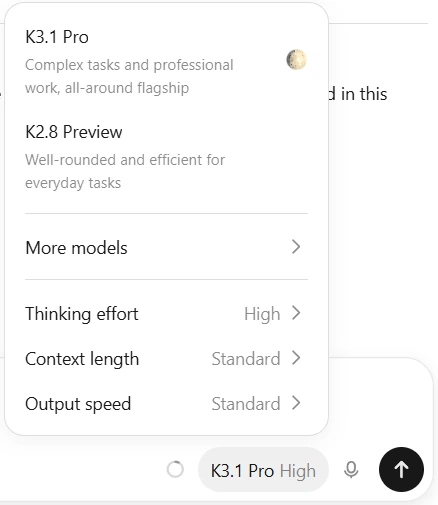
Inside the Kimi app, model choice is mainly about speed, reasoning depth, task complexity, and credit use. Kimi also decides by itself whether a prompt needs web access, so the user’s main choice is usually the model and reasoning strength rather than manually turning search on or off.
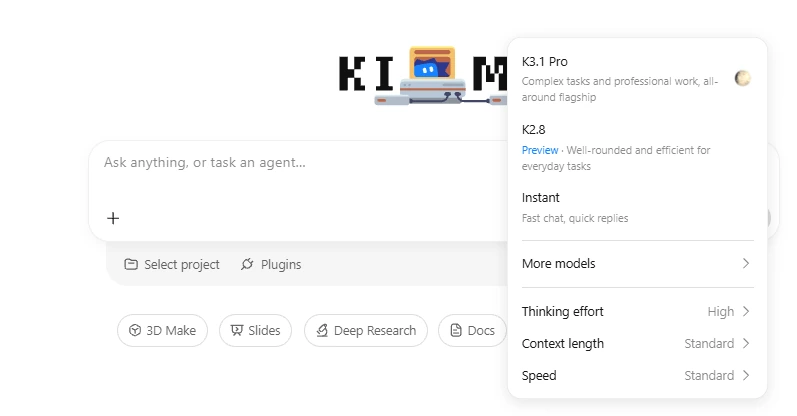
K2.6: best for fast Q&A and everyday chat
K2.6 is the practical choice when you want faster answers, lower credit use, and ordinary text output. It is suitable for quick explanations, short writing help, everyday chat, coding questions, and simple outlines.
Kimi’s own help page says K2.6 is better suited for fast Q&A and outputs text content such as PPT outlines, Word body text, and code. It is not the best choice when you want Kimi to create a complete editable file from end to end.
K3: best for complex tasks and finished documents
K3 is the strongest general model option in the Kimi app. It is better for complex conversations, Agent tasks, multi-step workflows, visual work, document generation, presentations, spreadsheets, and tasks where you want Kimi to produce a finished editable deliverable.
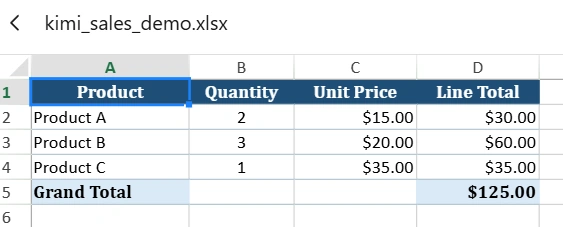
Kimi says K3 can produce end-to-end editable documents such as .pptx, .docx, .xlsx, and .pdf. If your output needs to be a real file, not just text that you later copy into a file, K3 is usually the safer starting point.
K3 Cluster: best for large-scale parallel tasks
K3 Cluster is not just “K3 but better for everything.” It is designed for large-scale search, batch processing, very long writing projects, and workloads where multiple subagents and many tool calls can work in parallel.
Kimi describes Agent Cluster as supporting more than 4,000 parallel tool calls and up to 300 subagents. That makes it useful for broad research, high-volume comparison work, batch content processing, and large workflows that would be too slow as a normal chat.
Reasoning effort: Standard, Advanced, and Extreme
In the Kimi app, “Thinking mode” is no longer a separate experience in the old sense. Kimi now expresses deeper thinking through the model choice and reasoning effort level.
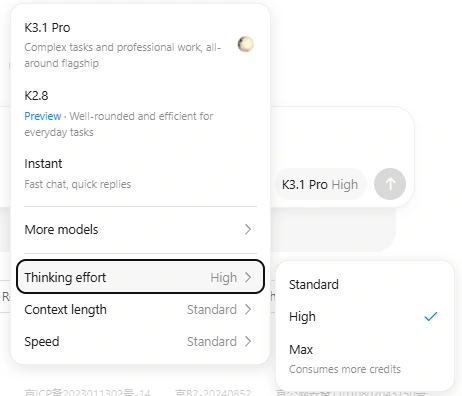
| Reasoning level | Use it when | Tradeoff |
|---|---|---|
| Standard | You want speed, lower credit use, and simple answers | Less depth on hard reasoning tasks |
| Advanced | You need better reasoning for analysis, planning, or complex questions | Uses more tokens and credits than Standard |
| Extreme | You are using K3 or K3 Cluster for difficult reasoning, large tasks, or complex Agent workflows | Best reserved for work where the extra reasoning is worth the added cost |
A simple rule works well: use Standard when the answer is easy, Advanced when quality matters, and Extreme only when the task is complex enough to justify deeper reasoning.
Kimi API models and model IDs
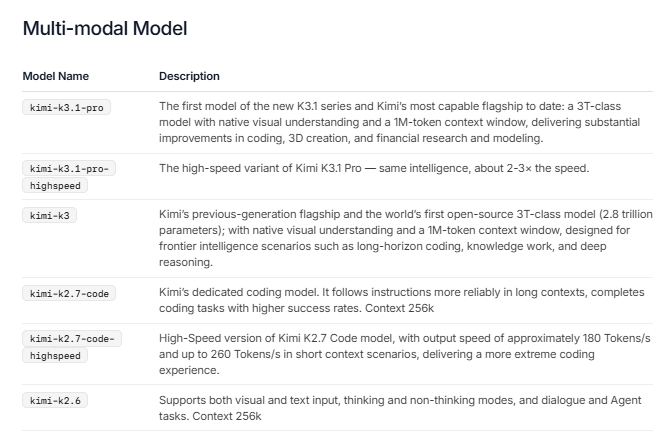
Developers should use the official Kimi API model IDs, not the app labels. The current Kimi API model list includes kimi-k3, kimi-k2.7-code, kimi-k2.7-code-highspeed, and kimi-k2.6.
| API model ID | Main role | Context window | Input support | Reasoning behavior | Best use |
|---|---|---|---|---|---|
kimi-k3 | Flagship model | 1M tokens | Text and native visual understanding | Thinking is always enabled; supports reasoning_effort low / high / max | Complex coding, long-context work, deep reasoning, knowledge work, visual analysis |
kimi-k2.7-code | Dedicated coding model | 256K tokens | Text, image, and video input | Thinking is on by default and cannot be disabled | Long-context coding, tool-based coding agents, code repair, refactoring |
kimi-k2.7-code-highspeed | High-speed coding model | 256K tokens | Text, image, and video input | Same parameter constraints as K2.7 Code | Latency-sensitive coding tasks where faster output matters |
kimi-k2.6 | General-purpose model | 256K tokens | Text, image, and video input | Supports thinking and non-thinking modes | General chat, visual understanding, agent tasks, code generation, balanced API usage |
If you are building a new API workflow and do not have a specific reason to choose a lower-cost or coding-only route, start by testing kimi-k3. If your task is mainly coding and output speed matters, test kimi-k2.7-code-highspeed. If you need a more general-purpose 256K-context model, test kimi-k2.6.
Kimi K3 explained
Kimi K3 is Kimi’s flagship model for long-horizon coding, end-to-end knowledge work, deep reasoning, and visual understanding. In the API docs, Kimi describes K3 as a 2.8-trillion-parameter model with native visual understanding and a 1M-token context window.
K3 is the right choice when the task needs stronger planning, deeper reasoning, large context, multimodal input, or a workflow that combines code, tools, documents, and visual feedback. It is especially relevant for software agents, large codebases, document-heavy work, and complex analysis.
For developers, the important API detail is that K3 uses the top-level reasoning_effort field with low, high, or max. Do not copy K2.x thinking configuration into K3 calls.
Kimi K2.7 Code explained
Kimi K2.7 Code is the API model family aimed at coding. It is designed to follow instructions more reliably in long contexts and complete coding tasks with higher success rates than a general-purpose model.
The regular API ID is kimi-k2.7-code. The high-speed version is kimi-k2.7-code-highspeed. Kimi says the high-speed version is the same model family but optimized for output speed, with approximately 180 tokens per second and up to 260 tokens per second in short-context scenarios.
Use K2.7 Code when the work is clearly programming-focused: code editing, debugging, refactoring, repo understanding, tool-based coding agents, test repair, and long coding sessions. Do not choose it just because it sounds newer; choose it when the task is actually coding-heavy.
Kimi K2.6 explained
Kimi K2.6 is the practical general-purpose Kimi model. In the API, kimi-k2.6 supports text, image, and video input, dialogue and Agent tasks, and both thinking and non-thinking modes with a 256K-token context window.
In the Kimi app, K2.6 is also the best fit for quick conversations and fast answers. This creates an important distinction: K2.6 can be a capable multimodal API model, but in the app experience it is positioned as the faster option for Q&A rather than the model for end-to-end editable deliverables.
Use K2.6 when you want speed, simpler credit use, and a broad model that can still handle visual and coding tasks without the full overhead of K3.
Kimi Code models are different from Kimi API models
Kimi Code has its own model IDs. This matters if you use Kimi Code Desktop, the Kimi Code CLI, the VS Code extension, Claude Code, OpenCode, Codex, or other third-party coding tools connected to Kimi Code.
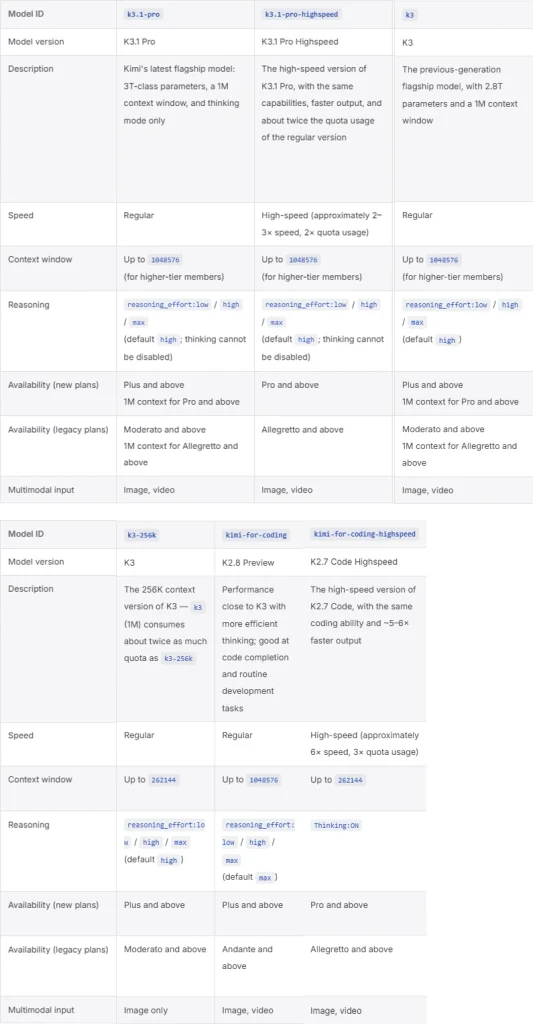
| Kimi Code model ID | Model version | Context window | Reasoning | Best for |
|---|---|---|---|---|
k3 | K3 | 1,048,576 tokens for eligible higher-tier members | reasoning_effort: low / high / max, default high | Most capable coding tasks, large codebases, complex agent work |
k3-256k | K3 | 262,144 tokens | reasoning_effort: low / high / max, default high | K3 coding when you want fixed 256K context and lower quota pressure |
kimi-for-coding | K2.8 Preview | 1,048,576 tokens | reasoning_effort: low / high / max, default max | Routine development, code completion, everyday coding work |
kimi-for-coding-highspeed | K2.7 Code HighSpeed | 262,144 tokens | Thinking on | Fast coding output when response speed matters |
Use the model ID, not the display name. For example, in Kimi Code you should enter k3 or kimi-for-coding, not “K3” or “K2.8 Preview” as if they were API IDs.
When switching Kimi Code models, starting a new session is often the cleaner path because switching can invalidate the context cache and increase usage temporarily. This is especially important when moving between context sizes or switching reasoning effort.
Which Kimi model should you choose?
Use this decision table if you do not want to read every model spec.
| Task | Best starting model | Why |
|---|---|---|
| Fast Q&A | K2.6 in the Kimi app | Faster responses and lower reasoning overhead |
| Everyday chat | K2.6 | Good enough for quick explanations, summaries, and short writing tasks |
| Complex analysis | K3 | Stronger overall capability and deeper reasoning options |
| Finished PPT, Word, Excel, or PDF output | K3 | K3 is positioned for end-to-end editable document generation |
| Large-scale search or batch processing | K3 Cluster | Built for parallel tool calls and coordinated subagents |
| API integration with strongest model | kimi-k3 | Flagship API model with 1M context and visual understanding |
| API coding work | kimi-k2.7-code | Dedicated coding model with 256K context |
| API coding with faster output | kimi-k2.7-code-highspeed | High-speed version for coding workflows where latency matters |
| General-purpose API usage | kimi-k2.6 | Balanced model with text, image, video, thinking, and non-thinking modes |
| Kimi Code routine development | kimi-for-coding | Kimi Code’s current standard coding route based on K2.8 Preview |
| Kimi Code large codebase work | k3 | Flagship coding model with up to 1M context where eligible |
Vision, video, documents, and multimodal support
Kimi’s current model lineup includes multimodal capabilities, but the exact support depends on where you are using the model.
- In the Kimi app, K3 supports richer multimodal work and can handle images, videos, PDFs, Word files, Excel files, and other materials in complex workflows.
- In the API,
kimi-k3has native visual understanding. - In the API,
kimi-k2.6andkimi-k2.7-codesupport text, image, and video input. - In Kimi Code,
k3,kimi-for-coding, andkimi-for-coding-highspeedsupport image and video input, whilek3-256ksupports image input only.
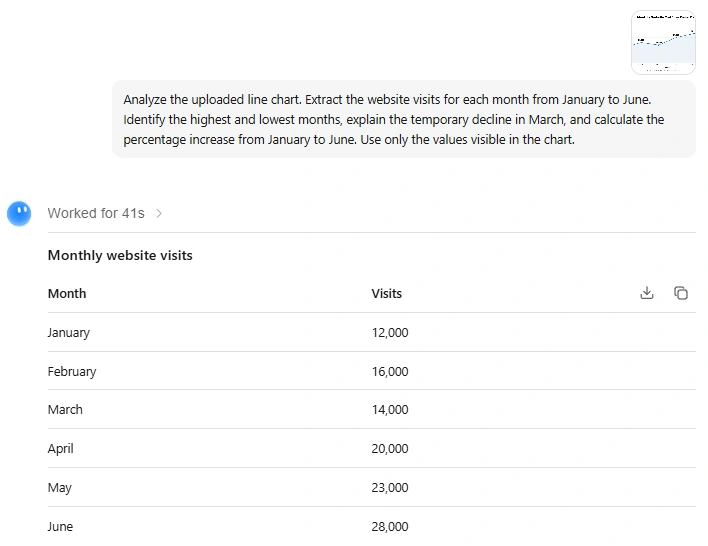
Kimi analyzes a sample website traffic chart and extracts monthly visit counts from January to June.
For serious visual or document-heavy work, use K3 first. For API workflows, test the exact model ID with your own file size, token budget, latency needs, and expected output format.
Context windows: what the numbers actually mean
A context window is the maximum amount of information the model can consider in one request or session context. A larger context window can help with long documents, large codebases, long chats, and multi-step agent workflows. It does not automatically guarantee a better answer; it only gives the model more room to work with.
| Model path | Context note | Practical meaning |
|---|---|---|
| K2.6 in the Kimi app | About 128K tokens in a single-turn app context | Good for large but not extreme chat or file tasks |
| K3 in the Kimi app | 1M-token context window where the required membership benefit is available | Better for long documents, large projects, and complex multimodal work |
kimi-k3 API | 1M tokens | Best API choice for very long context and complex workflows |
kimi-k2.7-code API | 256K tokens | Large enough for many coding tasks and repository slices |
kimi-k2.6 API | 256K tokens | Balanced long-context general use |
k3 in Kimi Code | 1,048,576 tokens for eligible accounts | Useful for large codebases and long coding sessions |
k3-256k in Kimi Code | 262,144 tokens | Useful when you want K3 behavior but fixed 256K context |
Do not compare the app and API context numbers without checking the product path. The same model family can appear with different limits depending on whether you are using Kimi chat, Kimi API, or Kimi Code.
Deprecated Kimi models to avoid
If you are building a new workflow, avoid discontinued Kimi model IDs. Deprecated models may return errors, lose support, or stop receiving maintenance.
| Deprecated model or series | Status | What to use instead |
|---|---|---|
kimi-k2.5 | Discontinued on August 31, 2026 | kimi-k3 for latest support |
moonshot-v1 series, including moonshot-v1-auto and vision preview variants | Discontinued on August 31, 2026 | kimi-k3 or another active Kimi API model |
kimi-k2 series | Discontinued on May 25, 2026 | kimi-k3 or active K2.7 / K2.6 models where appropriate |
kimi-latest | Discontinued on January 28, 2026 | Use a specific active model ID instead |
kimi-thinking-preview | Discontinued on November 11, 2025 | Use current thinking or reasoning controls on active models |
For production API work, do not use generic or legacy names just because an old tutorial shows them. Always check the official Kimi model list before deploying.
Are Kimi models open source?
Some Kimi models are described by Kimi as open-source or open-weight, but you should not assume that every product route, API endpoint, or Kimi Code model has the same release status.
Kimi describes K3 as an open 3T-class model with released model weights, and the Kimi K3 technical material describes it as a 2.8T-parameter model with native vision and a 1M-token context window. Kimi also describes K2.6 as an open-source model whose weights and code are publicly available on Hugging Face and GitHub.
The practical rule: if you need self-hosting, licensing, or local deployment, verify the exact model card and repository for the specific Kimi model. If you are using Kimi through the app or API, you are using a hosted product, not necessarily self-hosting the open weights yourself.
Kimi models vs ChatGPT, Claude, Gemini, DeepSeek, and Qwen
Kimi models should be compared by workflow, not by brand name alone. K3 is strongest when you need long-context reasoning, coding, visual understanding, and agentic knowledge work. K2.6 is useful when you need fast everyday answers or a balanced general-purpose API model. K2.7 Code is best compared against coding-focused models rather than general chat models.
A fair comparison should check the same task type: coding, document analysis, visual input, API cost, context window, latency, file output, agent tools, and reliability. Do not rely only on benchmark screenshots or social media claims unless the source and methodology are clear.
Checklist before choosing a Kimi model
- Decide whether you are using Kimi app, Kimi API, or Kimi Code.
- Use K2.6 for fast app Q&A and K3 for complex app workflows.
- Use K3 Cluster only when the task benefits from parallel agents and batch processing.
- For API work, use exact model IDs such as
kimi-k3orkimi-k2.6. - For Kimi Code, use exact coding IDs such as
k3,k3-256k, orkimi-for-coding. - Check whether you need 1M context or whether 256K is enough.
- Check whether the model supports image or video input in the product path you are using.
- Do not use deprecated IDs such as
kimi-latest,moonshot-v1, or old K2 preview names. - When switching Kimi Code models, consider starting a new session to avoid cache and context issues.
- For production apps, verify the live model list before deployment.
Sources checked
This article was checked against official Kimi and Moonshot sources: the Kimi Help Center guide for choosing K2.6, K3, and K3 Cluster, the official Kimi API model list, the Kimi K3 API documentation, the Kimi K2.7 Code documentation, the Kimi K2.6 documentation, the Kimi model parameter reference, the Kimi Code model configuration page, and the official Kimi AI models page.
FAQ
What are the current Kimi models?
In the Kimi app, the main current choices are K2.6, K3, and K3 Cluster. In the Kimi API, current active model IDs include kimi-k3, kimi-k2.7-code, kimi-k2.7-code-highspeed, and kimi-k2.6. In Kimi Code, the active coding model IDs include k3, k3-256k, kimi-for-coding, and kimi-for-coding-highspeed.
What is the best Kimi model?
K3 is the strongest general Kimi model for complex work, long-context tasks, visual understanding, and Agent workflows. K2.6 is better for fast Q&A. K3 Cluster is better for large-scale parallel work. For coding in Kimi Code, start with kimi-for-coding or k3 depending on how complex the project is.
What is the difference between Kimi K2.6 and Kimi K3?
K2.6 is better for faster everyday answers and quick Q&A. K3 has stronger overall capability and is better for complex conversations, Agent tasks, visual work, and end-to-end editable documents such as PPT, Word, Excel, and PDF files.
What is Kimi K3 Cluster?
K3 Cluster is the Kimi app option for large-scale work. It is designed for high-volume search, batch processing, ultra-long-form writing, and coordinated tasks that benefit from many parallel tool calls and subagents.
Which Kimi model is best for coding?
For Kimi Code, use kimi-for-coding for routine development, k3 for the most capable coding work, and kimi-for-coding-highspeed when output speed matters. For the Kimi API, use kimi-k2.7-code or kimi-k2.7-code-highspeed for coding-focused workflows, or kimi-k3 for flagship long-horizon coding and reasoning.
What are the Kimi API model IDs?
The current Kimi API model IDs are kimi-k3, kimi-k2.7-code, kimi-k2.7-code-highspeed, and kimi-k2.6. Deprecated IDs such as kimi-k2.5, moonshot-v1, kimi-k2, kimi-latest, and kimi-thinking-preview should not be used for new builds.
Does Kimi support vision and video input?
Yes, but support depends on the model path. Kimi K3 has native visual understanding. In the API, kimi-k2.6 and kimi-k2.7-code support text, image, and video input. In Kimi Code, k3, kimi-for-coding, and kimi-for-coding-highspeed support image and video input, while k3-256k supports image input only.
Which Kimi models support thinking mode?
In the API, kimi-k2.6 supports thinking and non-thinking modes. kimi-k2.7-code has thinking on by default and does not support disabling it. kimi-k3 always has thinking enabled and uses reasoning_effort with low, high, or max levels instead of the older K2.x thinking setup.
Are Kimi models open source?
Kimi describes K3 as an open 3T-class model with released weights, and Kimi describes K2.6 as an open-source model with weights and code available publicly. Do not assume that every Kimi product route, API model, or Kimi Code model has the same release status; verify the exact model card or repository before planning local deployment.
Should I use Kimi app, Kimi API, or Kimi Code?
Use the Kimi app for chat, documents, research, slides, spreadsheets, and Agent workflows. Use Kimi API when you are building an app or backend integration. Use Kimi Code when your main goal is coding through the desktop app, CLI, VS Code, or third-party coding tools.