
Kimi API gives applications access to Kimi models through the official Kimi Open Platform. To get started, create a Platform API key, activate paid access, and send a request to https://api.moonshot.ai/v1/chat/completions. The Python example below uses kimi-k3 and the OpenAI SDK, with usage reporting and checks for incomplete responses.
Last verified: October 12, 2026.
This guide covers the international public API. The developer website is platform.kimi.ai, while its inference host remains api.moonshot.ai. Keep that distinction when configuring a client; the documentation domain is not the request endpoint. The official API overview documents the supported routes.
Get the correct Kimi API key and account access
- Sign in to Kimi Open Platform and open the API Keys console. Create a key for your integration and store it securely.
- Check your Platform balance and access requirements. The current recharge documentation lists a minimum $1 top-up; a successful top-up unlocks K3 access. This is account funding, not the price of one request.
- Use that Platform key with the matching public API endpoint. Keys from another regional platform or inference provider may belong to a different authentication system.
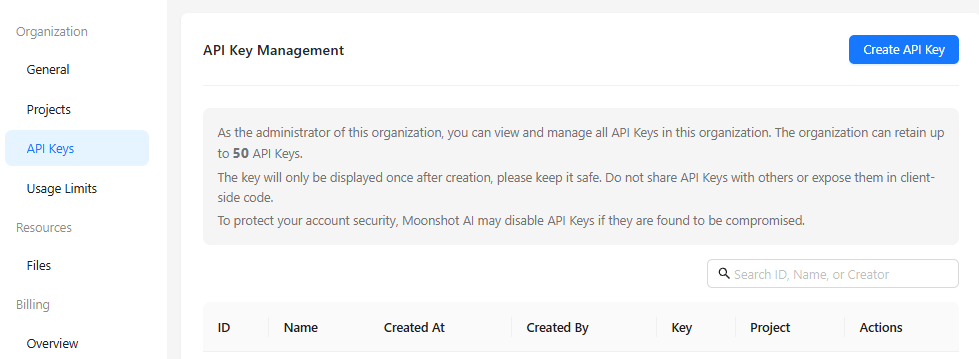
A Kimi consumer membership or Kimi Code subscription does not turn into public Platform API balance. Kimi Work and the consumer app also should not be treated as the developer billing console. The official troubleshooting guide distinguishes these products, credentials, and balances. Likewise, the public model kimi-k2.7-code is a model identifier; the separate Kimi Code product has its own access rules.
For the distinction between consumer subscriptions, Code access, and developer billing, see our Kimi membership and API billing guide.
Plan for paid inference. A free account, a promotional voucher, or a subscription elsewhere does not establish unlimited free Kimi API usage. Check any credit offer in your own Platform account before relying on it.
Make your first request with Python
The following example rewrites a short support note into a customer-facing sentence. It uses the Chat Completions route throughout, so the model, parameters, response fields, and billing discussion refer to the same API.
1. Install the SDK
Use Python 3.10 or later in a local terminal. This example was checked with OpenAI Python SDK 3.29.0, whose official repository documents the runtime requirement and client configuration. In your Python environment, run:
python -m pip install "openai==3.29.0"If your installation uses python3 instead of python, use that command consistently for installation and execution. Installing the SDK does not send an inference request.
2. Save and run the complete example
Save the following as kimi_api_quickstart.py. It reads MOONSHOT_API_KEY from the environment when available; otherwise, it prompts for your key without displaying it. Run it in a terminal that supports hidden input. The script stops if secure input is unavailable or the key is empty, following Python’s getpass behavior.
Running this script with a valid, funded account sends a billable model request. Keep the real key out of the source file.
import getpass
import os
import warnings

import openai


def read_key() -> str:
    key = os.environ.get("MOONSHOT_API_KEY", "").strip()
    if key:
        return key

    try:
        with warnings.catch_warnings():
            warnings.simplefilter("error", getpass.GetPassWarning)
            key = getpass.getpass("Kimi API key (hidden): ").strip()
    except (getpass.GetPassWarning, EOFError, KeyboardInterrupt):
        raise SystemExit(
            "Secure key entry unavailable. Use a terminal or set MOONSHOT_API_KEY."
        ) from None

    if not key:
        raise SystemExit("No key supplied; no request sent.")
    return key


def main() -> None:
    try:
        with openai.OpenAI(
            api_key=read_key(),
            base_url="https://api.moonshot.ai/v1",
            timeout=60.0,
            max_retries=0,
        ) as client:
            completion = client.chat.completions.create(
                model="kimi-k3",
                messages=[
                    {
                        "role": "user",
                        "content": (
                            "Turn this support note into one clear sentence "
                            "for a customer: The report export has finished; "
                            "download it from the Reports page."
                        ),
                    }
                ],
                reasoning_effort="low",
                max_completion_tokens=4096,
            )
    except openai.APIStatusError as exc:
        raise SystemExit(
            f"HTTP {exc.status_code}; error type: {exc.type or 'unknown'}. "
            "See the troubleshooting table."
        ) from None
    except openai.APIConnectionError:
        raise SystemExit(
            "Connection failed or timed out. Check your network and API usage "
            "before trying again."
        ) from None

    if completion.usage is not None:
        print("Token usage:")
        print(completion.usage.model_dump_json(indent=2))

    if not completion.choices:
        raise SystemExit("No completion choice returned; inspect before retrying.")

    choice = completion.choices[0]
    if choice.finish_reason != "stop":
        raise SystemExit(
            f"Completion status: {choice.finish_reason}. "
            "No complete answer printed; inspect the status before retrying."
        )

    answer = choice.message.content
    if not answer or not answer.strip():
        raise SystemExit("Response stopped without final text; inspect before retrying.")

    print("\nAnswer:\n" + answer)


if __name__ == "__main__":
    main()
Run the file:
python kimi_api_quickstart.pyK3 always reasons, and its supported reasoning-effort settings are low, high, and max. The example chooses low for this small task and sets max_completion_tokens=4096 as an output budget. Reasoning and final text share that budget; it does not guarantee a complete answer for every prompt.
The request uses max_completion_tokens, the current Chat Completions field, and omits sampling overrides and older thinking toggles. Check the model parameter reference before adapting those settings to another model. Changing a model name alone may leave incompatible parameters behind.
The client has a 60-second timeout setting and disables automatic SDK retries with max_retries=0. This keeps a failed introductory request from being retried automatically. A client timeout is not proof that the server performed no work; check usage before resubmitting an uncertain request.
3. Read the answer, completion status, and usage
- Final text:
completion.choices[0].message.contentcontains the assistant’s answer for this non-streaming text request. - Completion status:
finish_reason="stop"means generation stopped normally.lengthindicates a limit interrupted generation;tool_callsmeans the application must handle a tool request. The script prints final text only after a normal stop and a nonempty answer. - Token usage: the returned
usageobject reports input and completion usage, with additional details when supplied. The script prints it before checking the answer, so an incomplete completion can still show its usage.
These fields are defined in the Chat Completions reference. A normal stop and nonempty text establish a usable response shape; your application still needs to assess whether the answer satisfies its task. If a response is incomplete, inspect the status and your budget before changing the request.
Validation note: the example was checked offline against SDK 3.29.0 using simulated HTTP responses, including incomplete output and error cases. No authenticated Kimi request was made, so this is not a live performance or answer-quality test.
Choose a current model and compatible endpoint
Which model should you use?
The current model catalog provides these starting points. The task descriptions below help narrow an evaluation; they are not benchmark rankings.
Our Kimi model guide explains how app labels, API IDs and coding-model names differ.
| Model ID | Consider it for | Listed context window |
|---|---|---|
kimi-k3 | Coding, knowledge work, reasoning, and visual understanding | 1 million tokens |
kimi-k2.7-code | Coding-focused workflows | 256K tokens |
kimi-k2.6 | General text and vision tasks, including thinking and non-thinking modes | 256K tokens |
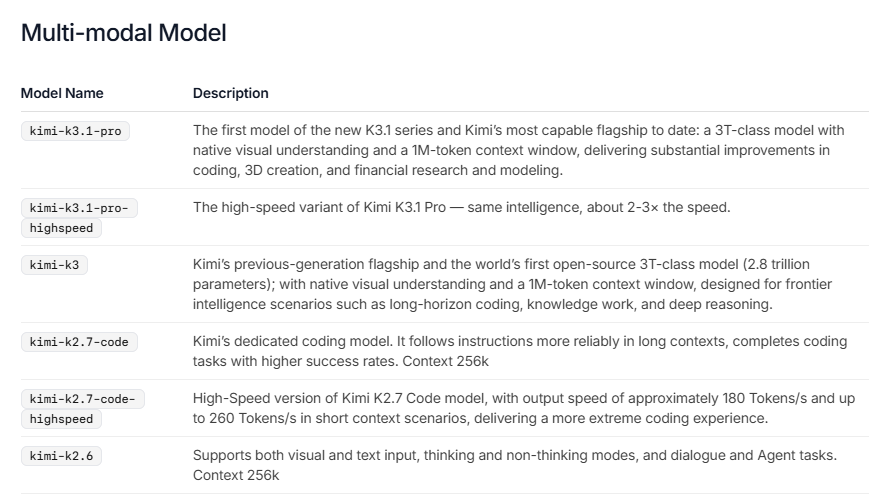
The catalog also lists kimi-k2.7-code-highspeed, a faster serving variant for coding. Check its own pricing and parameter documentation when evaluating it. A context window is the capacity available to the request and generated content; it is separate from the output cap you select, your account’s throughput limits, and your balance.
Older tutorials may use kimi-k2.5, moonshot-v1, or kimi-latest. The current catalog marks these as discontinued. Select an active model ID and recheck its settings instead of copying an old request unchanged.
Base URLs and full HTTP endpoints
An SDK appends a resource path to its base URL. A raw HTTP client needs the complete endpoint. Use the appropriate entry from the API overview:
| Protocol | SDK base URL | Complete HTTP endpoint |
|---|---|---|
| Chat Completions | https://api.moonshot.ai/v1 | https://api.moonshot.ai/v1/chat/completions |
| Responses | https://api.moonshot.ai/v1 | https://api.moonshot.ai/v1/responses |
| Anthropic Messages | https://api.moonshot.ai/anthropic | https://api.moonshot.ai/anthropic/v1/messages |
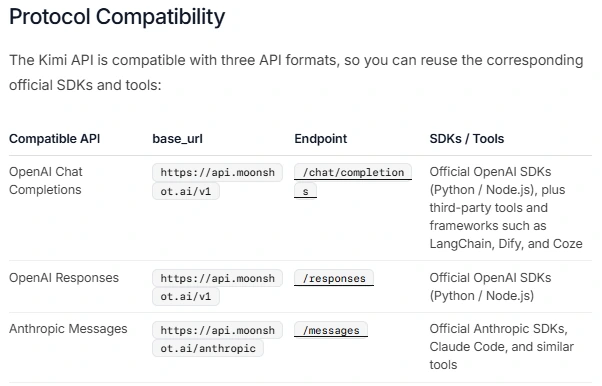
For the Python example, pass the base URL to OpenAI(base_url=...); do not append /chat/completions there. Bearer authentication is added by the SDK using the key you supply.
Compatibility has a defined scope. The current Responses reference supports kimi-k3, and the Messages reference also lists kimi-k3 as its supported model. Do not assume every catalog model works through every protocol.
The protocols also use different request and response fields. For example, Messages requires max_tokens and reports stop_reason. Kimi’s current Responses contract fixes store and background to false, and previous_response_id and conversation to null. Follow the chosen endpoint’s state-management rules when migrating an existing integration.
Kimi API pricing and rate limits
Current token prices
The following direct public API rates are listed on the official Platform model cards. Prices are in USD per 1 million tokens. The inference pricing documentation describes pay-as-you-go billing and notes that applicable taxes are additional.
| Model | Uncached input | Cache-read input | Output |
|---|---|---|---|
kimi-k3 | $3.00 | $0.30 | $15.00 |
kimi-k2.7-code | $0.95 | $0.19 | $4.00 |
kimi-k2.6 | $0.95 | $0.16 | $4.00 |
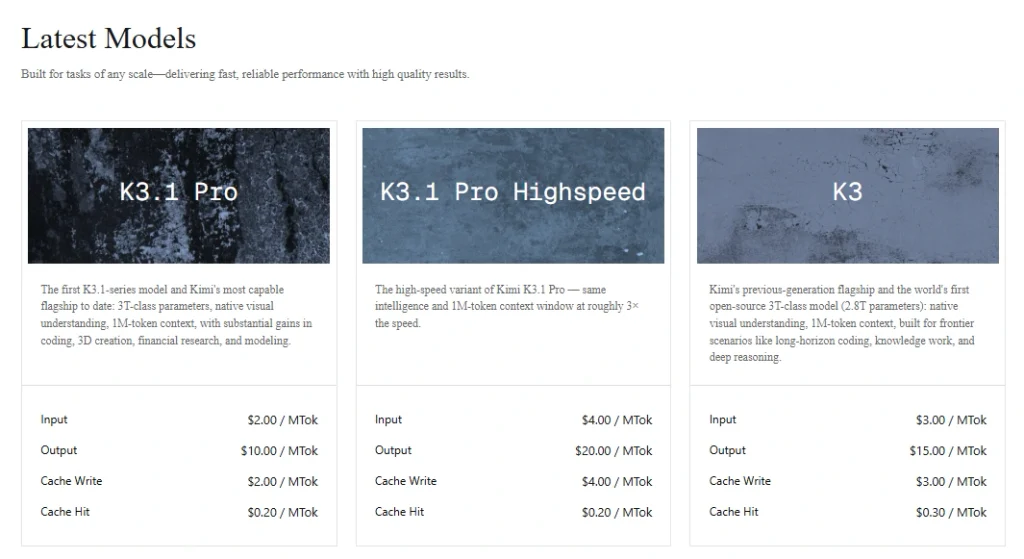
For K3, cache writes cost $3.00 per million tokens with the default five-minute lifetime, or $6.00 with a one-hour lifetime. The context-caching guide explains when each applies. In Chat Completions, uncached input, cache reads, and cache writes are mutually exclusive parts of total input: avoid charging every input token at the uncached rate and then adding a write charge for the same tokens.
For reconciliation, Chat Completions reports total input in usage.prompt_tokens, cache reads in usage.prompt_tokens_details.cached_tokens, and cache writes in usage.prompt_tokens_details.cache_write_tokens. Match those categories to the applicable rates. The table covers model inference; separately priced tools, batch processing, and third-party providers require their own pricing checks.
A small, hypothetical cost calculation
Assume a K3 request uses 1,000 input tokens, has no cache hits, uses the default five-minute cache tier, and generates 500 output tokens in total, including reasoning and final text. These are calculation assumptions, not measurements from the sample script.
- Input:
1,000 × $3.00 ÷ 1,000,000 = $0.003. Uncached input and five-minute writes have the same rate in this example. - Output:
500 × $15.00 ÷ 1,000,000 = $0.0075. - Estimated inference cost: $0.0105, excluding taxes, tools, retries, and additional requests.
The thinking-model documentation confirms that reasoning is billable. Use the API’s returned usage to assess generated output; the length of the visible answer alone is insufficient. A configured cap of 4,096 tokens does not mean every call generates or bills 4,096 tokens.
Why a funded account can still hit a limit
Balance determines whether you can pay for usage; rate limits control how quickly you can send work. The account limits cover concurrency, requests per minute, tokens per minute, and tokens per day. They depend on the account tier, so a single universal requests-per-minute figure would be misleading.
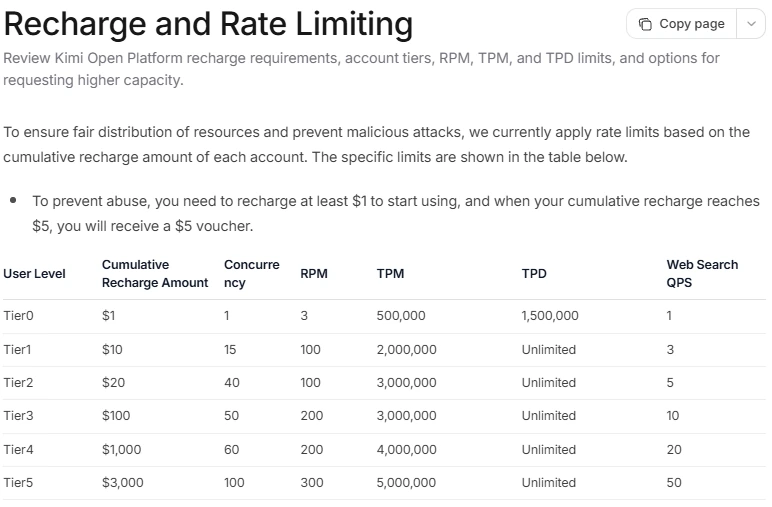
For rate-limit accounting, the service may reserve the input tokens plus the requested output cap, while billing uses actual usage. An unnecessarily large max_completion_tokens value can therefore affect throughput even when the final answer is short. Choose a budget suited to the task and leave room for reasoning. This distinction is explained in the Platform’s core concepts.
Fix common authentication, quota, and request errors
Read the HTTP status together with the returned error.type. The official error reference distinguishes the following cases:
| Status or error type | What to check or change |
|---|---|
400: invalid_request_error | Check required fields, model-specific parameters, and the input-plus-output budget. |
| 401: authentication error | Confirm the key is correct and matches the endpoint’s regional platform. |
403: permission_denied_error | Check whether your account can access the requested API. |
| 404: model or resource not found | Verify the endpoint path, exact model ID, and model availability. |
429: rate_limit_reached_error | Reduce request rate or concurrency; inspect the account’s token limits. |
429: exceeded_current_quota_error | Check API balance and account quota before resubmitting. |
429: engine_overloaded_error | Observe Retry-After when supplied, lower concurrency, and use bounded exponential backoff. |
| Temporary server failures | Use a limited retry policy and retain a request identifier when available. |
Adding balance does not resolve server overload. For transient failures, cap both retry attempts and the time spent retrying. Authentication, invalid-parameter, permission, and depleted-quota errors need their underlying cause corrected; repeatedly sending the same request is not a remedy.
If the script reports length after a successful HTTP response, inspect the completion budget and task size. If it reports a normal stop without final text, inspect the response structure. Both cases concern completion handling, so changing an API key is unlikely to address them.
Add capabilities when your application needs them
Streaming for incremental display
Use streaming when an interface should show output as it arrives. For Chat Completions, enable stream=True; request final usage with stream_options={"include_usage": True}. A usage-only final chunk can have an empty choices list, so check it before accessing an item. Keep reasoning, answer text, and tool-call deltas separate. The official streaming guide covers the event structure.
Structured output for data your application will parse
For extraction or classification, decide whether you need a JSON object or a specific schema. Kimi documents json_object and model-dependent json_schema support in the response-format guide. Parse the returned message content, then validate required fields and business rules in your application. Syntactically valid JSON does not establish that a date, amount, or classification is correct.
Tool calls for actions and external data
With function tools, the model requests a call; your application validates the arguments, runs an allowed function, and returns the result with the matching tool_call_id. It then continues the conversation to obtain the answer. Follow the tool-calling workflow and enforce authorization in the function itself. A user’s access to an order or document should be checked by your application before a tool returns it.
Document questions through the Files workflow
For the documented file-based Q&A workflow, upload the document with purpose="file-extract", retrieve the extracted text, and include that text in the model request. Merely obtaining a file ID does not insert the document into a Chat Completions conversation. The official file-based Q&A guide explains the sequence. Budget for the document text and any conversation history you send alongside it.
Keep the integration safe when adding it to a website
For a WordPress site or web application, place the Kimi request in a backend route you control. The browser sends the user’s input to your server; the server supplies the API credential and returns the permitted result. Apply these controls before exposing that route to public traffic:
- Protect the credential. Keep it in a server-side secret store or environment variable. Exclude it from browser bundles, public WordPress blocks, logs, and repository commits.
- Control who can spend. Authenticate users where appropriate, limit request size, and enforce per-user usage controls in your application.
- Preserve conversation state correctly. For K3 multi-turn requests, retain the complete assistant messages and required reasoning or tool fields, as described in the reasoning-effort guide. Saving only the displayed answer can lose fields the next request needs.
- Validate results before using them. Check structured values, encode output for the context where it will appear, and enforce permissions before any tool performs an action.
Kimi’s API data-security page states that API inputs and outputs are not used for model training. Assess retention, data location, and applicable API terms separately when handling sensitive information; the training statement alone does not establish zero retention or a data-residency guarantee.