
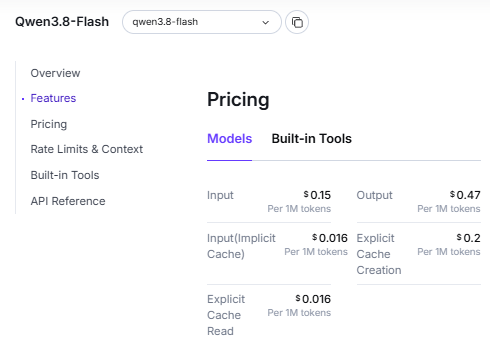
Qwen pricing depends on how you access it: the consumer app, a metered API, a subscription for compatible AI tools, or a model you run yourself. For example, QwenCloud currently lists Qwen3.8-Flash at $0.15 per million input tokens and $0.47 per million output tokens. That is an API usage price; it does not describe every Qwen product or subscription.
Last checked: October 12, 2026. Prices below are in USD. Token rates are per 1 million tokens unless stated otherwise. Examples exclude taxes, free quotas and additional services unless explicitly included. Promotional prices can change; check the linked official listing and your account before purchasing. Flash source: Qwen3.8-Flash.
Qwen pricing at a glance
| Access route | How you pay | What to check |
|---|---|---|
| Qwen consumer app | Free access is advertised on the official Qwen site. | Account availability, feature limits and the consumer service terms. |
| QwenCloud API | Pay for model usage and applicable tool fees. | Exact model ID, input tier, cache type and usage records. |
| Alibaba Cloud Model Studio API | Pay for usage at the selected deployment price. | Region and deployment scope, as well as the model. |
| QwenCloud Token Plan | A subscription with a Credits allowance. | Personal or Team plan, supported tools and permitted usage. |
| Model Studio Coding Plan | A subscription with model-call quotas. | The dedicated plan endpoint, API key and all quota windows. |
| Self-hosted Qwen | Your own hardware or hosting costs. | The exact model’s license and deployment requirements. |
The official Qwen consumer page describes free access. Its consumer terms currently limit use to private, non-commercial purposes. Consumer access does not provide an unlimited API allowance. For an application integration, start with our Qwen API guide; the API and subscription routes below have separate billing rules.
QwenCloud API prices for text output
| Model | Input tokens per request | Input / 1M tokens | Output / 1M tokens |
|---|---|---|---|
qwen3.8-flash | Published standard rate | $0.15 | $0.47 |
qwen3.7-plus | Up to 256K | $0.32 promotional List: $0.40 | $1.28 promotional List: $1.60 |
qwen3.7-plus | Above 256K, up to 1M | $0.96 promotional List: $1.20 | $3.84 promotional List: $4.80 |
qwen3.8-max | Published standard rate | $2.00 | $6.00 |
The Plus prices include the currently listed 20% promotion. They apply to the exact model ID shown; a dated snapshot can have a different price. The input bands are pricing bands, and the model’s actual request limits still apply.
A tier is selected per request, not from your monthly token total. The matching tier applies to the whole request, including its output. A Plus request with 500,000 input tokens therefore uses the higher input and output rates. You do not price the first 256K at the cheaper tier. See the QwenCloud pricing guide for tier selection and our Qwen model guide for model naming.
How to calculate Qwen API cost without counting thinking twice
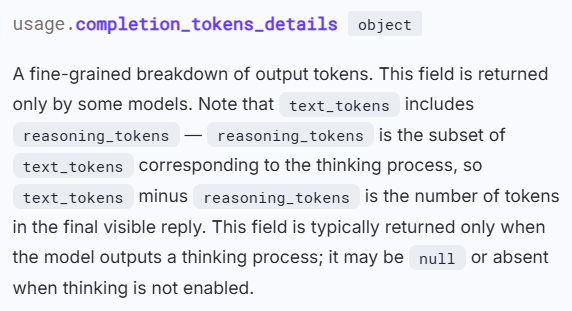
When using API usage data, the reported total output already includes reasoning tokens. In Chat Completions, use usage.completion_tokens. In Responses, use usage.output_tokens. The corresponding reasoning_tokens field describes part of that output; adding it to the output total would count the same tokens twice.
| Value to identify | Chat Completions: inside usage | Responses: inside usage |
|---|---|---|
| Total input tokens | prompt_tokens | input_tokens |
| Total output, including reasoning | completion_tokens | output_tokens |
| Reasoning breakdown within output | completion_tokens_details.reasoning_tokens | output_tokens_details.reasoning_tokens |
| Input tokens read from cache | prompt_tokens_details.cached_tokens | input_tokens_details.cached_tokens |
The reasoning breakdown may be absent for some models or responses. That does not mean you should add a separately estimated thinking count. Also, usage.total_tokens combines input and output, so it cannot be multiplied by the output rate alone.
A worked example using reported output
This is an illustrative text-only usage record, not a measured API test. Assume Qwen3.8-Flash, no cache, and no paid tools:
| Usage value | Tokens | How it affects the calculation |
|---|---|---|
| Total input | 10,000 | Charge at the input rate. |
| Total output | 2,000 | Charge at the output rate once. |
| Reasoning within that output | 1,500 | Already included in the 2,000 output tokens. |
| Remaining answer text in this example | 500 | Also included in the 2,000 output tokens. |
Input costs 10,000 ÷ 1,000,000 × $0.15 = $0.00150. Output costs 2,000 ÷ 1,000,000 × $0.47 = $0.00094. The total is $0.00244. Using 3,500 output tokens would overstate the cost because it adds the 1,500 reasoning tokens again.
For an advance estimate based on separately counted answer and reasoning text, you can add those two counts once to estimate total output. Once you have the API’s aggregate usage, use that aggregate directly.
The cost formula, including cache usage
For a QwenCloud text request with one applicable input/output price tier, keep ordinary input, cache reads and explicit cache creation as separate categories:
ordinary_input_tokens =
    total_input_tokens - cache_read_tokens - cache_creation_tokens

text_cost_usd =
    (ordinary_input_tokens * input_rate
     + cache_read_tokens * cache_read_rate
     + cache_creation_tokens * cache_creation_rate
     + total_output_tokens * output_rate) / 1_000_000
    + separately_billed_fees
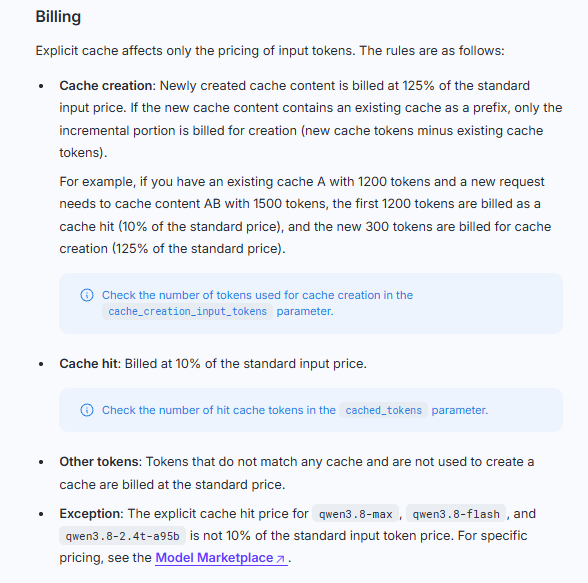
All rates in this formula are USD per million tokens. total_output_tokens includes reasoning once. Set both cache counts to zero when no cache is used. For implicit caching, set cache_creation_tokens to zero and use the model’s implicit cache rate for reported hits. For explicit caching, use the separately reported creation and read counts and their respective prices.
Cache reads and explicit creation are portions of the total input in these OpenAI-compatible usage records. The creation price is the price for those tokens, so do not charge them again as ordinary input. In Chat Completions, creation is reported in usage.prompt_tokens_details.cache_creation_input_tokens; its five-minute breakdown is not an additional token total. See the QwenCloud context cache guide. For APIs with different usage-field definitions, map those fields before applying the formula.
This is a text billing formula. Images, audio and other separately priced units need their own line items. A tool fee can also apply in addition to the model tokens consumed by using that tool.
Monthly API cost examples
Assume 10 million uncached input tokens and 2 million total output tokens spread across ordinary real-time requests. Output includes any reasoning. Every Plus request in this example remains within its first input tier. No tools, media or other fees are included.
| Model | Input cost | Output cost | Estimated total |
|---|---|---|---|
| Qwen3.8-Flash | 10 × $0.15 = $1.50 | 2 × $0.47 = $0.94 | $2.44 |
| Qwen3.7-Plus, current promotion | 10 × $0.32 = $3.20 | 2 × $1.28 = $2.56 | $5.76 |
| Qwen3.8-Max | 10 × $2.00 = $20.00 | 2 × $6.00 = $12.00 | $32.00 |
These are arithmetic comparisons at identical usage volumes. They do not establish equal answer quality, equal reasoning length or equal numbers of completed tasks. For your own budget, use usage from representative requests and include every model call made by an agent.
QwenCloud cache prices and savings
| Model / input tier | Implicit cache read / 1M | Explicit creation / 1M | Explicit read / 1M |
|---|---|---|---|
| Qwen3.8-Flash | $0.016 | $0.20 | $0.016 |
| Qwen3.7-Plus, up to 256K | $0.064 | $0.40 | $0.032 |
| Qwen3.7-Plus, above 256K to 1M | $0.192 | $1.20 | $0.096 |
| Qwen3.8-Max | $0.25 | $2.50 | $0.17 |
Use the listed model rates instead of applying one cache percentage to every model. Implicit cache hits are not guaranteed; use the hit count returned by the API. Explicit caching charges for creating new cache content and for later reads. Session caching follows the cache type actually used, as explained in the QwenCloud context cache guide.
Example: 80% of input hits the implicit cache
Keep the Flash workload above, but assume 8 million of its 10 million input tokens are reported as implicit cache hits. The remaining 2 million input tokens use the ordinary rate:
| Billing category | Calculation | Cost |
|---|---|---|
| Ordinary input | 2 × $0.15 | $0.300 |
| Cached input | 8 × $0.016 | $0.128 |
| Total output, including reasoning | 2 × $0.47 | $0.940 |
| Estimated total | $0.300 + $0.128 + $0.940 | $1.368, or about $1.37 |
The cached 8 million tokens are part of the 10 million input total. Adding them on top of the full input total would duplicate input charges in your estimate.
Batch pricing: use the published Batch rate
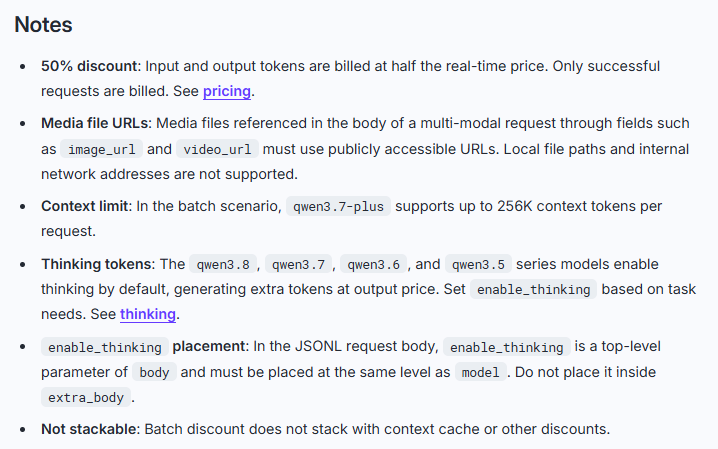
For eligible asynchronous work, QwenCloud publishes separate Batch prices. Its Batch API guide says Batch discounts cannot be combined with cache or other discounts. The guide currently limits Qwen3.7-Plus Batch requests to 256K context tokens per request.
| Qwen3.7-Plus billing mode | Input / 1M | Output / 1M | 10M input + 2M total output |
|---|---|---|---|
| Real-time list price, first tier | $0.40 | $1.60 | $7.20 |
| Real-time current promotion, first tier | $0.32 | $1.28 | $5.76 |
| Published Batch price, eligible requests | $0.20 | $0.80 | $3.60 |
Here, Batch is half the list price. Applying another 50% reduction to the already discounted real-time price would produce an incorrect $2.88 estimate. Check support for your exact model before scheduling a Batch workload.
Tool fees can increase the final API bill
| QwenCloud feature | Published fee | Additional billing to consider |
|---|---|---|
| Web Search | $10 per 1,000 calls | Model input and output tokens. |
| Image Search | $8 per 1,000 calls | Model token usage. |
| PDF parsing | $0.0033 per parsed page | Parsed content consumes model input tokens; output is also billed. |
| Web Extractor | Extractor fee temporarily free | Extracted text consumes input tokens; internally triggered Web Search can incur its fee. |
| Code Interpreter | Tool fee temporarily free | Model token usage still applies. |
| Function Calling / MCP | No additional QwenCloud tool fee | Model tokens and any charges from the external service. |
Sources: QwenCloud pricing guide, PDF understanding billing and Web Extractor billing. These are pay-as-you-go fees, not Token Plan Credits prices.
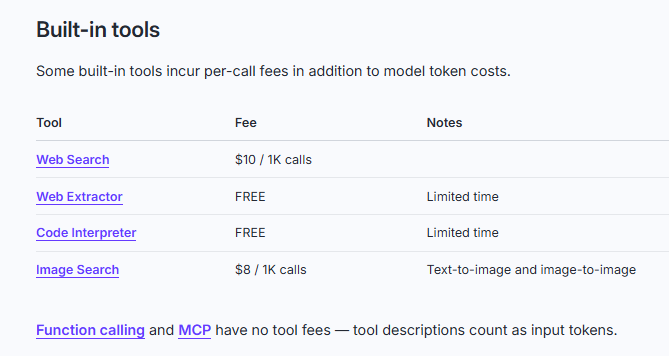
For example, 100 Web Search calls add $1.00 before token charges. Parsing 100 PDF pages adds $0.33 before token charges. Temporarily free tool execution does not make the entire model request free.
Alibaba Cloud Model Studio: region and deployment scope matter
A QwenCloud quote should not be copied into a Model Studio budget without checking the deployment. The following selected Model Studio rates show why both region and scope matter:
| Model Studio region | Deployment scope | Qwen3.8-Max: input / output per 1M | Qwen3.8-Flash: input / output per 1M |
|---|---|---|---|
| Singapore | International | $2.00 / $6.00 | $0.15 / $0.47 |
| Hong Kong, Frankfurt, Virginia or Tokyo | Global | $1.65 / $4.951 | $0.113 / $0.382 |
| Virginia | US | $2.00 / $6.00 | $0.15 / $0.47 |
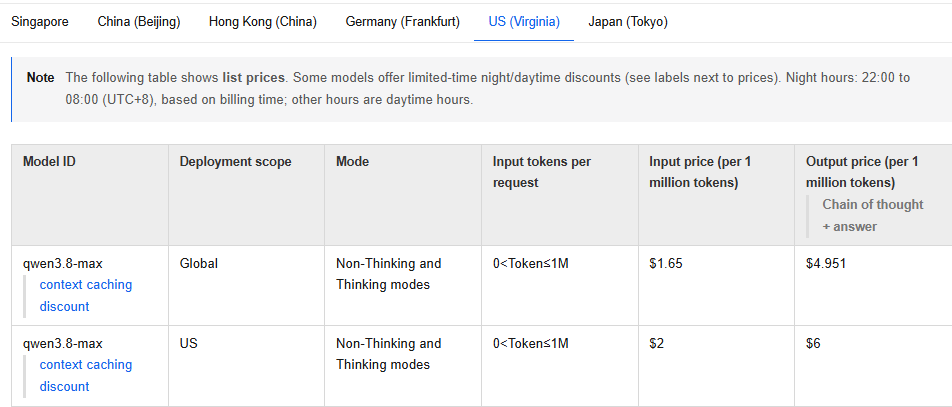
Virginia currently has both Global and US entries, so “US region pricing” alone is not precise enough. Confirm the deployment scope in your console. Other models, dated variants, modes and promotional periods can have different rates.
QwenCloud Token Plan: Personal and Team prices
Token Plan provides Credits for interactive work in supported AI tools. It uses its own plan configuration and allowance. Both Personal and Team are intended for permitted interactive tool usage; the documentation excludes unattended scripts and application backends. For that workload, evaluate the ordinary metered API.
Data terms also affect plan choice. The official Personal-versus-Team comparison describes Personal data use for service improvement and model optimization, while Team makes a separate commitment not to train on conversation data. Do not transfer Model Studio’s or QwenCloud pay-as-you-go API’s no-training statement to every subscription. Check the agreement for the exact plan and key before sending private repositories or confidential material; the comparison does not prove that every Personal conversation is used for training.
Personal plans
| Personal plan | Current monthly price | Monthly list price | Credits per cycle |
|---|---|---|---|
| Lite | $6 | $8 | 11,500 |
| Essential | $10 | $16 | 25,500 |
| Standard | $18 | $25 | 45,000 |
| Pro | $68 | $80 | 180,000 |
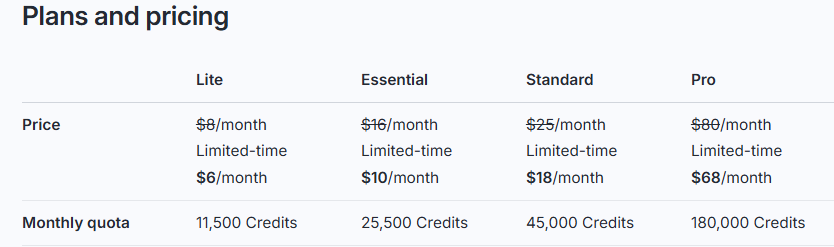
Personal uses a 30-day subscription cycle. Unused monthly Credits expire. An active subscriber can buy a $15 pack with 20,000 Credits, valid for one month. You may hold up to five Credit Packs at a time. After available plan and pack Credits are exhausted, plan usage pauses instead of automatically switching to pay-as-you-go.
The current Personal promotion reduces Credit consumption for Qwen3.8-Max and Qwen3.8-Flash by 60% during 22:00–08:00 UTC+8. This is a limited-time Credits promotion; it does not change the ordinary API dollar rates or apply automatically to Team.
Team plans
| Team seat | Published monthly price per seat | Monthly list price | Credits per cycle |
|---|---|---|---|
| Standard | $20 | $30 | 25,000 |
| Pro | $75 | $100 | 100,000 |
| Max | $200 | Not separately listed | 250,000 |
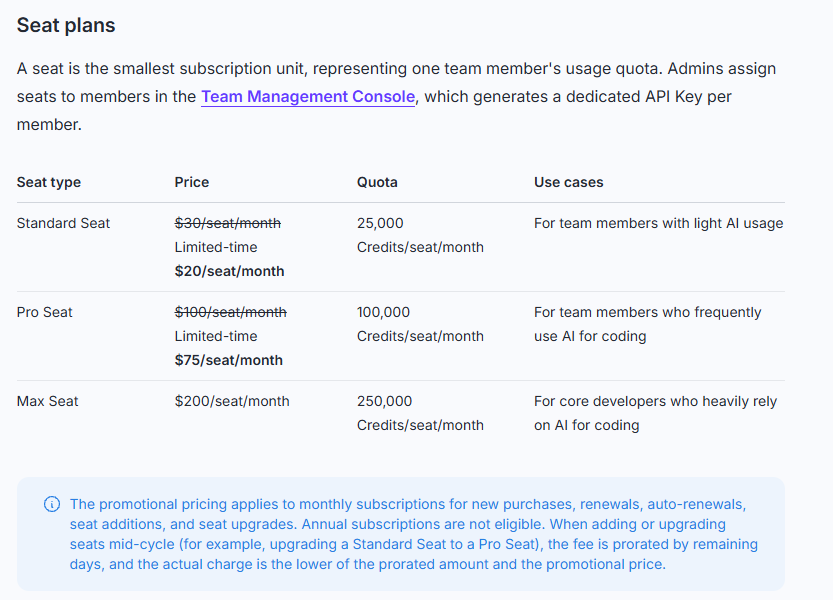
The listed Team promotions apply to monthly subscriptions. A shared $700 Credit Pack provides 625,000 Credits for one month. Seat Credits are used before eligible shared pack Credits; unused cycle Credits do not roll over. When the available allowance is exhausted, usage pauses. Check the Team billing date and checkout terms for the actual cycle.
Credits are not a fixed number of tokens. Consumption depends on the model and workload, including reasoning and supported tools or media. Use the plan’s usage view to compare your actual tasks; a Credits allowance is not an unlimited-call promise. Setup details are in our Qwen Code guide.
Model Studio Coding Plan
Alibaba Cloud Model Studio’s Coding Plan is a separate product from QwenCloud Token Plan. The currently listed Pro subscription uses model-call limits:
| Pro plan item | Published allowance or rule |
|---|---|
| Monthly price | $50 |
| Rolling five-hour allowance | 6,000 model calls |
| Weekly allowance | 45,000 model calls |
| Monthly allowance | 90,000 model calls |
| Permitted access | Supported interactive coding tools, using the dedicated plan key and endpoint |
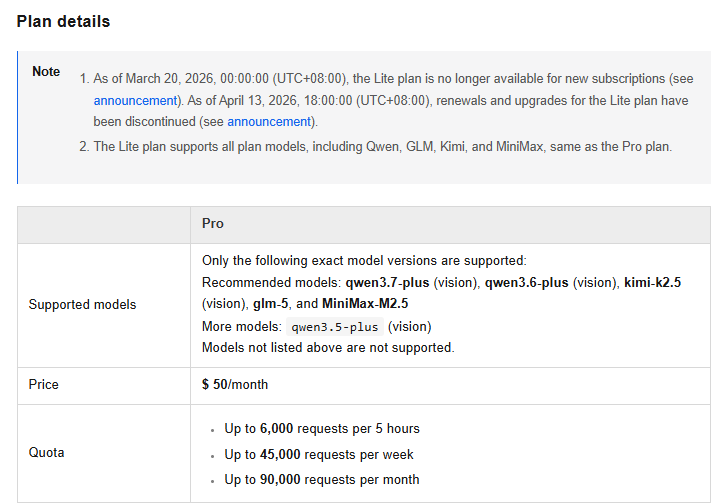
All quota windows apply at the same time. One coding task may trigger multiple model calls, so 90,000 monthly calls does not mean 90,000 completed user tasks. The plan does not permit unattended scripts or application backends. When any quota limit is reached, plan calls pause until the applicable allowance becomes available again; they do not automatically switch to pay-as-you-go.
Free API quotas: QwenCloud and Model Studio differ
| Rule | QwenCloud pay-as-you-go API | Model Studio pay-as-you-go API |
|---|---|---|
| Activation / eligibility | Payment information must be verified to activate the free quota. | Eligible models in Singapore with International deployment. |
| Allowance | Check the per-model allowance in your account. | Check the per-model allowance; aliases and dated models can have separate quotas. |
| Validity | Generally 90 days from activation or a later model release. | 90 days from activation, model release or access approval, whichever is later. |
| Token accounting | Input and output share the model’s token quota. | Input and output share the model’s token quota. |
| After expiry or exhaustion | Usage normally switches to paid billing unless Free quota only is enabled. | Usage normally switches to paid billing unless Free Quota Only is enabled. |
| Depletion alerts | The free-quota guide says no depletion notification is provided. | The guide describes in-app and email alerts at 20% remaining and at exhaustion. |
Sources: QwenCloud free quota rules and Model Studio free quota rules. The quota-only switch is off by default. Enabling it stops eligible model use when the quota runs out instead of allowing paid continuation.
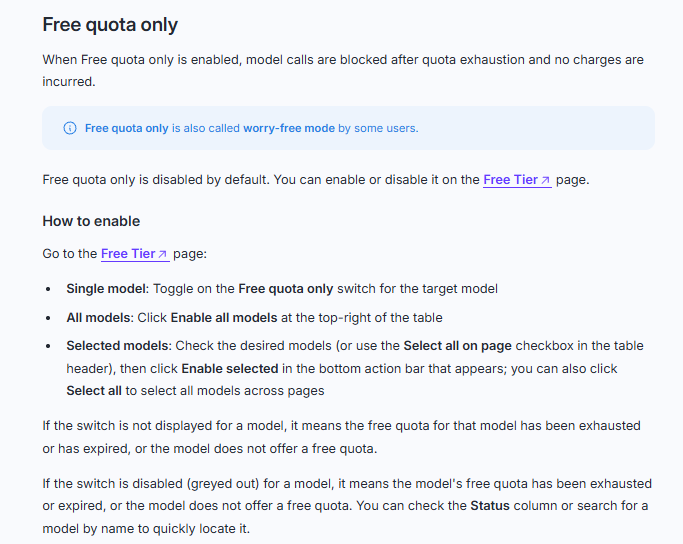
Do not treat a free model quota as covering Batch jobs, every built-in tool, or a Token Plan/Coding Plan subscription. Check the service exclusions and the API key you are actually using. Free consumer access is also separate from these API allowances.
Qwen image pricing uses image counts
For the following Model Studio image models in Singapore, International deployment, calculate input reference images and successfully generated output images using the applicable row:
| Image model | Price per input reference image | Price per output image |
|---|---|---|
qwen-image-3.0-pro | $0.003 | 1K: $0.04 2K: $0.075 |
qwen-image-3.0 | $0.003 | $0.03 at 1K or 2K |
qwen-image-2.1-pro | No input-image charge | $0.04 |
qwen-image-2.1-turbo | No input-image charge | $0.016 |
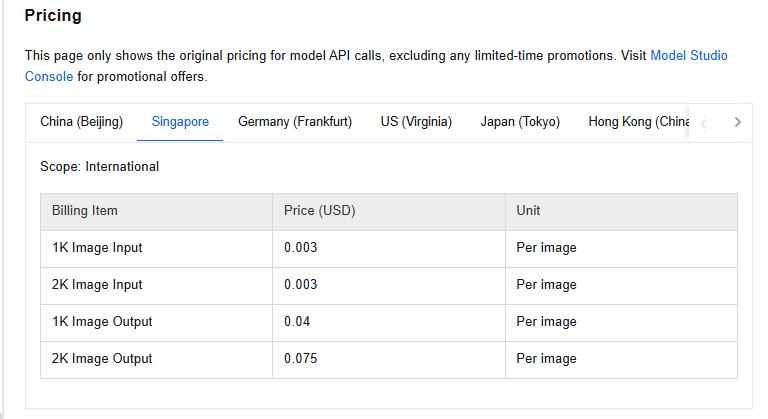
Example: 100 successful Qwen-Image-3.0-Pro editing requests, each with one reference image and one 1K output, cost 100 × ($0.003 + $0.04) = $4.30 before any free quota or tax. Pure text-to-image requests have no input reference image to charge. The $0.003 input price does not apply to the 2.1 models in this table.
See our Qwen Image Generator guide for model selection and prompts. For other media, check the exact model’s billing unit: video can charge per generated second and sometimes per input second; speech can use characters, audio duration or modality-specific tokens. Those charges cannot be estimated reliably with a single text-token rate.
How to keep a Qwen budget accurate
- Record the exact route and model. Save the provider, deployment scope, model ID and applicable price tier with your usage estimate.
- Use the returned usage totals. Count aggregate output once and use reported cache hits instead of assuming a fixed hit rate.
- Measure a complete task. Include every billable model call, paid tool invocation and media operation in an agent workflow.
- Control reasoning and response length where supported. Check the exact API parameter: a limit on visible answer tokens may not limit reasoning as well.
- Reuse stable context when it helps. Compare measured cache savings with any explicit creation charges.
- Recheck promotions and quota settings. Build a budget that can survive a temporary discount ending.
The Chat Completions usage reference and Responses usage reference explain the supported token-limit parameters and their model-specific behavior. A response-length setting is not a complete spending cap for tools or repeated requests.
Why your estimate may differ from your bill
| What you notice | What to check |
|---|---|
| Your calculator seems too expensive | Did you add reasoning tokens to an output total that already includes them? Did you add cached tokens on top of total input? |
| Long requests cost more than short ones | Check whether the entire request entered a higher input tier. |
| Expected cache savings do not appear | Inspect reported cache hits and any creation charges. |
| An agent costs more than a single prompt | Count its model calls, tool invocations and generated media. |
| API usage becomes paid after being free | Check quota expiry, remaining allowance, deployment eligibility and the quota-only switch. |
| A subscription stops despite remaining monthly allowance | Check other quota windows, seat allowance, plan endpoint and the key in use. |
Is running Qwen locally cheaper?
It depends on your workload. With a local model, estimate the hardware you buy or the server you rent, plus relevant operating costs such as electricity, storage and maintenance. Compare that total against metered API use at a similar task quality and response time.
Read the exact model’s license before choosing a deployment, especially for commercial use, and check its hardware requirements. Our guide to running Qwen locally covers the installation and hardware choices.
Qwen pricing FAQ
Are thinking tokens charged in addition to output tokens?
Thinking consumes billable output tokens. In the documented OpenAI-compatible usage fields, those tokens are already included in the total output. Charge that total once; the reasoning breakdown is useful for understanding consumption, not for adding a second output charge. The Model Studio Responses example also shows reasoning as a breakdown within output.
Can I use one monthly subscription for an unattended app?
The Token Plan Personal, Token Plan Team and Model Studio Coding Plan documentation restrict these plans to permitted interactive tool use. For an unattended application, use an API arrangement whose terms support that workload and calculate its metered cost.
Which Qwen option should I choose first?
Start from the task: consumer access for permitted personal use, a supported subscription for interactive tool work, a metered API for application integration, or local deployment when you want to manage the model yourself. For API model selection, compare a representative task across the available models and measure quality, latency and total cost before committing to volume.
Sources and update policy
ChinaAI.chat is an independent guide. This page uses the live official model listings and billing documents linked beside each section. Prices and plan rules were checked on October 12, 2026; worked examples are calculations from those published rates, not invoices or performance benchmarks. Your exact model, deployment, account terms and current checkout determine what you pay.