
The Qwen API gives developers hosted access to Qwen text, reasoning, vision, and multimodal models without running inference infrastructure. For a new application, the clearest current starting point is QwenCloud pay-as-you-go: create a workspace API key, connect through its OpenAI-compatible base URL, and use the Responses API. Alibaba Cloud Model Studio is a separate official route with region-specific keys and endpoints, so its credentials must not be mixed with QwenCloud settings.
Last verified: October 7, 2026. Model availability, promotions, free quotas, prices, and rate limits can change; check the linked official model page before deploying or estimating a production budget.
Which Qwen API route should you use?
“Qwen API” can refer to several access routes. Choosing one first prevents the most common setup problem: using a valid key with the wrong base URL, region, billing plan, or model ID.
| Route | Best fit | Credential and endpoint rule |
|---|---|---|
| QwenCloud pay-as-you-go | Web apps, backends, agents, batch jobs, and general API integrations | Use a QwenCloud workspace key and the QwenCloud pay-as-you-go base URL. This is the route used in the quickstart below. |
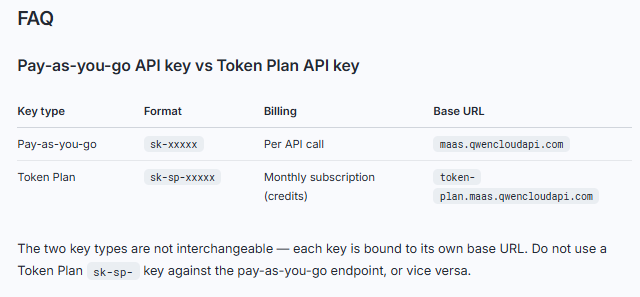
| QwenCloud Token Plan | Interactive AI coding tools and clients that consume monthly credits | Uses a separate subscription key and base URL. Do not use Token Plan credentials with a pay-as-you-go endpoint. |
| Alibaba Cloud Model Studio | Teams already using Alibaba Cloud or needing region- and workspace-specific deployment controls | Create the key in the same region as the endpoint. Production deployments should use the applicable workspace-dedicated domain where supported. |
| Third-party API provider | A unified gateway across multiple vendors or provider-specific routing features | Use that provider’s key, model names, prices, limits, and base URL. They are not interchangeable with official QwenCloud settings. |
| Self-hosted Qwen model | Infrastructure control, local processing, or custom deployment | You operate the model and endpoint yourself. Open-weight availability does not make the hosted Qwen API free. |
The consumer Qwen chat interface and the developer API are also different products. Signing in to the chat product does not replace creating an API key in QwenCloud or Model Studio, and a consumer subscription should not be assumed to include API usage.
Qwen API quickstart with Python
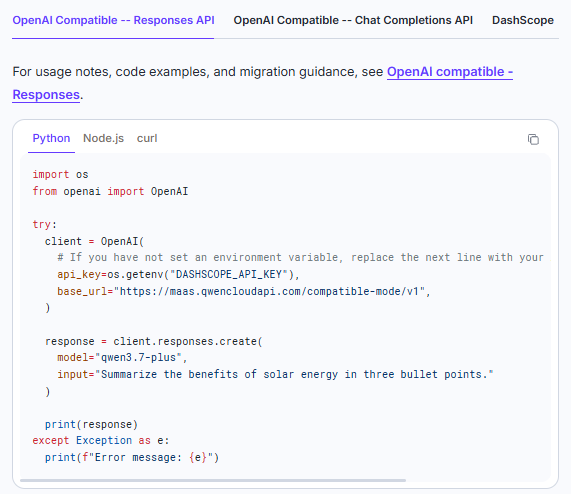
This walkthrough uses QwenCloud pay-as-you-go, the OpenAI Python SDK, the official QwenCloud OpenAI-compatible endpoint, and qwen3.7-plus. QwenCloud currently recommends the Responses API for new integrations and Chat Completions for existing OpenAI-compatible code.
1. Create a QwenCloud API key
- Sign in to the QwenCloud console.
- Open API Keys, create a pay-as-you-go workspace key, and copy it when shown. Current QwenCloud workspace keys begin with
sk-ws-. - Keep the key server-side. Do not place it in browser JavaScript, a mobile app bundle, a public repository, a screenshot, or a committed configuration file.
QwenCloud documents separate credentials for pay-as-you-go and Token Plan access. Confirm which key type you created before troubleshooting an authentication failure.
2. Store the key in an environment variable
On macOS or Linux, set the variable for the current terminal session:
export DASHSCOPE_API_KEY="sk-ws-your-key-here"In Windows PowerShell, use:
$env:DASHSCOPE_API_KEY="sk-ws-your-key-here"These commands do not make the variable permanent. For production, store secrets in the secret manager provided by your hosting platform rather than in a user profile or source file.
3. Install the OpenAI SDK
python -m pip install -U openaiThe official examples use the OpenAI SDK or the native DashScope SDK. A package whose name resembles qwen-api may be an unofficial wrapper for the consumer web service; do not assume it is the official hosted API client.
4. Send a request through the Responses API
Create a file named qwen_quickstart.py:
import os
import sys

from openai import OpenAI

api_key = os.getenv("DASHSCOPE_API_KEY")
if not api_key:
    sys.exit("DASHSCOPE_API_KEY is not set.")

client = OpenAI(
    api_key=api_key,
    base_url="https://maas.qwencloudapi.com/compatible-mode/v1",
)

try:
    response = client.responses.create(
        model="qwen3.7-plus",
        store=False,  # Stateless example; no stored-response follow-up.
        input=(
            "Explain three practical uses of demand forecasting "
            "for an electricity retailer."
        ),
    )
    print(response.output_text)
except Exception as exc:
    print(f"Qwen API request failed: {exc}", file=sys.stderr)
    raise
Run it from the same directory:
python qwen_quickstart.pyA successful call prints model-generated text. The example above follows the current official QwenCloud request pattern, but it is not presented as a live execution from your account; your key status, quota, billing setup, model access, and network determine the actual result.
Responses storage choice checked October 16, 2026: the QwenCloud Responses reference sets store=true by default, and the data-handling guidance describes 30-day conversation storage when it is enabled. This standalone example uses store=False because it does not need a stored response for a later previous_response_id call. If your application relies on that follow-up mechanism, choose storage deliberately and explain the retention to users. Disabling conversation storage does not promise zero billing metadata, logs, or external-tool retention.
Migrating existing Chat Completions code
If an application already uses an OpenAI-compatible chat client, keep the same client configuration and call Chat Completions instead:
completion = client.chat.completions.create(
    model="qwen3.7-plus",
    messages=[
        {"role": "system", "content": "Answer clearly and concisely."},
        {"role": "user", "content": "Explain retrieval-augmented generation."},
    ],
)

print(completion.choices[0].message.content)
This compatibility reduces migration work, but it does not make every OpenAI parameter, tool, or response field universally portable. Check the QwenCloud text-generation documentation for the selected interface and model.
Which Qwen API model should you choose?
Start with the least expensive model that meets your quality, modality, latency, and tool-use requirements, then evaluate it against representative tasks. The table below covers the current general-purpose starting points on QwenCloud rather than listing every specialized model.
Use our Qwen model guide to distinguish hosted API IDs from downloadable checkpoints.
| Model ID | Use it when | QwenCloud input/output price | Listed context |
|---|---|---|---|
qwen3.8-max | The task requires the strongest current option for difficult reasoning, coding, or professional workflows. | US$2 / US$6 per 1M tokens | 1M |
qwen3.7-plus | You need a balanced default for general applications, vision-language tasks, coding, and agents. | For the ≤256K-input tier: US$0.32 / US$1.28 promotional; list US$0.40 / US$1.60 | 1M |
qwen3.8-flash | Cost and throughput matter more than using the flagship tier for every request. | US$0.15 / US$0.47 per 1M tokens | 1M |
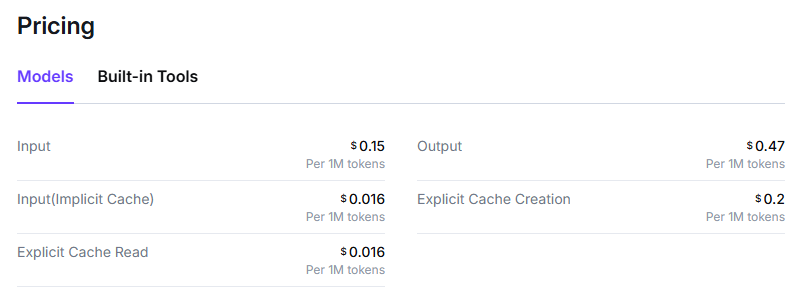
Those prices are QwenCloud pay-as-you-go rates displayed on October 7, 2026. The qwen3.7-plus row is explicitly tied to the listed input tier and promotion; longer requests can fall into another tier, and promotions can end. Prices from Model Studio or a third-party provider may differ.
All three model pages list a 1M-token context window, but that is not the same as an unrestricted 1M-token prompt. Space is also needed for output and, when enabled, reasoning. The current pages list maximum input and output values separately, so validate the exact limits before processing a near-limit document.
For audio or broader multimodal understanding, evaluate qwen3.8-omni-flash, which accepts text, image, audio, and video input and returns text. Image generation, video generation, speech, embeddings, and reranking use separate model families and billing units; do not send those workloads to a text model simply because it has a multimodal input capability.
Qwen API pricing, free quota, and cost control
The hosted Qwen API is not permanently free. QwenCloud gives eligible new users per-model free quota, but the official free-quota rules say it is typically valid for 90 days. The start date depends on whether it is a new-user quota or a quota attached to a model released after account activation.
For provider-specific budgets and worked calculations, see our Qwen pricing and cost examples.
- Quota is model-specific: unused tokens for one model cannot be transferred to another, and an alias and a dated snapshot can have separate quota records.
- Payment information may be required: QwenCloud currently asks users to complete payment verification to activate free quota.
- Real-time inference only: free quota does not offset Batch API calls, paid built-in tool calls, fine-tuning, deployment, or custom-model costs.
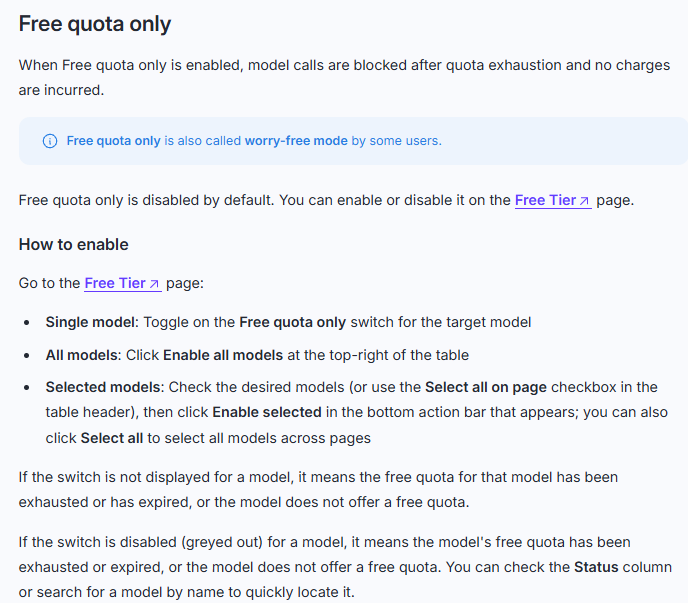
- Billing can continue automatically: after eligible quota is exhausted, verified accounts normally move to pay-as-you-go unless “Free quota only” is enabled for the model.
- Do not rely on a depletion email: the current documentation says there is no free-quota exhaustion notification. Use the console, the “Free quota only” control, and spending alerts.
For text generation, the basic estimate is:
estimated_cost = (
    (input_tokens / 1_000_000 * input_rate)
    + (output_tokens / 1_000_000 * output_rate)
)
Use the rate for the actual model, input tier, provider, and request mode. The QwenCloud pricing guide bills thinking tokens as output, and cache discounts vary by model. For Batch, use the model’s published Batch input and output rates rather than halving an already promotional real-time price. The Batch guide says its discount cannot be combined with cache or other discounts. Built-in tools may add per-call fees.
Batch pricing clarification checked October 16, 2026: for eligible Qwen3.7-Plus Batch requests, the official model listing shows $0.20 per million input tokens and $0.80 per million output tokens. These are half the $0.40/$1.60 list rates, not half the promotional $0.32/$1.28 rates. Across eligible requests totaling 10 million input and 2 million output tokens, the Batch subtotal is $3.60, not $2.88, before other charges. The guide currently limits Plus Batch requests to 256K context tokens per request.
Rate limits and long-context requests
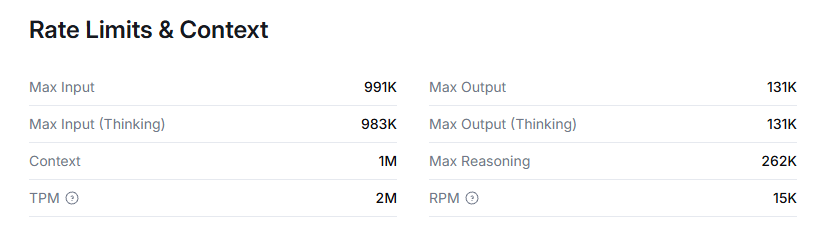
QwenCloud measures rate limits with RPM (requests per minute) and TPM (tokens per minute). Limits are account-level and shared across the workspaces and keys under that account, so creating another key does not create a separate throughput allowance.
At the verification date, the model pages list qwen3.7-plus at 15K RPM and 5M TPM, while qwen3.8-max and qwen3.8-flash list 15K RPM and 2M TPM. These values can change. QwenCloud can also enforce short burst limits, so a sudden spike may return HTTP 429 even when the one-minute average appears acceptable.
- Queue and smooth bursts instead of releasing a large batch simultaneously.
- Retry 429 responses with exponential backoff and jitter rather than an immediate tight loop.
- Limit concurrency and cap output length for predictable workloads.
- Use the Batch API for non-urgent asynchronous work instead of forcing it through the real-time endpoint.
- Read the live rate-limit documentation and model page before a load test.
Capabilities to verify before implementation
QwenCloud exposes more than basic text completion, but support depends on the model and API interface. Check the selected model page instead of assuming one feature matrix applies to the entire catalog.
| Capability | Practical use | What to verify |
|---|---|---|
| Streaming | Display partial output and reduce perceived wait time. | Event format, disconnect handling, retries, and whether reasoning and answer fields arrive separately. |
| Function calling | Let the model request an application-defined tool, database lookup, or API action. | Your application—not the model—must validate arguments, execute the tool, and return the result. |
| Structured output | Return JSON that follows a defined shape for downstream processing. | Model support, schema restrictions, validation failures, and fallback handling. |
| Multimodal input | Analyze images, screenshots, documents, audio, or video with a suitable model. | Accepted media types, file limits, modality-specific token accounting, and output modality. |
| Context caching | Reuse long repeated prefixes at lower cost. | Whether the model supports implicit or explicit caching and the applicable cache rates. |
| Batch processing | Run large non-interactive workloads asynchronously at a lower token rate. | Eligible models, turnaround, input format, and the fact that free quota does not cover batch calls. |
Function calling is not autonomous execution. The model proposes a tool name and arguments; your server must authorize the action, validate inputs, execute the tool, and send the result back. Treat all model-produced tool arguments as untrusted input.
Qwen API base URLs and regional rules
The correct base URL depends on the platform, plan, and region. Copy it from the same console or official documentation used to create the key.
| Configuration | OpenAI-compatible base URL rule |
|---|---|
| QwenCloud pay-as-you-go | https://maas.qwencloudapi.com/compatible-mode/v1 |
| QwenCloud Token Plan | Use the dedicated Token Plan URL shown with the subscription credentials. It is separate from pay-as-you-go. |
| Alibaba Cloud Model Studio | Use the endpoint for the key’s region and billing plan. Workspace-dedicated domains follow a region-specific pattern and require the applicable workspace ID where supported. |
| Third-party provider | Use only the provider’s documented URL and its model identifiers. |
For example, the current Model Studio production pattern for Singapore is https://{WorkspaceId}.ap-southeast-1.maas.aliyuncs.com/compatible-mode/v1. Other regions use different domains, and keys are region-specific. The Model Studio base URL table is the authoritative place to copy the current endpoint for your region and plan.
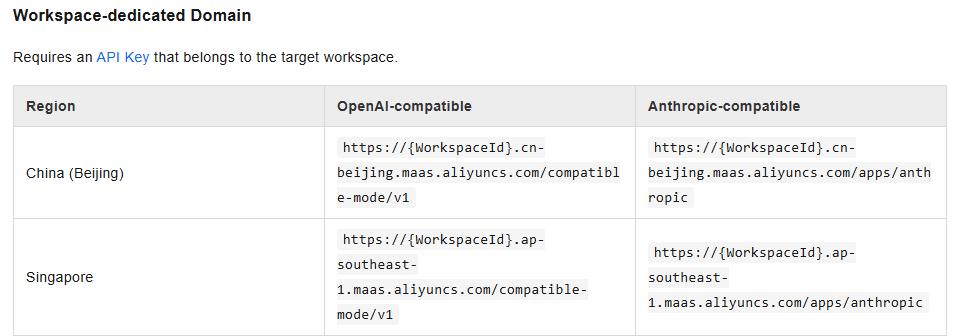
Do not diagnose a 401 by regenerating keys repeatedly until you have checked the route. A real key can be rejected when it belongs to another region, workspace, billing plan, or platform.
Common Qwen API errors and fixes
| Symptom | Likely cause | What to check |
|---|---|---|
| 401 / invalid API key | The variable is missing, the key was copied incorrectly, or the key does not match the platform, plan, workspace, or region. | Print only whether the variable exists—never the key itself. Then compare the key source and base URL. Model Studio keys must match the endpoint region. |
| 404 / model not found | The model ID is misspelled, unavailable to the account, or taken from a model hub rather than the hosted provider’s catalog. | Copy the exact API model ID from the selected QwenCloud or Model Studio model page. |
| 404 / model not supported | The chosen model does not support the OpenAI-compatible interface being called. | Check the model’s supported protocols. Use the native DashScope interface when the official model page requires it. |
403 / AllocationQuota.FreeTierOnly | The free quota ended while free-quota-only access or unverified billing prevents paid continuation. | Check the Free Tier page, payment verification, quota status, and the “Free quota only” switch before changing code. |
| 429 / rate limit | RPM, TPM, concurrency, or short-burst limits were exceeded. | Reduce concurrency, smooth traffic, shorten requests, and retry with exponential backoff and jitter. |
| 400 / unsupported parameter | A parameter from another API, model, or SDK version is not accepted. | Compare the request with the documentation for the exact model and interface; remove unsupported fields one at a time. |
| 400 / content inspection failure | The service’s moderation checks rejected the input or requested output. | Review the content, avoid repeatedly resending the same blocked request, and use the provider’s safety documentation. |
| Timeout or connection error | Network failure, an incorrect domain, an overly long request, or an aggressive client timeout. | Verify DNS and the full base URL, set reasonable connect/read timeouts, and retry only transient failures. |
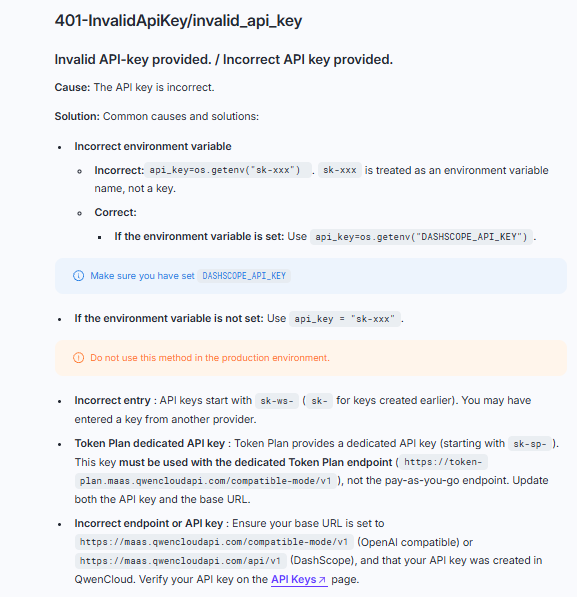
Use the provider’s request ID and exact error body when opening a support case, but redact API keys, personal data, proprietary prompts, and customer content. The official QwenCloud error reference should take priority over generic fixes from forum posts.
Production security and reliability checklist
- Keep calls server-side: browsers and distributed client apps cannot reliably protect a permanent provider key.
- Separate environments: use different keys or workspaces for development and production, with the minimum access each needs.
- Rotate and revoke: replace exposed keys immediately and remove keys that are no longer required.
- Set budgets and alerts: monitor usage by model and key; enable spending alerts or free-quota-only controls where appropriate.
- Validate inputs and tool arguments: cap file size, prompt length, output tokens, and the operations an agent can request.
- Handle failures deliberately: set timeouts, retry only transient errors, add backoff with jitter, and prevent duplicate side effects.
- Log safely: record model ID, latency, token usage, status, and request ID without logging credentials or unnecessary sensitive content.
- Test model changes: evaluate quality and response structure in staging before changing the production model ID or interface.
- Review data terms for the exact service: do not assume that consumer-chat, QwenCloud, Model Studio, and third-party-provider policies are identical.
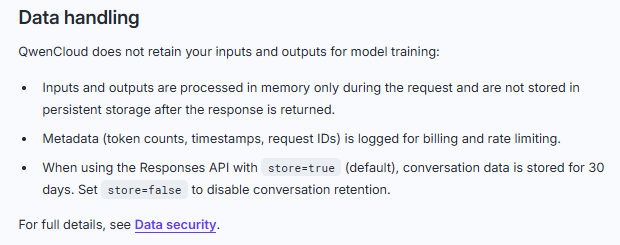
The QwenCloud security guidance recommends environment variables or secret managers, separate development and production keys, rotation, input validation, output limits, and application-level rate limiting. QwenCloud’s API data-handling guidance separately states that API inputs and outputs are not used for model training; stored Responses conversations and billing metadata still need separate review. Keep pay-as-you-go API, Token Plan subscriptions, and external-tool data terms distinct, and review the agreement for your actual route.
Qwen API vs self-hosting Qwen
| Consideration | Hosted Qwen API | Self-hosted open-weight model |
|---|---|---|
| Setup | Create a key and call a managed endpoint. | Provision hardware, choose an inference runtime, deploy the model, and operate the service. |
| Cost model | Usage-based token, media, character, second, or tool-call billing. | Infrastructure, storage, bandwidth, engineering, monitoring, and scaling costs. |
| Scaling | The provider manages serving capacity within documented limits. | You plan capacity, concurrency, batching, failover, and upgrades. |
| Control | Use the provider’s available models, protocols, regions, and policies. | More control over runtime and deployment, subject to the model’s license and your infrastructure. |
| Best fit | Fast implementation and managed inference. | Teams with a clear control, locality, customization, or unit-economics reason and the ability to operate inference. |
Qwen has released open-weight models that can be deployed with frameworks such as vLLM or SGLang and used locally through tools such as Ollama or LM Studio. That is a separate deployment path from QwenCloud. Check the specific model card and license rather than treating every model carrying the Qwen name as having identical weights, terms, or hardware requirements.
Frequently asked questions
Is the Qwen API free?
Not as a permanent general rule. QwenCloud currently offers eligible users per-model free quota that is typically valid for 90 days, after which calls may move to pay-as-you-go. Availability, amount, activation requirements, and eligible operations depend on the model and account.
How do I get a Qwen API key?
For the QwenCloud route used in this guide, sign in to QwenCloud, open API Keys, create a pay-as-you-go workspace key, and store it as DASHSCOPE_API_KEY. For Alibaba Cloud Model Studio, create the key in the same region as the endpoint you will call.
Is Qwen compatible with the OpenAI SDK?
Yes, QwenCloud and Model Studio provide OpenAI-compatible interfaces for supported models. QwenCloud currently recommends Responses API for new integrations and Chat Completions for existing OpenAI-compatible applications. Compatibility is not a guarantee that every parameter or model supports every interface.
What is the Qwen API base URL?
For QwenCloud pay-as-you-go OpenAI compatibility, it is https://maas.qwencloudapi.com/compatible-mode/v1. Model Studio, Token Plan, and third-party providers use different URLs. Always pair the URL with the key’s platform, region, workspace, and billing plan.
Which Qwen model is the best starting point?
qwen3.7-plus is the current balanced starting recommendation in QwenCloud documentation. Use qwen3.8-max when difficult reasoning or coding justifies the higher rate, and test qwen3.8-flash when cost and throughput are the priority. Validate all three on your own workload rather than relying on a universal “best model” claim.
Can I run Qwen locally instead of using the API?
Yes, for Qwen models whose weights and license are available for your intended use. Local or self-hosted deployment replaces provider token billing with infrastructure and operational responsibility; it is not the same service as the hosted Qwen API.
Sources checked
The following primary sources were checked on October 7, 2026:
- QwenCloud developer overview and first API call.
- QwenCloud text generation and interface guidance.
- QwenCloud API key documentation and billing FAQ.
- QwenCloud pricing guide, free-quota rules, and rate limits.
- Qwen3.8-Max, Qwen3.7-Plus, Qwen3.8-Flash, and Qwen3.8-Omni-Flash model pages.
- QwenCloud error reference and security guidance.
- Alibaba Cloud Model Studio Qwen API reference and regional base URL documentation.
- Qwen’s official Qwen3 open-weight deployment post.