
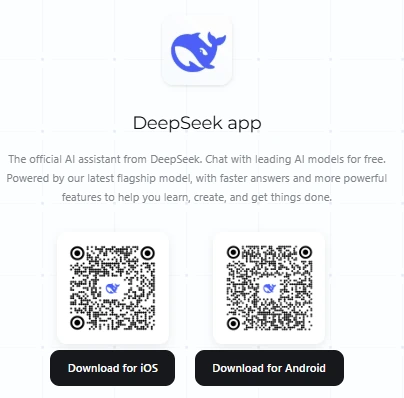
DeepSeek pricing depends on how you use it. The standard consumer chat app is offered for free, while the developer API charges for token usage. DeepSeek’s official app page advertises free conversations; its API price card separates uncached input, cached input, and output charges.
For API users, the important question is not simply “How much is DeepSeek per month?” It is which model you call, how many tokens each task consumes, whether input qualifies for caching, and when the work runs. The examples below turn those variables into reproducible estimates.
Pricing checked: October 9, 2026. All API rates and calculated examples below are in USD.
Search and Fetch billing update: October 16, 2026. The token tables and worked estimates below do not include retrieval fees. The current Search and Fetch documentation lists each service at $0.75 per 1,000 successful requests. Search must return non-empty results and Fetch must return page content to be billable; failed, empty, or timed-out retrieval is not charged under those rules. For example, 1,000 billable Search calls plus 1,000 billable Fetch calls add $1.50 before model tokens.
For search through Claude Code and Codex, DeepSeek announces a Search request-fee waiver during the first two weeks after the Search API launch, followed by standard Search pricing; it says the billing start date will be announced separately. Do not assume a permanent exemption or invent an end date. Check the current notice before estimating costs. Built-in Responses web_search is supported with Pro and ignored with Flash; standalone Search/Fetch and consumer chat have different access and billing paths.
Is DeepSeek free, or do you need a subscription?
You do not need to buy API credits just to use the standard DeepSeek chat app. Its official download page describes chat access as free. No fixed-price monthly subscription for standard consumer chat was advertised on the official public product pages checked for this guide. Free access should not be interpreted as a promise of unlimited capacity or permanent availability of every feature.
A model name containing “Pro” is not a subscription plan. In the API documentation, deepseek-v4-pro identifies a model. It does not establish a consumer “DeepSeek Pro” membership with a monthly fee.
DeepSeek Harness is a separate case. Its desktop interface should not be confused with the free consumer chat app. The Harness terms require prepayment to the DeepSeek Open Platform when using its default official models. When you configure a custom model, that model provider’s token charges or subscription conditions apply.
DeepSeek API pricing: current model rates
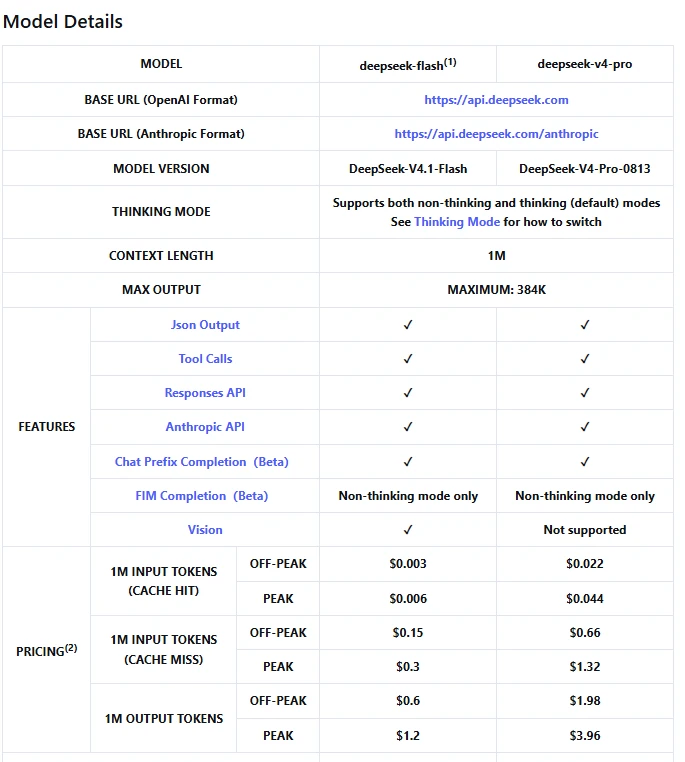
The following table covers DeepSeek’s directly billed API, not third-party subscriptions or hosting. Each amount is the charge per 1 million tokens in that category.
| API model | Billing period | Uncached input | Cached input | Output |
|---|---|---|---|---|
deepseek-flash | Off-peak | $0.15 | $0.003 | $0.60 |
deepseek-flash | Peak | $0.30 | $0.006 | $1.20 |
deepseek-v4-pro | Off-peak | $0.66 | $0.022 | $1.98 |
deepseek-v4-pro | Peak | $1.32 | $0.044 | $3.96 |
Source: DeepSeek Models & Pricing. The listed versions are DeepSeek-V4.1-Flash and DeepSeek-V4-Pro-0813, respectively. “Per million tokens” is a billing unit, not a requirement to purchase a million-token bundle.
When do peak and off-peak prices apply?
The published peak windows are 01:00–04:00 UTC and 06:00–10:00 UTC, Monday through Friday, excluding Chinese public holidays. Every other period is off-peak, including entire weekends and Chinese public holidays.
Off-peak rates are half the corresponding peak rates. The published schedule does not specify how a request spanning a price boundary is classified. Avoid assuming that your local send time guarantees a particular rate; check billed usage when scheduling near a transition.
Why do other pages show different DeepSeek prices?
Some pages quote older releases or third-party providers. Model aliases can also be misleading: DeepSeek’s change log says the old deepseek-v4-flash and deepseek-v4-flash-vision-exp identifiers temporarily route to V4.1 Flash. They are not additional current pricing tiers.
There is also a documented correction concerning V4 Pro. The original V4.1 Flash announcement described plans to redirect V4 Pro requests. The amended API change log instead confirms continued V4 Pro service after September 14, 2026, with unchanged billing. This guide follows that correction and the current price card.
Before reusing any quoted price, match the provider, model, currency, token category, and billing period. An older R1 or V3 price is not automatically the price of a current Flash request.
What counts toward your API bill?
Input includes more than the latest question
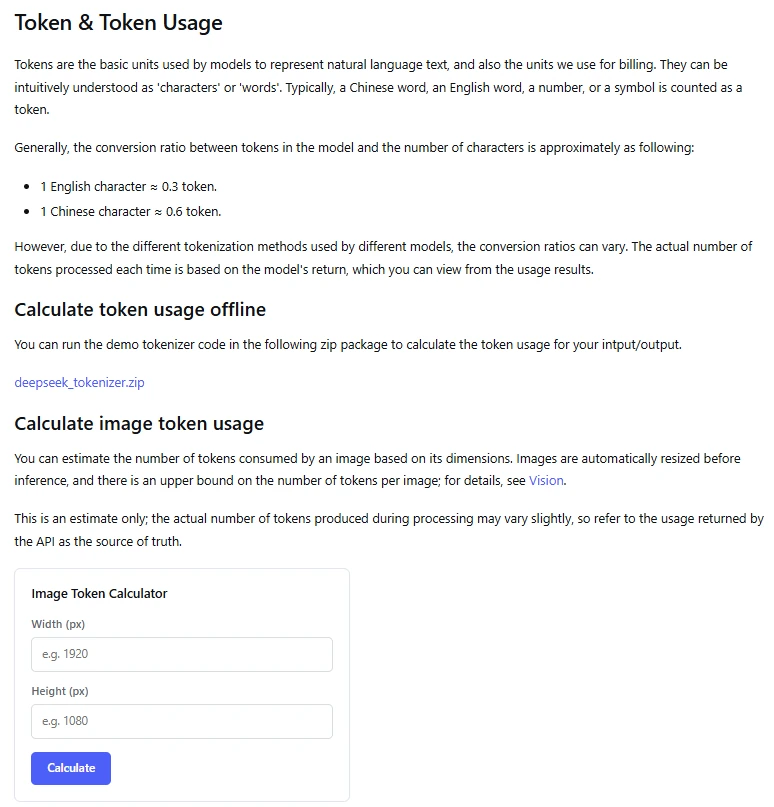
Tokens are the units the model processes, not a fixed number of words. DeepSeek’s token-usage documentation warns that tokenization varies and recommends using the usage returned by the API rather than treating a character-to-token estimate as exact.
Input can include instructions, conversation history, documents, and tool results submitted with the request. For the Chat Completions interface, DeepSeek’s multi-round conversation guide explains that applications supply the history themselves. A short follow-up question can therefore arrive with a much longer billable input.
For image-based tasks, do not assume a universal token count per image. The official token guide estimates image usage from dimensions and processing rules, but identifies the API’s returned usage as the source of truth.
Cached input is discounted, not automatically free
Context caching is enabled by default. However, a hit requires reuse of a matching prefix unit that has already been persisted to the cache. Merely asking a similar question does not establish a cache hit.
The current rules distinguish persisted request boundaries, detected common prefixes, and periodic boundaries in long sequences. This means a repeated document prefix may become reusable after the system identifies and stores it; not every early request necessarily qualifies. Caching operates on a best-effort basis, so budget from measured hits rather than assuming a guaranteed percentage.
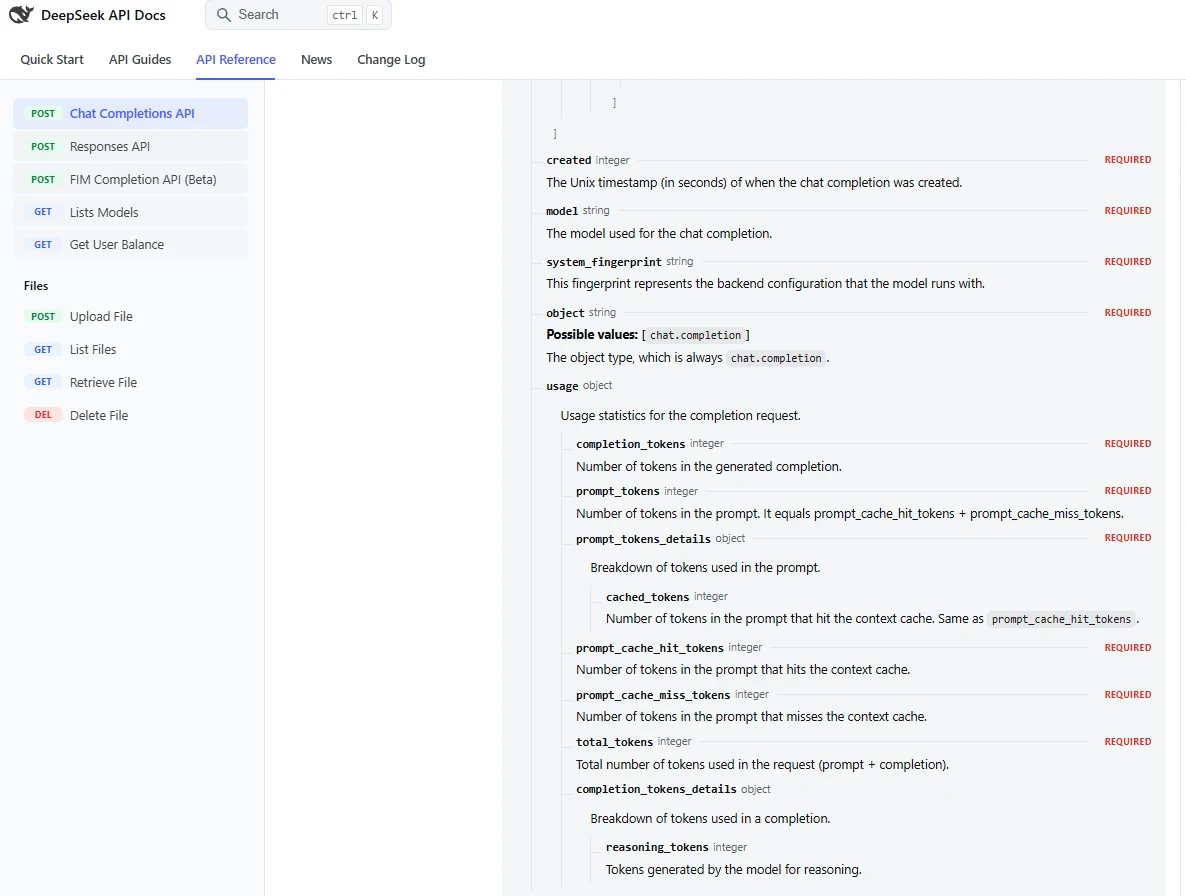
The response fields prompt_cache_hit_tokens and prompt_cache_miss_tokens identify the two input categories. Together, they account for the input total: do not charge all input at the uncached rate and then add cached tokens again. The Chat Completions usage schema documents this relationship.
The published estimate here uses the listed hit and miss rates; it does not introduce an undocumented cache-storage surcharge. Output remains a separate category because caching input does not eliminate generation.
Reasoning can increase output beyond the visible answer
DeepSeek’s thinking mode produces reasoning before the final answer and is enabled by default with high effort. A short final response therefore does not necessarily mean little output was generated.
For Chat Completions, completion_tokens is the completion total, while completion_tokens_details.reasoning_tokens is a breakdown within it. Use the reported completion total for output calculations; do not add the reasoning breakdown to that total a second time. These fields are defined in the official response schema.
Similarly, total_tokens combines input and completion usage. Multiplying that combined number by one headline rate will give the wrong estimate when the categories have different prices.
Calculate your DeepSeek cost: three worked examples
For the price structure above, calculate each category separately:
Estimated cost in USD =
(uncached input tokens × uncached input rate
 + cached input tokens × cached input rate
 + billable output tokens × output rate)
÷ 1,000,000
Use rates from the same model and billing period. For work split between peak and off-peak periods, calculate each portion separately, then add the results.
The following workloads are illustrative assumptions, not measured customer averages or invoices. They calculate token charges only, before any applicable taxes, payment-related charges, third-party fees, or external tools. No promotional credit is subtracted. Output counts include any reasoning within the billable completion total.
Example 1: one Flash request with no cache hit
Assume one deepseek-flash request runs off-peak with 2,000 uncached input tokens and 500 billable output tokens. There are no cached input tokens.
Input:  2,000 × $0.15 ÷ 1,000,000 = $0.0003
Output:   500 × $0.60 ÷ 1,000,000 = $0.0003

Total: $0.0006
That is 0.06 US cents, not $0.06. Keeping the decimal places matters: rounding this request to two decimal places would incorrectly make it appear free.
Example 2: 10,000 requests in a month
Now assume 10,000 requests during a month, each with the same 2,000 uncached input tokens and 500 billable output tokens. Monthly usage is therefore 20 million input tokens and 5 million output tokens.
| Model and billing assumption | Input cost | Output cost | Monthly token cost |
|---|---|---|---|
deepseek-flash, all off-peak | $3.00 | $3.00 | $6.00 |
deepseek-flash, all peak | $6.00 | $6.00 | $12.00 |
deepseek-v4-pro, all off-peak | $13.20 | $9.90 | $23.10 |
deepseek-v4-pro, all peak | $26.40 | $19.80 | $46.20 |
These are calculations from the published API rates, not monthly plans. The table holds token counts constant to isolate pricing differences; it does not assume both models produce identical answers or consume identical tokens on real tasks.
For an application with variable request sizes, replace the assumed counts with actual monthly totals. Request count alone is insufficient: one document-analysis request may contain much more input than one short conversation turn.
Example 3: the same Flash workload with 80% cached input
Keep the second example’s 10,000 requests, 20 million total input tokens, and 5 million output tokens. This time, assume 80% of input tokens actually receive cache-hit billing: 16 million cached and 4 million uncached. All requests run off-peak.
Uncached input: 4 million × $0.15  = $0.600
Cached input:  16 million × $0.003 = $0.048
Output:         5 million × $0.60  = $3.000

Total: $3.648, approximately $3.65
Compared with the $6.00 uncached baseline, the saving is 39.2%. An 80% input cache-hit rate does not produce an 80% reduction in the entire bill: output costs remain unchanged, and cache hits still have a charge.
The assumed hit rate covers the complete month, including any initial misses. It is not a prediction that your first repeated prompt will qualify. Measure the actual split before using this scenario as a budget.
API payments, free credits, and refunds
Topping up is not buying a monthly subscription
DeepSeek deducts usage charges from available topped-up or granted balances, using eligible granted balance first when both exist. Its deduction rules describe consumption of funds rather than a fixed monthly token allowance.
Once you are ready to use the developer account, follow our DeepSeek API setup guide to create a key and send a first request.
Before paying, check the minimum top-up, supported payment method, currency, and any account-specific conditions in the developer platform. The public sources reviewed do not establish one universal minimum payment or signup-credit amount for every user. The Open Platform terms defer recharge methods and free quotas to the product and platform information.
Do not treat a possible promotion as a permanent API free tier. The balance documentation distinguishes purchased funds from unexpired granted funds. Check the amount and validity of any credit actually assigned to your account instead of relying on an older tutorial’s offer.
Check balance and distinguish billing errors from rate limits
The documented GET /user/balance endpoint reports total_balance, granted_balance, topped_up_balance, and the balance currency. Its is_available field indicates whether the balance is sufficient for API calls. See the official balance reference.
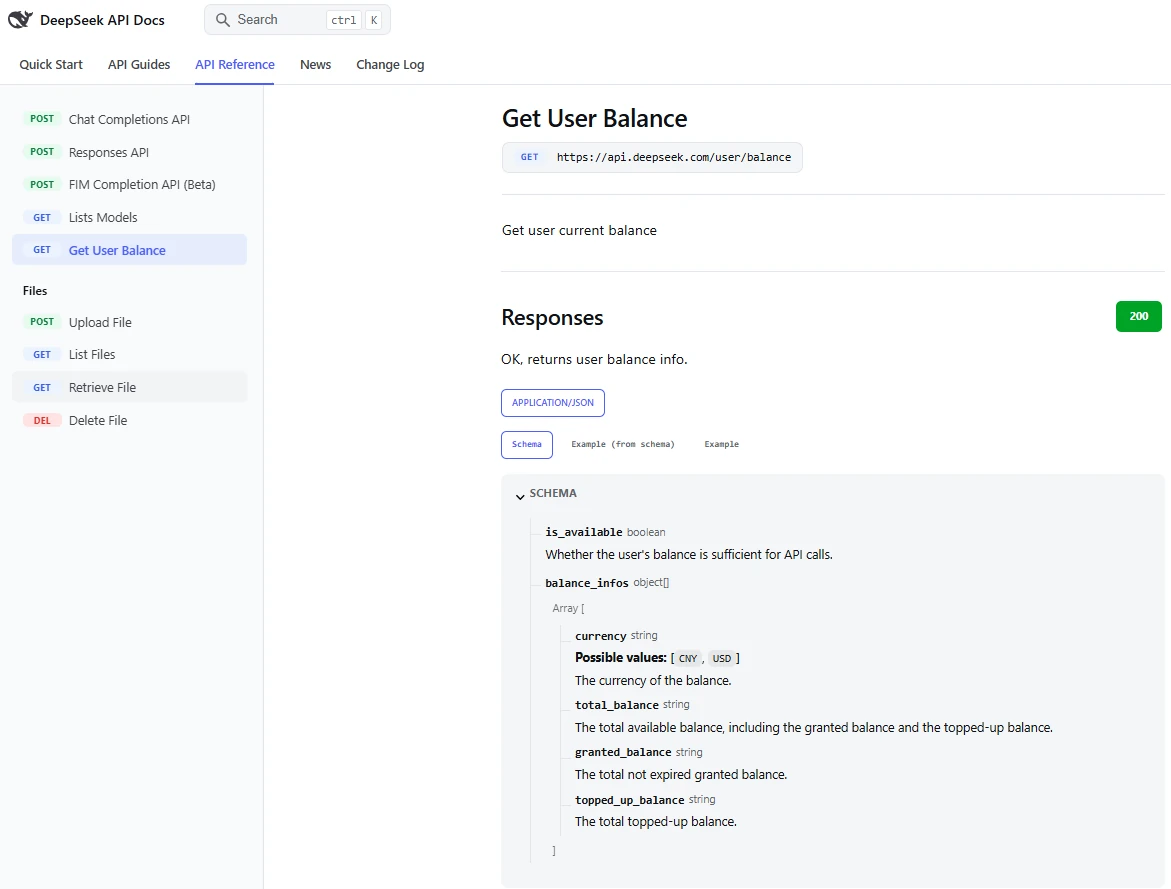
An HTTP 402 response indicates insufficient balance; an HTTP 429 indicates a rate-limit problem. These require different actions, as explained in the error-code documentation. Adding funds is not a general fix for excessive concurrent requests.
Concurrency limits apply at account level, regardless of which API key you use. They govern simultaneous requests, not a monthly token allowance. Creating more keys does not turn one account into multiple independent concurrency allocations.
Can unused API funds be refunded?
The Open Platform refund terms require a request and review. If approved, the remaining unspent amount is refunded together, after necessary deductions such as handling fees. Partial refunds and refunds of already-consumed amounts are not supported under that policy. Approval should not be assumed.
Control spending without breaking the workflow
Measure complete tasks, not just final answers. Record the model, cache-hit and cache-miss input, completion total, applicable billing period, and number of calls needed for a finished result. DeepSeek’s tool-calling workflow can involve several reasoning and tool rounds before one final response. A task that takes several calls should not be budgeted as a single request.
Trim irrelevant context, but preserve required messages. Removing duplicated documents can reduce input. However, do not indiscriminately discard conversation or reasoning fields from an agent integration: DeepSeek documents different history requirements when a request carries tools. Follow the current thinking-mode rules rather than optimizing solely for a shorter request.
Use output limits and reasoning settings deliberately. Set a completion limit appropriate to the task, then test whether it truncates useful answers. The API reference documents max_tokens; the thinking guide explains mode and effort controls. Less generation can reduce cost, but an incomplete answer that must be regenerated may defeat the saving.
Schedule flexible work and evaluate results. Move non-urgent jobs to eligible off-peak periods when the delay is acceptable. Compare models using your own acceptance criteria, including retries and corrections. A higher price is not proof of better results, and a lower token rate is not the whole cost of completing a task.
Protect the API key that can spend your balance. DeepSeek’s developer terms warn against public disclosure and exposure in browser-side code. Treat key security as part of cost control, not just account administration.
Third-party services and self-hosting use different cost models
When another application or hosting provider offers a DeepSeek model, check who operates the endpoint and who bills you. For example, OpenRouter publishes its own listing for DeepSeek V3; that is not the same product or price card as DeepSeek’s current direct Flash API.
A monthly charge from another app may cover its interface, bundled usage, or additional services. Do not infer that this fee is an official DeepSeek subscription. Likewise, a bring-your-own-key integration may leave API consumption on your own provider account; confirm the arrangement before paying for the interface.
Self-hosting replaces hosted API charges with a different budget. DeepSeek publishes open weights, including the V4.1 Flash model card and license, but downloadable weights do not provide free hardware, electricity, storage, maintenance, or rented infrastructure. Check the specific model’s license and deployment requirements rather than treating every DeepSeek release as interchangeable.
For a meaningful comparison, estimate the total cost of running your chosen deployment for the same workload, including idle time and operations. Compare that with a measured API bill—not with a token rate alone. For occasional manual use, start with the standard chat service; for an application, start with representative usage measurements before committing to a larger prepaid balance or dedicated infrastructure.