DeepSeek models include current general-purpose API models, downloadable reasoning models, smaller distilled models, and specialist releases for coding, vision, document processing, and mathematics. The first distinction to make is between DeepSeek’s current hosted API catalog and its broader official collection of downloadable weights. They are not the same list.
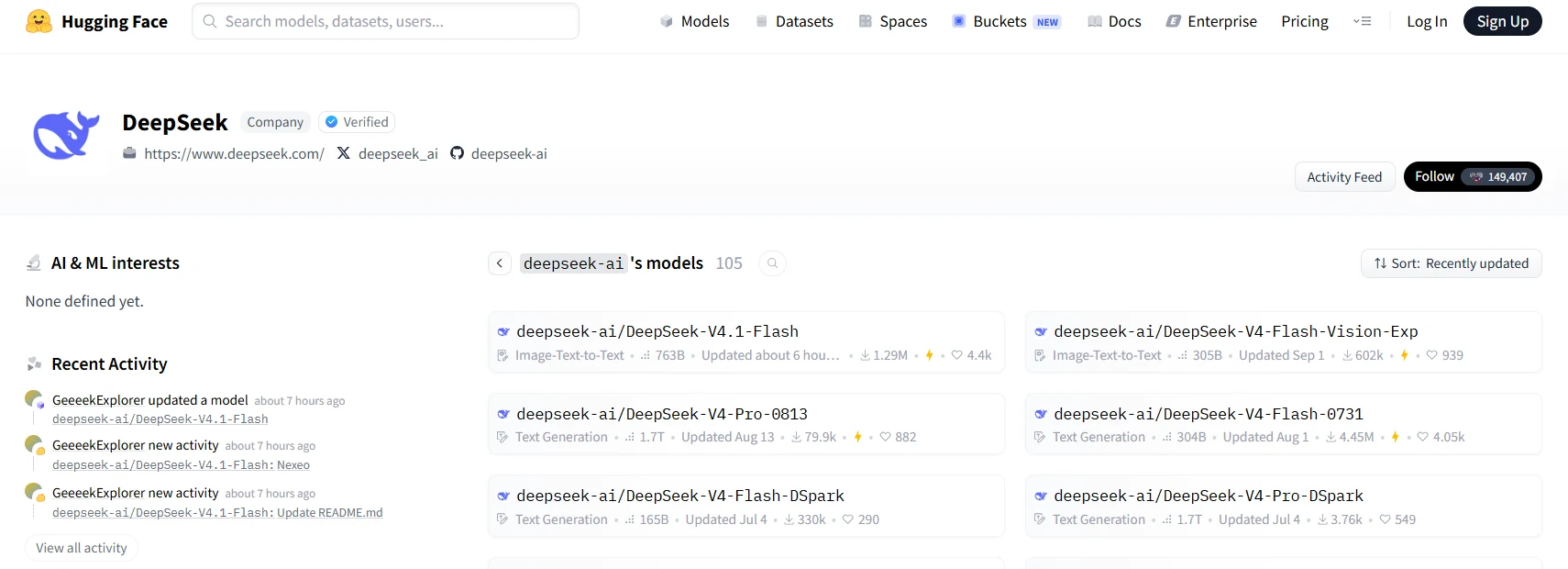
The most recent general-purpose release verified in DeepSeek’s official announcements is DeepSeek-V4.1-Flash, introduced on September 10, 2026. However, the newest release is not automatically the right choice for every deployment. Your task, access method, hardware, and need for a specific checkpoint determine which options deserve consideration.
Last checked: October 9, 2026.
Current DeepSeek API models at a glance
DeepSeek’s direct API currently lists two primary model identifiers. The linked model cards also provide access to the corresponding official downloadable weights.
| Current model version | Direct API identifier | Supported input and output |
|---|---|---|
| DeepSeek-V4.1-Flash | deepseek-flash | Text and image input; text output |
| DeepSeek-V4-Pro-0813 | deepseek-v4-pro | Text input and output; vision is not supported on this API model |
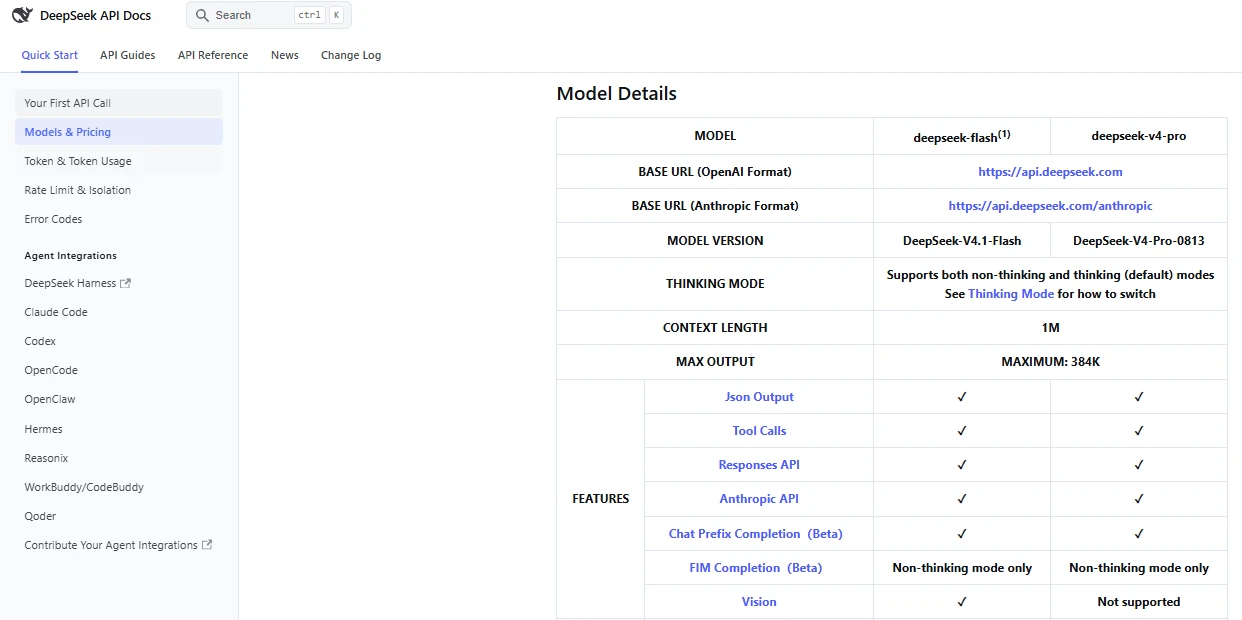
The official model-details table lists a 1M-token context window and a 384K maximum output for both API options. Both support thinking and non-thinking modes, tool calls, and JSON output. These are hosted-service specifications, not a guarantee that a local deployment will allocate the same context or support every feature identically.
“Pro” does not mean “newer than Flash.” The Pro-0813 checkpoint is the official V4 Pro release that superseded its preview. V4.1 Flash belongs to the subsequent architecture generation. Compare the exact releases rather than assuming the names establish a permanent quality ranking.
What happened to the older API names?
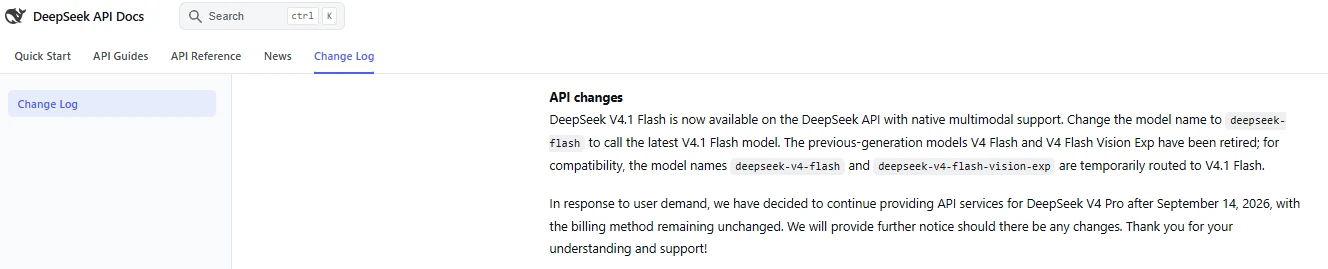
The identifiers deepseek-v4-flash and deepseek-v4-flash-vision-exp remain temporarily accepted for compatibility, but requests are served by V4.1 Flash. They do not select the original Flash or experimental vision checkpoints. DeepSeek documents this mapping in its API change log.
The same change log announced July 24, 2026 as the retirement date for deepseek-chat and deepseek-reasoner. They are not the primary identifiers in the current catalog. Do not reuse them as supposedly permanent selectors for V3 or R1.
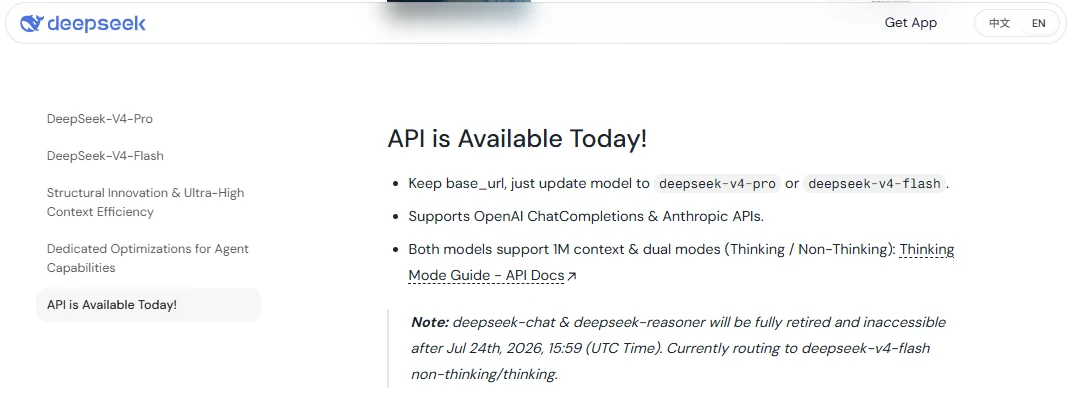
V4 Pro requires an additional clarification: an earlier announcement proposed redirecting its requests after September 14. The amended change log instead confirms continued V4 Pro API service. The current catalog lists it separately, so treating every Pro request as Flash would also be incorrect.
Thinking mode is a setting, not another model family
DeepSeek’s thinking-mode documentation describes controls for enabling reasoning and selecting low, high, or max effort. Thinking is enabled by default, with high effort. Changing these settings does not turn the current Flash model into the historical R1 checkpoint.
This distinction matters when comparing results. Record both the model and its reasoning configuration. A comparison that changes the model, effort level, output allowance, and available tools simultaneously cannot show which individual change caused a better result.
For the interface terminology and practical steps, see our DeepSeek DeepThink guide; record the model and thinking settings separately.
DeepSeek R1 and distilled models: the main downloadable reasoning options
DeepSeek-R1 is a specific reasoning-model release, not a generic name for every DeepSeek model that thinks before answering. Its original documentation reports 671B total parameters, with 37B activated per token. That full model is a substantially different deployment proposition from an 8B distilled model.
DeepSeek-R1-0528 is a later R1 checkpoint with updated post-training and reasoning behavior. Its weights remain publicly available. The presence of an older API link in a model card does not establish that the direct API still serves that exact checkpoint.
R1-Zero is primarily a research reference. The original R1 model card describes readability, repetition, and language-mixing problems in R1-Zero that motivated subsequent R1 development. It is not the obvious starting point for an everyday assistant.
Which smaller R1 models are available?
The original R1 release includes six dense models trained using R1-generated reasoning examples. A later Qwen3-based 8B model uses reasoning from R1-0528. The following table separates their underlying base models rather than grouping everything under “R1 8B” or “small R1.”
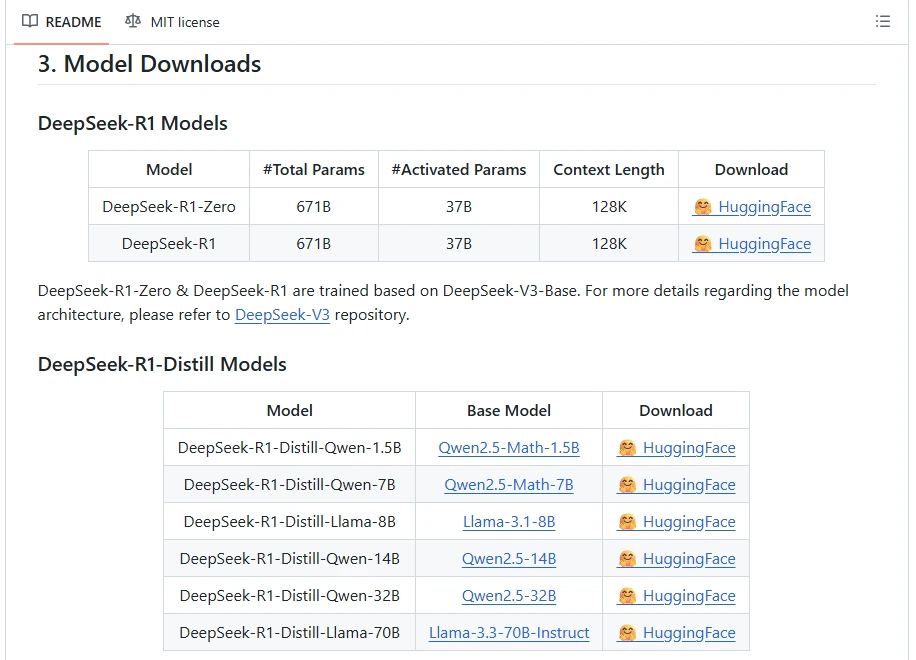
| Official checkpoint | Underlying base model | Reasoning source |
|---|---|---|
| DeepSeek-R1-Distill-Qwen-1.5B | Qwen2.5-Math-1.5B | Original R1 |
| DeepSeek-R1-Distill-Qwen-7B | Qwen2.5-Math-7B | Original R1 |
| DeepSeek-R1-Distill-Llama-8B | Llama-3.1-8B | Original R1 |
| DeepSeek-R1-Distill-Qwen-14B | Qwen2.5-14B | Original R1 |
| DeepSeek-R1-Distill-Qwen-32B | Qwen2.5-32B | Original R1 |
| DeepSeek-R1-Distill-Llama-70B | Llama-3.3-70B-Instruct | Original R1 |
| DeepSeek-R1-0528-Qwen3-8B | Qwen3-8B Base | R1-0528 |
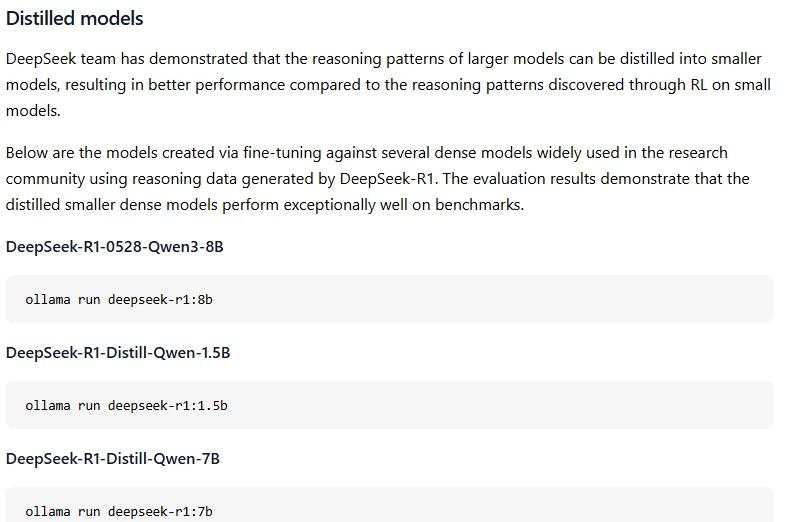
The two 8B entries are different checkpoints with different base models. In particular, the Ollama R1 library currently maps deepseek-r1:8b to the R1-0528 Qwen3 variant. Seeing “8B” in a tutorial is not enough to identify which model its author used.
Distillation and quantization solve different problems
Distillation trains a separate model using examples from another model. The R1 distills are not unchanged pieces of the full R1 network, and their teacher’s benchmark scores should not be assigned to them. DeepSeek’s release documentation describes their separate training and evaluation.
Quantization changes how numerical values are represented. A lower-precision version of an existing checkpoint can reduce memory requirements, with accuracy and compatibility trade-offs. The Transformers quantization documentation explains this distinction. A model can therefore be both distilled and quantized; those labels are not alternatives.
Specialist DeepSeek models beyond general chat
These selected specialist releases have official downloadable weights and task-specific documentation. They should not be treated as additional names that can automatically be passed to DeepSeek’s current general-purpose API.
| Family or representative checkpoint | Documented focus | Important distinction |
|---|---|---|
| DeepSeek-Coder-V2-Lite-Instruct | Code-oriented text generation and instruction following | A downloadable coding checkpoint, not proof that the older Coder family is the strongest current coding option |
| DeepSeek-VL2 | Visual question answering, document and chart understanding, and visual grounding | Image understanding should not be confused with image generation |
| Janus-Pro-7B | Multimodal understanding and image generation | Uses the Janus model workflow rather than turning the standard text API into an image generator |
| DeepSeek-OCR-2 | Document-image text extraction and conversion to Markdown | Designed around document processing, not a general-purpose image-creation task |
| DeepSeek-Math-V2 | Mathematical proof generation with model-based self-verification | A mathematical-reasoning workflow, not a guarantee that every generated proof is correct |
| DeepSeek-Prover-V2-7B | Formal theorem proving in Lean 4 | Targets a formal proof environment rather than only producing a persuasive explanation |
For example, asking questions about an uploaded chart fits the current Flash vision API. Producing an illustration belongs to a different capability: the Janus repository provides separate understanding and text-to-image workflows. Neither capability should be inferred merely from the word “multimodal.”
Likewise, extracting a scanned page into text and checking a formal proof require different evaluation criteria. For OCR, compare the extracted content and reading order with the original document. For Prover, check the generated proof in the intended Lean environment. A fluent-looking answer is not an adequate success criterion for either task.
Where V3, V2, and base checkpoints fit
The earlier DeepSeek LLM, V2, and V3-era releases remain relevant to research, existing deployments, and checkpoint-specific comparisons. Their repositories are historical model resources, not a reliable description of today’s consumer app or direct API menu.
Two transitions explain much of the naming confusion. V3.1 supports thinking and non-thinking behavior within one model. V3.2 includes a revised chat template and “thinking with tools” capability. Consequently, the old shortcut “V3 is for chat, R1 is for reasoning” does not describe the full progression of DeepSeek models.
Even superseded hosted releases can retain downloadable weights. The V4-Flash-0731 checkpoint, for example, remains an official download despite the current Flash API serving a newer release. Use the exact checkpoint when reproducing an older experiment rather than expecting a moving API alias to preserve it.
Base and instruction-tuned versions are different starting points
A base checkpoint is not interchangeable with its chat- or instruction-tuned counterpart. The Coder-V2 documentation illustrates this concretely: it provides Base examples for code completion and Instruct examples for conversational requests.
For ordinary assistant use, start by evaluating an instruction-tuned or chat release. For custom training or a research reproduction, inspect the specified base checkpoint and its training assumptions. Downloading a model labeled “Base” simply because its name resembles the chat model can give you a different behavior than expected.
How to choose a DeepSeek model for your task
For everyday conversations, choose the access route first
For manual writing, explanations, and general questions, the official web service or consumer app avoids the need to manage inference hardware. The app page advertises free chat access. That does not make API consumption or every separate DeepSeek product free.
Use a downloadable checkpoint instead when controlling the particular weights is part of the requirement. A consumer interface is not the best basis for a reproducibility claim when its backend version has not been independently identified.
For APIs, coding, and agents, evaluate completed tasks
For a new application that needs both text and image input, deepseek-flash is the relevant current candidate because its documented vision interface accepts images. For text-only workloads, compare Flash and Pro using representative tasks rather than choosing Pro by name alone.
For coding, judge whether the output passes your tests and respects the surrounding project—not merely whether the explanation sounds convincing. For an existing Pro integration, compare a proposed replacement against the prompts, tool definitions, and acceptance checks that the application already uses.
A model generating a tool call is not the same as an application executing it. DeepSeek’s tool-calling guide describes a workflow in which the application handles the requested function and returns its result. Model selection must therefore include the tool runtime and failure handling, not only the model’s name.
For a concrete coding-client setup, see how to use DeepSeek with OpenCode, then evaluate the selected model on a small repository task.
For structured responses, check the required guarantee. The documented JSON Output mode targets valid JSON. That alone does not establish that every field satisfies your application’s schema or contains correct information. Validate the response before passing it to another system.
For local experimentation, shortlist smaller checkpoints
For a first local reasoning experiment, the 1.5B R1 distill and R1-0528 Qwen3 8B are sensible candidates to investigate before committing to full-scale R1 or V4 weights. This is a recommendation based on their smaller scope, not a promise that either fits every computer.
Check your runtime’s support for the exact checkpoint and quantization, then evaluate the model with the context you actually need. Record usable response speed and correctness on your own tasks. A model that loads successfully but needs unacceptable time or repeatedly fails those tasks is not a successful deployment.
Make the comparison small enough to repeat
Build a short evaluation set from your real workflow: a code change with tests, a document question with a known answer, a required output format, or a task that needs several tool steps. Keep the task instructions and success criteria consistent, while using each model’s required message formatting.
Record the exact model, reasoning settings, correctness, latency, usage, and retries. For local models, also record the quantization and runtime configuration. This gives you a defensible shortlist without pretending that one benchmark score identifies a universal winner.
Read model specifications without confusing size, memory, and context
Active parameters are not the complete model
A mixture-of-experts model uses selected parts of its network for a token rather than activating all parameters. The V4.1 Flash model card reports 552B backbone parameters, with 8B active during input processing and 16B during decoding. Those numbers describe different aspects of the architecture.
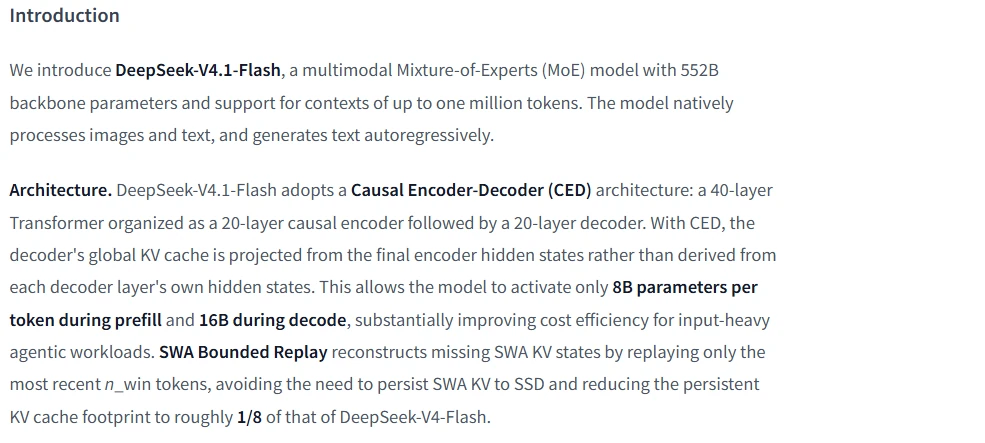
It would be misleading to call that model an “8B model” and equate its storage needs with an 8B R1 distill. An active-parameter count is not a complete weight-memory budget. Likewise, a backbone count and a model repository’s file-derived parameter total should not be substituted for one another without checking their scope.
For deployment planning, inspect the actual weight format and runtime requirements. Quantization support varies by method and hardware, and reduced weight precision does not eliminate the memory needed for the rest of the inference workload.
Context capacity is different from output length
DeepSeek’s model metadata documentation defines the context window as the combined capacity for input and output, while max_output_tokens describes the server’s output ceiling. A 1M context window therefore does not mean you can submit 1M input tokens and then add the maximum output on top.
Local settings introduce another limit. A runtime may allocate less context than the checkpoint’s advertised capacity. Ollama’s context documentation explains that increasing allocated context increases memory requirements and shows how to inspect the allocation with ollama ps.
Treat a long context window as capacity to evaluate, not proof of perfect recall. Test whether the model can retrieve and correctly use the information your task depends on, especially when that information is buried among irrelevant material.
Are DeepSeek models open source and free to use?
Many DeepSeek releases provide downloadable weights, but licensing must be checked per release. The current V4.1 Flash and V4 Pro-0813 repositories provide MIT license files. DeepSeek-Math-V2 uses Apache 2.0 instead.
Do not check only the code license. Coder-V2 distinguishes its MIT-licensed code from the separate model license, which includes use conditions. A repository’s headline badge is not a substitute for reading the terms attached to its weights.
The R1 licensing notes also identify the Qwen and Llama parent models used by the distills and point to their original licenses. Check the applicable release and parent-model terms before redistribution or commercial deployment rather than treating every DeepSeek-related download as identically licensed.
“Open-weight” also does not mean free hosted inference. DeepSeek’s direct API charges by token usage, while self-hosting requires hardware or rented compute, storage, and operation. Downloading the parameters is a different decision from paying to run them.
How to verify the exact DeepSeek model you are using
For the direct API: check the current catalog and the documented GET /models endpoint. Its metadata can describe identifiers, display names, modalities, context, output limits, and effort settings. A documentation example is not a live response from your account, and an accepted alias is not necessarily a version-pinned checkpoint.
For a third-party service: inspect that provider’s exact listing and routing rules. OpenRouter’s DeepSeek catalog, for example, includes its own “Latest” aliases and multiple releases. Its menu is not evidence that the same identifiers are available on DeepSeek’s direct endpoint.
For downloaded weights: start from the official publisher collection, then record the exact repository and revision, tokenizer, configuration, quantization, and runtime version. When using a community conversion, retain its original-model reference as well as the conversion’s own identity.
Keep that record alongside your evaluation results. “DeepSeek” identifies the ecosystem; the checkpoint or endpoint, configuration, and access route identify the model setup you can meaningfully compare, reproduce, and maintain.