
Can DeepSeek generate images? Not through the standard DeepSeek chat app or its current first-party API in the same way that a consumer image generator turns a prompt into a downloadable picture. The official app supports visual understanding and image uploads, while the current API returns text output. DeepSeek has, however, released a separate open-weight model family called Janus that includes text-to-image generation. Ordinary users therefore need a Janus demo, a local Janus installation, or a third-party host rather than the normal DeepSeek chat box.
Independent-site disclosure: This is an independent guide and is not affiliated with DeepSeek.
Last verified: October 9, 2026. DeepSeek can change its app, models and API capabilities. Recheck the current official interface and documentation before relying on a workflow described here.
Testing note: No image was generated during preparation of this article. Product-status statements are based on current first-party documentation, the official application listing and DeepSeek’s official Janus repository. No output, timing, hardware result or quality score has been fabricated.
The answer depends on which DeepSeek route you mean
| DeepSeek route | Can understand images? | Can generate a new image file? | Best use | Main limitation |
|---|---|---|---|---|
| Official DeepSeek app or web chat | Yes, through current vision features | No native text-to-image feature was confirmed in current official product documentation | Describe photos, read screenshots, inspect charts and write prompts | Uploading an image does not mean the app can create one |
| First-party DeepSeek API | Yes, with the current vision-capable model | No; current models list text as their output modality | Image analysis inside applications | No first-party image-generation endpoint is currently documented |
| Janus-Pro | Yes | Yes | Local experiments with unified image understanding and text-to-image generation | Separate model and workflow; not built into ordinary DeepSeek Chat |
| Official Janus Hugging Face demo | Depending on the active demo mode | Yes, when the generation demo is available | Trying Janus without building a full local interface | Availability, queues and hardware can change |
| Third-party Janus host | Depends on the provider | Usually, if that provider exposes generation | A hosted alternative to local installation | Uses the provider’s own pricing, privacy rules and serving configuration |
| DeepSeek as a prompt writer | Not required | No | Creating a detailed prompt for another image generator | The other model—not DeepSeek—creates the final image |
The most important distinction is between image understanding and image generation. DeepSeek’s current flagship service can inspect an existing image and answer with text. Janus-Pro can convert a text prompt into visual tokens and save a new image.
Can the official DeepSeek app generate images?
A native text-to-image feature could not be confirmed in the current official DeepSeek app documentation. The official DeepSeek App Store listing documents vision mode and improvements to image and file uploads. Its product description presents the application as an AI assistant powered by DeepSeek’s flagship model, but it does not advertise a text-to-image generator.
This means an ordinary prompt such as “Create a watercolor image of a lighthouse” should not be assumed to return a PNG, JPEG or other generated picture in the official chat. DeepSeek may instead:
- Describe how the image could look.
- Write a detailed prompt for another image model.
- Produce SVG, HTML, CSS or Python code that another program renders.
- Analyze an image that you upload.
- Return a link or tool result when an external service is connected.
None of those outcomes proves that the DeepSeek chat model natively synthesized the raster image. A browser-rendered SVG, an HTML canvas, a screenshot of a conversation or an externally hosted picture is not the same as native text-to-image generation.
Can the DeepSeek API generate images?
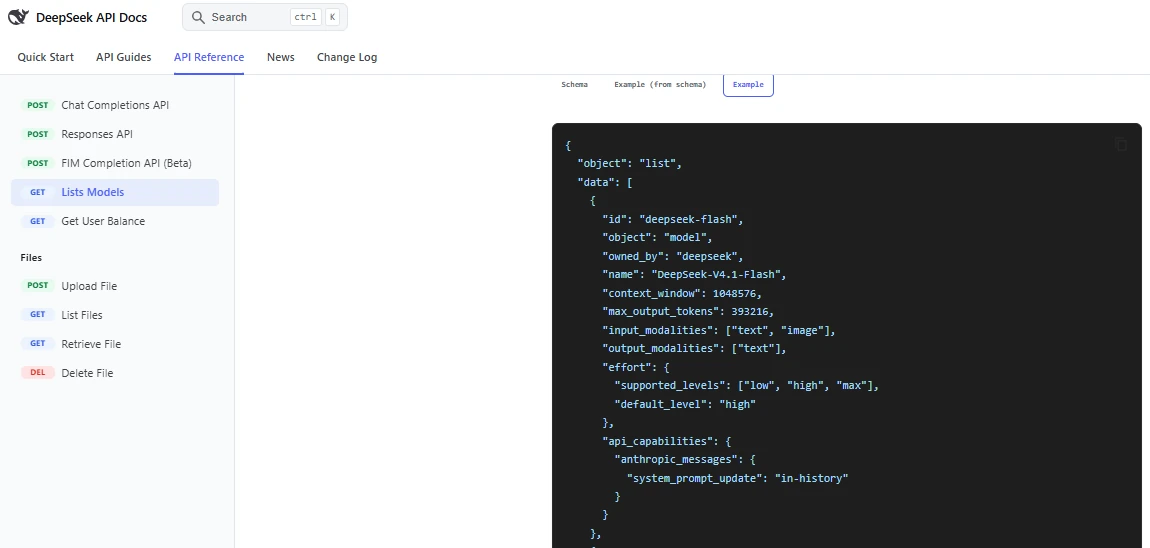
The current first-party API does not document an image-generation model or an Images-style endpoint. The official DeepSeek model-list reference defines current output modalities as text. The vision-capable deepseek-flash model accepts images as input, but returns textual analysis rather than image bytes, a base64 image or a generated-image URL.
| API action | Currently documented? | What it produces |
|---|---|---|
| Upload or reference an image for analysis | Yes, with the applicable vision-capable route | Text describing or answering questions about the image |
| Read screenshot text | Yes | Extracted or interpreted text |
| Analyze a chart | Yes | A textual explanation or extracted values |
| Generate a PNG or JPEG from a prompt | No current first-party endpoint was confirmed | Not available through the documented chat models |
| Edit an uploaded photo and return a modified image | No current first-party editing endpoint was confirmed | Not available through the documented chat models |
| Return image output through Responses API | No current image output modality was confirmed | Text output |
The official DeepSeek vision guide describes tasks such as identifying objects, reading screenshots and analyzing charts. These are visual-understanding tasks. They do not establish text-to-image generation.
Practical rule: an API model with
imagein its input modalities can inspect images. It can generate images only when its output modalities and API reference explicitly document image output.
What is DeepSeek Janus-Pro?
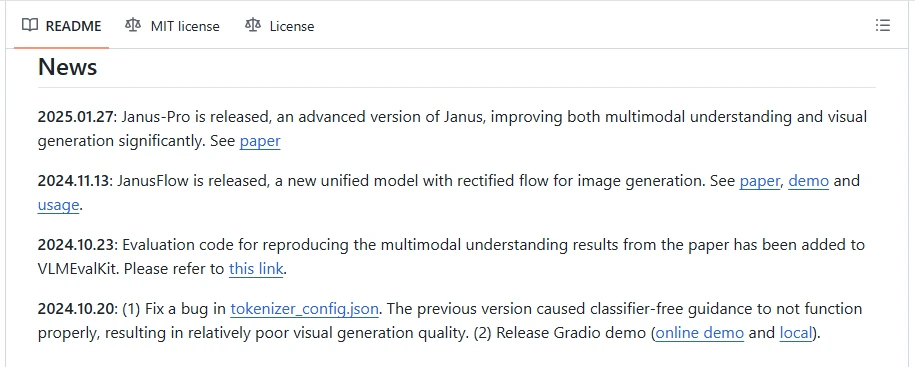
Janus is a separate DeepSeek research and open-weight model family designed to combine multimodal understanding with visual generation. The official repository lists four principal checkpoints:
Janus-1.3BJanusFlow-1.3BJanus-Pro-1BJanus-Pro-7B
DeepSeek released Janus-Pro on January 27, 2025. The repository describes it as an improvement over the original Janus in multimodal understanding, text-to-image instruction following and generation stability. Its News section still lists Janus-Pro as the latest Janus-family release, so it should be understood as a separate 2025 open-weight research route rather than a newly integrated 2026 DeepSeek Chat feature.
| Feature | Janus-Pro status | Important qualification |
|---|---|---|
| Image understanding | Supported | Uses a separate understanding pathway |
| Text-to-image generation | Supported | Requires the model, demo or a host that exposes generation |
| Official sizes | 1B and 7B | The larger model requires more memory and compute |
| Reference output size | 384 × 384 | The official generation code is configured for this size; do not assume arbitrary high-resolution output |
| Consumer app integration | Not confirmed | Janus-Pro is not documented as a normal DeepSeek Chat mode |
| First-party image API | Not confirmed | The normal DeepSeek Platform currently lists text-output models |
| Official online demo | Linked from the repository | Availability and queue time can vary |
| Local demo | Provided | The reference workflow assumes a suitable Python and CUDA environment |
The official Janus-Pro-7B model card confirms that the model unifies understanding and generation. The repository’s reference function sets img_size=384 and saves generated samples as JPEG files.
How to try Janus-Pro without confusing it with DeepSeek Chat
Option 1: use the official linked Hugging Face demo
The Janus repository links to an official Janus-Pro-7B Hugging Face Space. When the Space is active, it provides the simplest way to experiment without installing the complete project locally.
- Open the demo linked from the official Janus repository rather than a similarly named independent website.
- Check that the owner is
deepseek-ai. - Read any current usage, queue and privacy notice shown by Hugging Face.
- Select the generation workflow if the current Space exposes more than one mode.
- Enter a concise prompt with one clear subject, setting, composition and style.
- Generate the first result without repeatedly changing settings.
- Download the original file and inspect its dimensions and format.
- Do not upload private or confidential images unless the current Space policy is acceptable for that content.
A hosted demo may be sleeping, unavailable or queued. That is a hosting condition, not evidence that the Janus model has lost its generation capability.
Option 2: run the official Janus-Pro demo locally
The official repository documents Python 3.8 or later and supplies a Gradio application for Janus-Pro. Its reference code loads the model with PyTorch, converts it to bfloat16, moves it to CUDA and saves generated JPEG files.
git clone https://github.com/deepseek-ai/Janus.git
cd Janus

python -m venv .venv

# macOS or Linux
source .venv/bin/activate

# Windows PowerShell
# .\.venv\Scripts\Activate.ps1

python -m pip install --upgrade pip
pip install -e ".[gradio]"

python demo/app_januspro.py
These commands follow the project’s official demo path, but they were not executed for this article. Before running them:
- Review the repository and its dependency files.
- Use an isolated virtual environment.
- Confirm that your PyTorch installation supports the intended GPU.
- Confirm available GPU memory and system memory.
- Start with the smaller
Janus-Pro-1Bonly when the demo or code is configured to load that checkpoint. - Do not publish one universal VRAM requirement without testing the exact checkpoint, precision, batch size and runtime.
The official reference implementation generates multiple candidates in parallel by default. Parallel generation increases memory use. Reducing the number of simultaneous samples can lower memory pressure, but any code change should be tested rather than presented as an official hardware guarantee.
Can Janus-Pro generate high-resolution images?
The official Janus-Pro reference code is configured for 384 × 384 output. This is much smaller than the native output commonly expected from current dedicated consumer image generators.
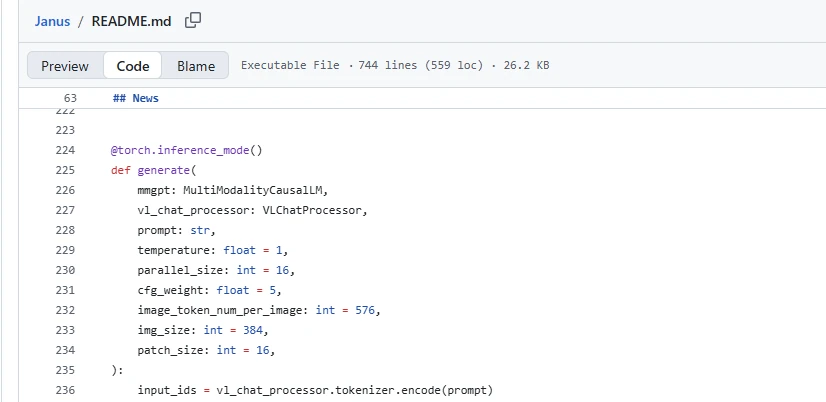
Changing img_size from 384 to 1024 does not prove that the model supports native 1024-pixel generation. Model tokenization, decoder dimensions and training resolution can impose architectural constraints. A third-party service may show a larger file because it:
- Upscaled the generated image.
- Used a community-modified pipeline.
- Applied post-processing.
- Used another model after Janus.
- Displayed a browser-scaled preview rather than the original file.
When resolution matters, inspect the downloaded original and record its width, height, format and whether an upscaler was used.
Can DeepSeek edit an existing image?
No current first-party consumer editing workflow or hosted image-editing endpoint was confirmed. The official Janus-Pro reference generation example is text-to-image: it creates an image from a text prompt. It does not document a consumer-style editor for inpainting, object removal, background replacement or iterative photo modification.
A third-party application may offer image editing while also advertising DeepSeek. Before attributing the edit to DeepSeek, identify the model that actually returned the modified pixels. The application may be using Flux, Stable Diffusion, DALL-E, another proprietary model or a custom Janus derivative.
Image understanding is not image generation
| Task | What happens | Does it create a new raster image? |
|---|---|---|
| Describe an uploaded photo | The model analyzes the image and returns text. | No |
| Read text from a screenshot | The model interprets visible content and returns text. | No |
| Analyze a chart | The model explains or extracts values. | No |
| Write an SVG | The model returns code that a browser renders. | No native raster generation |
| Write a Midjourney prompt | The model provides instructions for another generator. | No |
| Call an external image tool | The connected tool generates the image. | Yes, but the external tool is the generator |
| Run Janus-Pro text-to-image | Janus produces visual tokens that are decoded and saved as an image. | Yes |
This distinction is especially important when reviewing videos or screenshots that claim “DeepSeek generated this image.” The demonstration may show DeepSeek writing a prompt, a custom application invoking another service, or a Janus model running separately from the official app.
For the image-to-text API workflow, follow our DeepSeek Vision API tutorial.
Use DeepSeek to write a prompt for another image generator
For many users, the easiest practical workflow is to use standard DeepSeek Chat as a visual prompt writer, then send the prompt to a dedicated image generator. This does not make DeepSeek the image generator, but it can make the workflow more structured.
Reusable prompt for DeepSeek
Create a production-ready text-to-image prompt for [TARGET IMAGE MODEL].

Goal:
[Describe the final image and where it will be used.]

Subject:
[Main subject, number of subjects, pose or action.]

Environment:
[Location, background and time of day.]

Composition:
[Camera angle, framing, subject position and aspect ratio.]

Lighting:
[Light direction, quality, contrast and mood.]

Visual style:
[Photographic, illustration, 3D, editorial, watercolor or another style.]

Colors and materials:
[Palette, textures, clothing and surfaces.]

Exact visible text:
"[Insert text exactly, or write: no visible text.]"

Must include:
[List essential objects or attributes.]

Must avoid:
[List unwanted objects, errors, logos, styles or visual artifacts.]

Return:
1. One concise final prompt.
2. One negative prompt if the target model supports it.
3. A short checklist for verifying the generated image.
Tell DeepSeek which generator you will use because different products support different prompt syntax, reference images, negative prompts, seeds, aspect ratios and editing operations.
How to identify unofficial “DeepSeek Image Generator” websites
A website is not official merely because “DeepSeek” appears in its domain, title or logo. DeepSeek’s verified routes are linked from official properties such as deepseek.com, the official DeepSeek GitHub organization and the official DeepSeek Hugging Face organization.
Check these points before uploading a prompt or photo
- Ownership: Is the site linked from an official DeepSeek property?
- Affiliation: Does its footer state that it is independent or unaffiliated?
- Model: Does it name the exact checkpoint that generates the image?
- Provider: Is Janus running on the site, or is another model doing the generation?
- Pricing: Who receives the payment and what does each credit buy?
- Privacy: Are prompts, uploads and outputs retained or used for training?
- Deletion: Can uploaded and generated files be removed?
- Output: What dimensions, formats and watermarks are provided?
- Rights: Which terms govern commercial use?
- Security: Does the service require a copied DeepSeek session token or another unsafe credential?
Never copy an authentication token from the official DeepSeek application into an unrelated site. A legitimate third-party provider should use its own account and documented authentication system.
Janus-Pro limitations to consider
- Separate workflow: It is not a normal mode in DeepSeek Chat.
- Older research release: Janus-Pro was released in January 2025, and the repository does not currently list a later Janus-Pro generation.
- Reference resolution: The official generation example uses
384 × 384. - Setup: Local use requires Python, model files, compatible libraries and suitable compute.
- Hardware uncertainty: The official project does not provide one universal VRAM figure for every checkpoint, batch and environment.
- Editing: The official text-to-image reference is not a complete consumer image-editing suite.
- Text accuracy: Do not assume exact typography, numbers, logos or labels without testing them.
- Identity consistency: Do not assume stable faces or products across multiple images without a controlled test.
- Hosting differences: Third-party services may change sampling, quantization, prompts, filters or post-processing.
- No universal quality verdict: Vendor benchmarks do not prove that Janus-Pro is better than every current dedicated generator.
Janus-Pro is best treated as an interesting open-weight multimodal research model and experimentation route—not automatically as a polished replacement for a modern consumer image platform.
Is Janus-Pro free and can it be used commercially?
The Janus repository and model weights can be downloaded without a per-image DeepSeek API charge. That does not make the complete workflow cost-free. Local use may require:
- GPU or cloud-compute capacity
- System memory and storage
- Electricity
- Engineering and maintenance
- Monitoring and security
- Upscaling or editing tools
The official repository states that its code is licensed under MIT, while use of the model is governed by the separate DeepSeek Model License. The repository says commercial usage is permitted under those terms.
The model license permits broad model use but includes use-based restrictions. It also states that DeepSeek generally claims no rights in generated output while making the user responsible for that output and its subsequent use. The license does not guarantee non-infringement, ownership, merchantability or suitability for a particular commercial project.
Commercial permission under a model license does not automatically clear a generated image’s copyrighted characters, trademarks, logos, personal likenesses, training-data issues or rights of publicity.
Privacy and safety considerations
The current DeepSeek Privacy Policy says the consumer service can collect prompts, uploaded files, photos, voice input and chat history. It also says user interactions may be used to improve and train DeepSeek technology and that personal data is directly processed and stored in the People’s Republic of China.
Local Janus inference can reduce the need to send prompts and images to a hosted generator, but “local” is not automatically “offline” or “private.” The setup may still use the network for:
- Downloading model weights and dependencies
- Software updates
- Telemetry from an interface or extension
- Remote storage
- External upscaling
- Connected web tools
- Cloud fallbacks
For any route:
- Do not upload confidential photos without authorization.
- Remove unnecessary metadata from sensitive images.
- Obtain consent before using images of private individuals.
- Do not create deceptive, intimate or harmful images of real people.
- Verify generated medical, legal, engineering and evidentiary visuals with qualified experts.
- Review the third-party host’s policy rather than assuming DeepSeek’s policy applies.
- Label AI-generated content where law, platform policy or context requires it.
Which route should you use?
| Your goal | Best starting route | Why |
|---|---|---|
| Understand an existing photo, chart or screenshot | Official DeepSeek app or deepseek-flash API | These routes support visual understanding and text responses. |
| Create an image with a simple consumer interface | A dedicated current image generator | It will usually provide higher resolution, easier editing and clearer export controls. |
| Experiment specifically with DeepSeek’s own generation research | Janus-Pro official demo or local repository | This is the verified DeepSeek-developed text-to-image route. |
| Keep inference under your control | Local Janus-Pro installation | Prompts and outputs can remain on infrastructure you manage. |
| Avoid local setup | A clearly identified Janus third-party host | The provider handles the compute. |
| Improve a prompt for another generator | Ordinary DeepSeek Chat | DeepSeek can structure the subject, composition, lighting and restrictions. |
| Create high-resolution commercial design assets | A dedicated generator plus a design editor | Janus-Pro’s official reference output and editing workflow are comparatively limited. |
Choose Janus because you specifically want to test a DeepSeek open-weight visual model. Choose a dedicated image product when the important requirements are high resolution, reliable typography, inpainting, outpainting, transparent backgrounds, product consistency, identity preservation or an easy iterative editing experience.
Frequently asked questions
Can DeepSeek Chat create a picture from a prompt?
No native text-to-image workflow was confirmed in the current official DeepSeek chat product. It can analyze images and write prompts, but that is different from returning a newly generated PNG or JPEG.
Can the DeepSeek API return an image?
The current first-party model metadata lists text as the output modality. deepseek-flash can accept images for analysis, but the documented API returns text rather than generated image files.
Can DeepSeek R1 generate images?
R1 should not be confused with Janus. No native R1 text-to-image route is documented. Claims that “DeepSeek R1 generated an image” often involve an external image tool or a separate Janus model.
Can DeepSeek V4 or V4.1 generate images?
DeepSeek-V4.1-Flash provides native visual understanding, which means it can inspect images. The current API documentation still lists text output, so visual understanding should not be described as native image generation.
What is Janus-Pro?
Janus-Pro is an official DeepSeek open-weight multimodal model that combines image understanding with text-to-image generation. It is separate from ordinary DeepSeek Chat and the current hosted chat API.
Is Janus-Pro part of the normal DeepSeek app?
No current first-party documentation confirms that Janus-Pro is integrated as a normal image-generation mode in the official DeepSeek app.
What resolution does Janus-Pro generate?
The official reference generation code is configured for 384 × 384 images. A larger file from a third-party host may be upscaled or produced by a modified pipeline.
Can Janus-Pro edit an existing image?
The official reference workflow documents text-to-image generation and multimodal understanding. A consumer-style editing workflow for inpainting, object removal or background replacement was not confirmed.
Is there an official Janus-Pro online demo?
Yes. The official Janus repository links to a DeepSeek-owned Hugging Face Space. The Space may be queued, sleeping or temporarily unavailable depending on hosting conditions.
Is Janus-Pro free?
The official weights can be downloaded without a per-image DeepSeek API fee, but local or hosted generation still consumes hardware, cloud compute, storage, electricity and maintenance resources.
Can Janus-Pro be used commercially?
The official repository says commercial use is permitted under the DeepSeek Model License. Users must comply with its use restrictions and remain responsible for the generated output, intellectual-property issues, personal information and applicable law.
Are websites called “DeepSeek Image Generator” official?
Not necessarily. Treat a site as third-party unless it is controlled by DeepSeek or linked from an official DeepSeek property. Review its actual model, company, pricing, privacy policy and output terms.
Can DeepSeek help with image prompts?
Yes. Ordinary DeepSeek Chat can turn a concept into a structured prompt for Janus, Midjourney, Stable Diffusion, Flux, DALL-E or another image model. The selected image model—not DeepSeek Chat—creates the final visual.
Sources checked
The following first-party sources were checked on October 9, 2026:
- Official DeepSeek website
- Official DeepSeek App Store listing and version history
- DeepSeek-V4.1-Flash release announcement
- DeepSeek API model metadata and output modalities
- DeepSeek API vision guide
- Official DeepSeek Janus repository
- Official Janus-Pro-7B model card
- Official Janus-Pro-1B model card
- Official Janus-Pro Hugging Face demo
- DeepSeek Model License
- DeepSeek Privacy Policy