
DeepSeek API is DeepSeek’s first-party developer service for calling its hosted models from applications, scripts, and agent tools. The current official route supports OpenAI-compatible Chat Completions and Responses formats plus an Anthropic-compatible Messages format. The quickest supported starting path is to create a key on the DeepSeek Platform, use the OpenAI Python library with base_url="https://api.deepseek.com", and select a current model such as deepseek-flash. Compatibility is broad rather than identical: model names, supported parameters, streaming events, tools, files, and conversation state still require DeepSeek-specific checks.
Independent-site disclosure: This is an independent guide and is not affiliated with DeepSeek.
Last verified: October 9, 2026. Model aliases, prices, limits, and compatibility details are volatile. Recheck the linked official documentation before deploying or estimating production costs.
Testing note: The code below was checked against the current official documentation but was not executed with a funded DeepSeek API account during preparation. No response, latency, token usage, or request ID has been fabricated.
DeepSeek API at a glance
| Decision | Recommended starting route | Why | Main limitation |
|---|---|---|---|
| First text request | OpenAI-compatible Chat Completions with deepseek-flash | Simple SDK migration, low current price, thinking toggle, tools, JSON, and optional image input | OpenAI compatibility does not make every OpenAI parameter or built-in tool available. |
| OpenAI Responses client or Codex | DeepSeek Responses API | Uses the current Responses object and event format | It is stateless and does not support stored conversations or most OpenAI built-in tools. |
| Claude Code or Anthropic SDK | Anthropic-compatible endpoint | Uses the Messages API shape through a DeepSeek Base URL | Some Anthropic parameters are unsupported or ignored. |
| Image understanding | deepseek-flash | Accepts JPEG, PNG, GIF, and WebP inputs | It returns text; it is not an image-generation API. |
| Higher-cost text and agent work | Evaluate deepseek-v4-pro | Current premium first-party route | No vision support; test whether it improves your real task enough to justify the higher cost. |
| PDF or DOCX ingestion | Parse the document in your application, then send extracted content | The current first-party Files API is image-oriented | Do not treat the Files API as a generic document or RAG service. |
| Current web information | Use Pro’s Responses web_search, the standalone Search/Fetch APIs, or your own search function | Select the documented retrieval route and preserve source URLs and dates | Built-in web_search is supported with deepseek-v4-pro and ignored with deepseek-flash; standalone retrieval has separate billing. |
| Maximum control or offline use | Evaluate an official open-weight checkpoint locally | Infrastructure and data flow remain under your control | Local deployment has hardware, engineering, security, and maintenance costs. |
Use the official route, not a lookalike API
The first-party developer documentation is hosted at the DeepSeek API documentation site, and keys are created on the DeepSeek Platform. The OpenAI-compatible Base URL is https://api.deepseek.com; the Anthropic-compatible Base URL is https://api.deepseek.com/anthropic.
| Route | Credential and billing | Best for | Do not assume |
|---|---|---|---|
| DeepSeek consumer chat | Consumer account and consumer-service limits | Interactive use in the official web or mobile product | Free chat access includes API balance or production rights. |
| First-party DeepSeek API | DeepSeek Platform key and platform balance | Applications, scripts, agents, and server-side integrations | A third-party model ID, key, price, or data policy applies. |
| Third-party provider | That provider’s key, endpoint, account, and billing | Alternative regions, routing, consolidated billing, or provider-specific tools | The deployment matches DeepSeek’s first-party serving stack. |
| Local open-weight model | No first-party per-token bill; local or cloud infrastructure costs apply | Self-managed inference and customized deployment | The local checkpoint behaves exactly like the hosted API or includes hosted tools. |
The Open Platform and consumer chat currently use the same account, but the billing routes remain distinct. A consumer conversation does not create API credit automatically. The platform can deduct usage from granted balance or topped-up balance; any current promotion or free balance is account-specific and should be confirmed in the live console.
Current DeepSeek API models
The live Models & Pricing page currently lists two first-party model IDs. Both support thinking and non-thinking modes, a one-million-token context window, a maximum output of 384K tokens, JSON Output, Tool Calls, Responses API, and the Anthropic-compatible API.
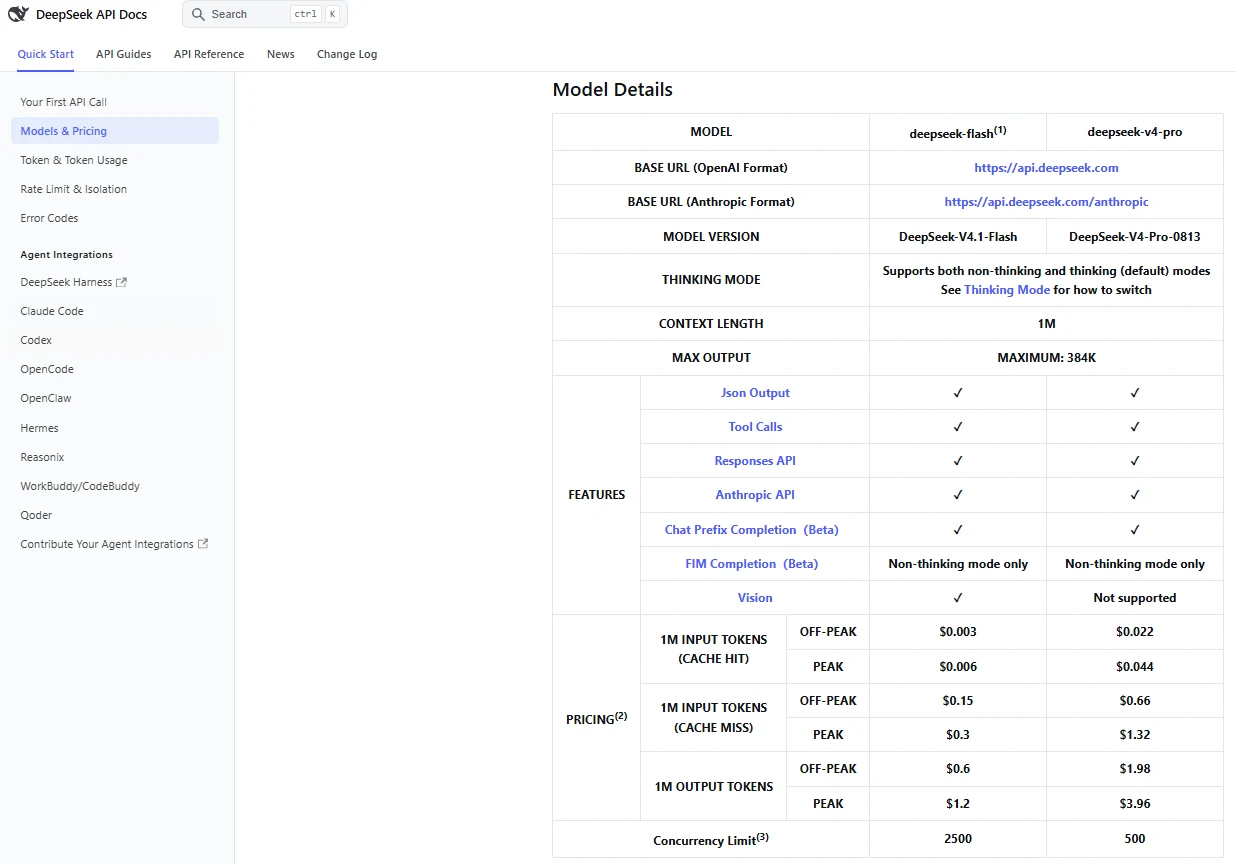
| Model ID | Current mapped version | Key capabilities | Best starting use |
|---|---|---|---|
deepseek-flash | DeepSeek-V4.1-Flash | Text and image input; thinking and non-thinking; tools; JSON; Responses; Anthropic; 1M context; 384K maximum output | Most applications, vision tasks, high-throughput processing, agents, and cost-sensitive workloads |
deepseek-v4-pro | DeepSeek-V4-Pro-0813 | Text input; thinking and non-thinking; tools; JSON; Responses; Anthropic; 1M context; 384K maximum output | Text-only workflows needing built-in Responses web search, or workloads where a matched evaluation justifies its higher price |
Older tutorials commonly use deepseek-chat and deepseek-reasoner. DeepSeek’s V4 release documentation states that those IDs were retired in July 2026. The legacy names deepseek-v4-flash and deepseek-v4-flash-vision-exp may still be accepted temporarily, but their original models are retired and requests route to the current Flash model. New integrations should use the current IDs returned by GET /models.
Model-selection rule: begin with
deepseek-flashfor cost-sensitive text and vision work, then evaluate results on representative tasks. Choosedeepseek-v4-prowhen you need its built-in Responses web search or when measured task quality justifies its higher token rates and lack of image input.
How to get a DeepSeek API key safely
- Open the official DeepSeek Platform and sign in with the account you use for DeepSeek services.
- Open the API key area and create a new key.
- Copy the key once and store it in a password manager or secrets manager. Do not place it in a public note or screenshot.
- Check the live balance or billing screen. The current service can require prepaid balance, and a request can fail with HTTP
402when balance is insufficient. - For a quick local test, expose the key as a shell environment variable. For production, use a server-side secrets manager and a rotation process.
- Revoke and replace a key immediately if it appears in source control, logs, client-side code, screenshots, or a public issue.
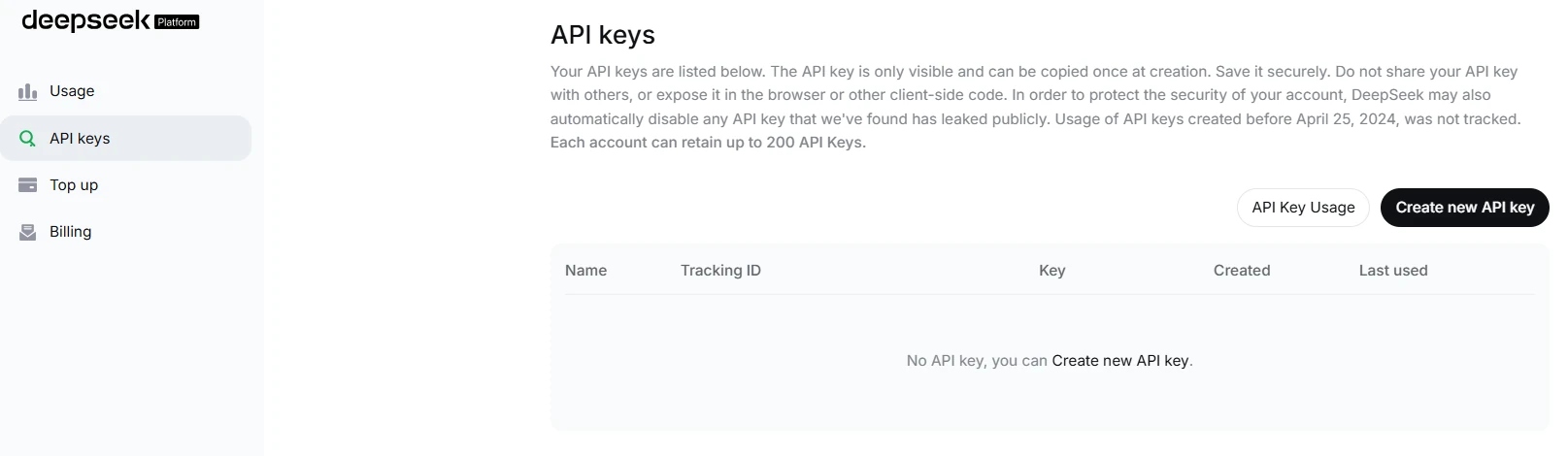
Never place a permanent DeepSeek key in browser JavaScript, a mobile application bundle, a public repository, or code sent to an end user. The Open Platform terms make the account holder responsible for charges caused by a leaked key.
Make your first DeepSeek API request with Python
This example uses the first-party DeepSeek endpoint, the current OpenAI-compatible Chat Completions protocol, the OpenAI Python package, and the deepseek-flash model. It disables thinking for a short, predictable first request and prints the provider’s usage object when available.
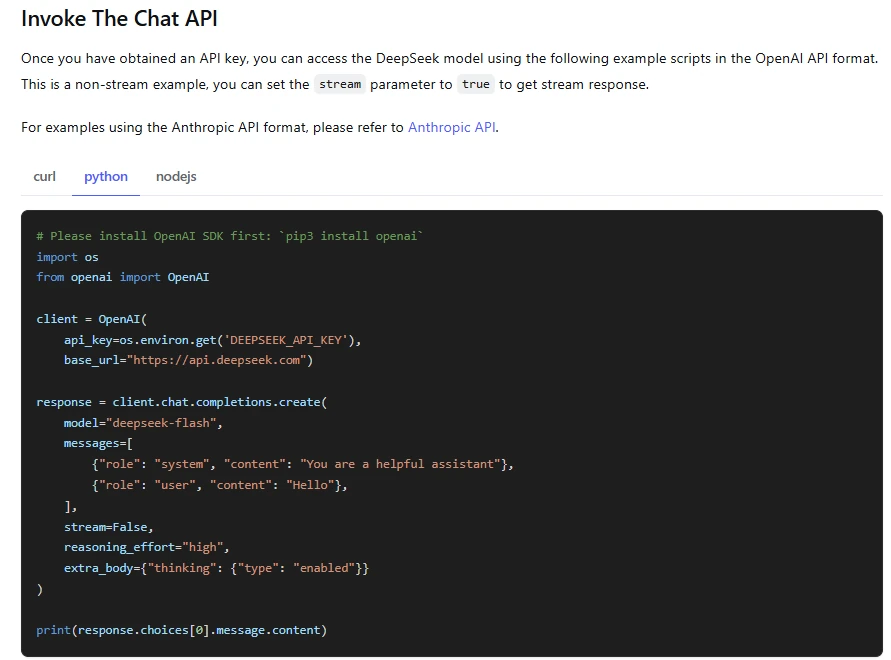
1. Install the client library
python -m pip install --upgrade openai2. Set the key for the current shell
# macOS or Linux
export DEEPSEEK_API_KEY="sk-use-a-fake-placeholder-here"

# Windows PowerShell
$env:DEEPSEEK_API_KEY="sk-use-a-fake-placeholder-here"
Replace the placeholder only in your private shell or secret manager. Do not paste the real key into the Python file.
3. Send a non-thinking Chat Completions request
import os
import sys

from openai import APIConnectionError, APIStatusError, OpenAI

api_key = os.getenv("DEEPSEEK_API_KEY")
if not api_key:
    raise SystemExit("Set DEEPSEEK_API_KEY before running this script.")

client = OpenAI(
    api_key=api_key,
    base_url="https://api.deepseek.com",
    timeout=60.0,
)

try:
    response = client.chat.completions.create(
        model="deepseek-flash",
        messages=[
            {
                "role": "system",
                "content": "Answer accurately and concisely.",
            },
            {
                "role": "user",
                "content": "Explain context caching in three bullet points.",
            },
        ],
        max_tokens=500,
        extra_body={"thinking": {"type": "disabled"}},
    )
except APIStatusError as exc:
    print(
        f"DeepSeek returned HTTP {exc.status_code}: {exc.response.text}",
        file=sys.stderr,
    )
    raise SystemExit(1)
except APIConnectionError as exc:
    print(f"Connection error: {exc}", file=sys.stderr)
    raise SystemExit(1)

print(response.choices[0].message.content)

if response.usage is not None:
    print(response.usage.model_dump())
Save the file as deepseek_first_request.py, then run python deepseek_first_request.py. Success means the request returns a final assistant message and does not raise an authentication, balance, parameter, or connection error. The exact wording, token counts, and latency will vary.
Chat Completions, Responses, or Anthropic Messages?
| Protocol | Use it when | Current behavior to know |
|---|---|---|
OpenAI-compatible Chat CompletionsPOST /chat/completions | You want the simplest general integration or are migrating an existing Chat Completions client. | Stateless; your application sends conversation history. Streaming ends with data: [DONE]. Supports functions, JSON Output, and Flash image inputs. |
OpenAI-compatible Responses APIPOST /responses | You use a Responses client, Codex, semantic streaming events, or schema-based text output. | Stateless; no previous_response_id, stored conversation, or background mode. Most OpenAI built-in tool types are ignored. |
Anthropic-compatible Messages API/anthropic | You use the Anthropic SDK, Claude Code, or another Messages-compatible client. | Uses Anthropic request shapes through a DeepSeek endpoint. Review the compatibility table because some parameters are ignored or only partly supported. |
The safest migration approach is not “change the Base URL and ship.” Change the Base URL, key, and model ID; then test streaming, reasoning controls, tools, images, structured output, token accounting, truncation, retries, and every parameter your application relies on.
If you want to use the API through a coding client, follow the DeepSeek with OpenCode setup guide and check its provider and model settings separately.
Important Responses API differences
- The current DeepSeek Responses API is stateless. Your client must send the full required history on every request.
previous_response_id,conversation,store,background, and several other OpenAI fields are not supported.- Unsupported top-level parameters can be silently ignored rather than rejected, so a request that returns HTTP 200 may still not behave as expected.
- Function tools are supported. The custom
apply_patchtool is supported for Codex compatibility. Built-inweb_searchis supported withdeepseek-v4-proand ignored withdeepseek-flash;file_search,code_interpreter,computer_use, andmcpremain ignored. - Responses streaming ends with
response.completed,response.incomplete, orresponse.failed, notdata: [DONE]. - General file inputs are not supported in Responses;
deepseek-flashcan accept image inputs throughinput_image.
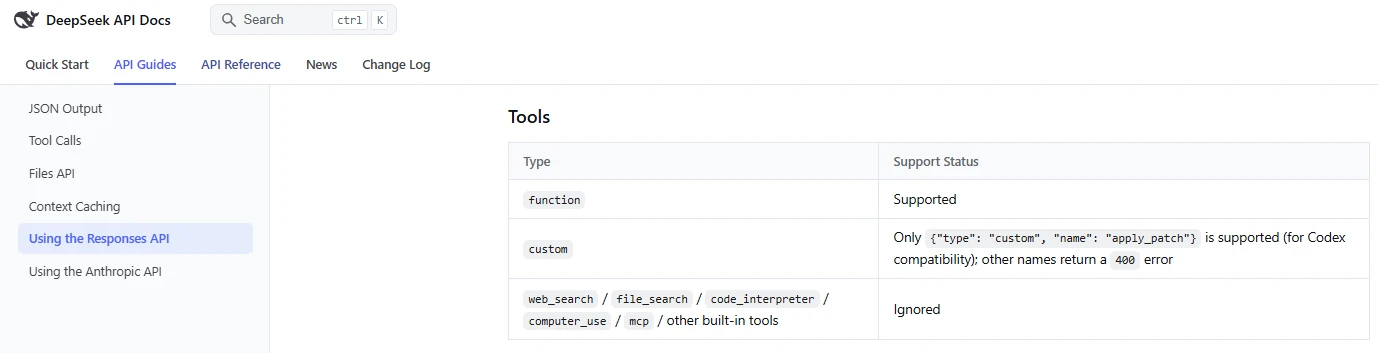
web_search with deepseek-v4-pro; it is ignored with Flash. Use the current guide rather than the older screenshot for tool support.Thinking mode and reasoning effort
Both current models support thinking and non-thinking modes. Thinking is enabled by default, and the current default effort is high. Use the lightest setting that meets a verified quality target; more reasoning increases output-token use, latency, and cost without guaranteeing a better answer.
| Goal | Chat Completions controls | Responses control |
|---|---|---|
| Disable thinking | thinking: {"type":"disabled"} or reasoning_effort="none" | reasoning: {"effort":"none"} |
| Light reasoning | Enable thinking and set reasoning_effort="low" | reasoning: {"effort":"low"} |
| Default deeper reasoning | Enable thinking and set reasoning_effort="high" | reasoning: {"effort":"high"} |
| Maximum documented effort | Enable thinking and set reasoning_effort="max" | reasoning: {"effort":"max"} |
temperature,presence_penalty, andfrequency_penaltydo not affect thinking-mode output under the current documentation.top_pis model-specific: withdeepseek-flash, it takes effect only in thinking mode within 0.95–1.0 and is fixed at 1.0 in non-thinking mode. Withdeepseek-v4-pro, it is ignored in thinking mode (fixed at 0.95 whentoolsis present, otherwise 1.0) and takes effect in non-thinking mode.- Reasoning tokens are part of output usage and therefore affect the bill.
- Do not expose raw reasoning to end users as proof of correctness. Evaluate the final answer, evidence, tests, latency, and cost.
- When using Chat Completions with tools in thinking mode, preserve the required
reasoning_contentfields between turns exactly as the current Tool Calls guide specifies; omitting them can cause HTTP400.
Streaming without mixing protocols
Chat Completions and Responses use different stream contracts. A production client should parse the selected protocol explicitly instead of treating every server-sent event as an ordinary text chunk.
| Protocol | Text event | End condition | Usage |
|---|---|---|---|
| Chat Completions | Text arrives in completion deltas. | data: [DONE] | Current usage is carried on the last content chunk when requested through stream_options. |
| Responses API | response.output_text.delta | response.completed, response.incomplete, or response.failed | The final response event carries the full usage object. |
Buffer partial function arguments until their “done” event, stop cleanly after completion or failure, handle keep-alive messages, and define what the user sees when a stream is interrupted. Do not execute a tool from a half-received JSON fragment.
Tool Calls: the model requests, your application executes
DeepSeek Tool Calls allow the model to propose a function name and arguments. The model does not call your database, shell, payment service, browser, or internal API by itself. Your application must validate the request, run the approved function, and return the result to the model.
- Define a small allowlisted function and a clear JSON Schema.
- Send the tool definition with the user request.
- Inspect the returned tool name and arguments.
- Parse the arguments as untrusted input.
- Reject unknown tools, missing fields, wrong types, unexpected properties, unsafe paths, and unauthorized actions.
- Require human approval for destructive, financial, external, privileged, or irreversible actions.
- Execute the function with timeouts and least privilege.
- Send a compact, sanitized tool result back to the model.
- Stop after a bounded number of tool rounds.
- Validate the final answer independently.
The current strict function-calling mode is a Beta feature and uses base_url="https://api.deepseek.com/beta". Treat Beta behavior as separately versioned, test it before production, and do not assume every JSON Schema feature is supported. In Chat Completions thinking mode, tool_choice="required" and forcing a named tool are not currently supported; disable thinking when the application must force a specific call.
JSON Output and schema validation
Chat Completions supports JSON Output with response_format={"type":"json_object"}. The prompt should explicitly request JSON and show the required shape. Set a sufficient output limit, because a response cut off for length can leave incomplete JSON. The official guide also notes that JSON mode can occasionally return empty content.
The Responses API additionally documents text.format values for plain text, json_object, and json_schema. Even when the response is syntactically valid, validate it against your application schema and business rules. Valid JSON can still contain invented IDs, impossible dates, unsafe URLs, incorrect totals, or semantically wrong values.
Vision and the Files API
Only deepseek-flash currently supports image input on the first-party API. It can describe images, read screenshot text, and analyze charts, returning text output. deepseek-v4-pro does not currently support vision.
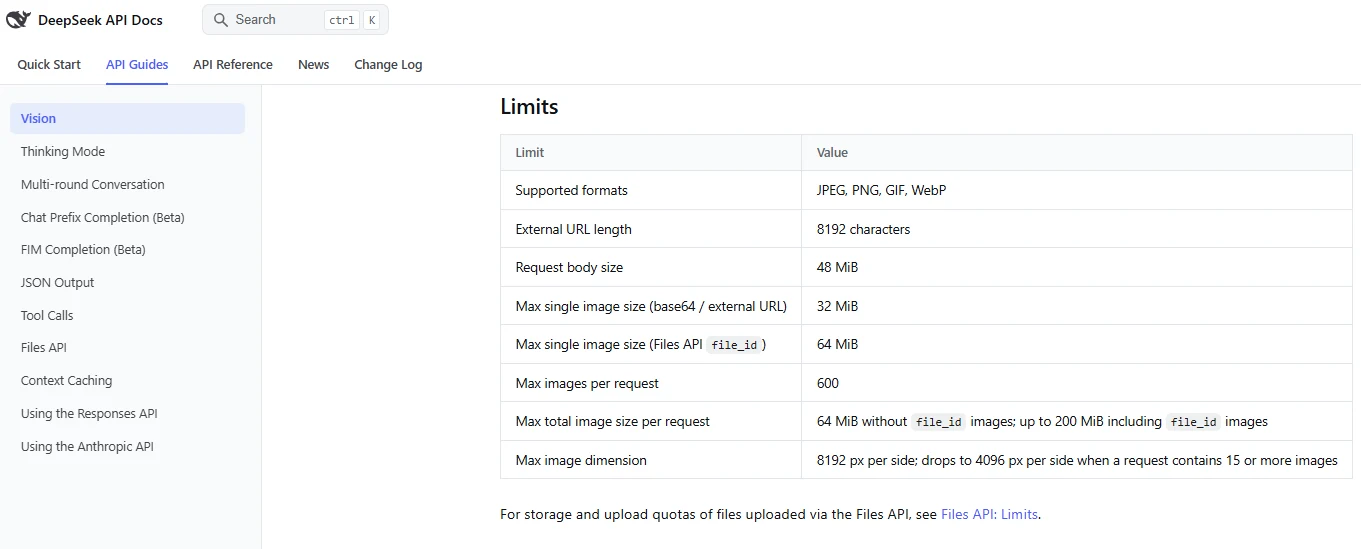
| Input method | Use it when | Current documented limits |
|---|---|---|
| Base64 data URL | The image is local and small enough to include inline. | JPEG, PNG, GIF, or WebP; 32 MiB per inline image; inline data counts toward the 48 MiB request-body limit. |
| Public HTTPS URL | The image is already reachable without authentication. | URL up to 8,192 characters; image up to 32 MiB; download must complete within the documented timeout. |
Files API file_id | You reuse an image or it is too large for the inline route. | Image upload up to 64 MiB; supported formats remain JPEG, PNG, GIF, and WebP. |
Important: the current DeepSeek Files API is for images. It is not a general PDF, DOCX, spreadsheet, audio, or arbitrary document-ingestion API. General file inputs are also not supported by the current Responses API.
To analyze a PDF today, your application must use an appropriate parser or OCR process, retain page and source metadata, then send selected content to the model within the context limit. The parser’s errors and the model’s errors are separate and should be tested separately. Files uploaded through the image Files API can be given a documented expiry or kept until explicitly deleted when no expiry is set, so apply deliberate retention and deletion rules.
Does the DeepSeek API include web search?
The current Responses compatibility guide supports server-side web_search with deepseek-v4-pro: the API runs the search, adds its results to context, and continues the response. Flash ignores this built-in tool. The other listed built-in types—file_search, code_interpreter, computer_use, and mcp—remain ignored.
For application-controlled retrieval, define a function tool, execute the approved search in your application, and return source text and metadata. DeepSeek also documents standalone Search and Fetch APIs at POST /v1/tools/search and POST /v1/tools/fetch. These use the DeepSeek API key and have separate request fees. In Codex, built-in search requires Pro and web_search = "live"; the setup script disables it by default. Preserve URLs and dates, verify citations, and treat retrieved content as untrusted input.
Automatic context caching
DeepSeek’s context caching is currently enabled automatically; developers do not create cache objects for ordinary requests. The usage object identifies cached and uncached prompt tokens, and cache-hit input is billed at a lower rate.
- Place stable system instructions, tool definitions, and shared reference text near the beginning.
- Keep the reusable prefix byte-for-byte stable where practical.
- Put the changing user request and recent data later.
- Measure
cached_tokens,prompt_cache_hit_tokens, andprompt_cache_miss_tokensrather than assuming a hit. - Do not damage prompt clarity merely to chase a cache discount.
- Use
user_idisolation where appropriate, without putting personal information in the identifier.
The Responses parameters prompt_cache_key and prompt_cache_retention are not currently supported by DeepSeek. Caching is managed by the provider.
DeepSeek API pricing
DeepSeek currently bills per one million tokens, with separate prices for cache-hit input, cache-miss input, and output. Output includes reasoning-token use. The current time-based schedule defines peak hours as 01:00–04:00 and 06:00–10:00 UTC, Monday through Friday, excluding Chinese public holidays. All other times are off-peak.
For workload estimates and billing examples, see our DeepSeek pricing and cost examples.
| Model and time tier | Cache-hit input | Cache-miss input | Output |
|---|---|---|---|
deepseek-flash — off-peak | $0.003 / 1M | $0.15 / 1M | $0.60 / 1M |
deepseek-flash — peak | $0.006 / 1M | $0.30 / 1M | $1.20 / 1M |
deepseek-v4-pro — off-peak | $0.022 / 1M | $0.66 / 1M | $1.98 / 1M |
deepseek-v4-pro — peak | $0.044 / 1M | $1.32 / 1M | $3.96 / 1M |
Pricing verified October 9, 2026. These are first-party US-dollar list prices from the official DeepSeek page. Taxes, third-party provider charges, external tools, retries, and engineering time are not included.
Search and parameter correction: October 16, 2026. The token rates above remain separate from Search and Fetch, each listed at $0.75 per 1,000 successful requests that return usable results. The official guide announces a Search request-fee waiver for Claude Code and Codex during the first two weeks after the Search API launch, with standard Search pricing afterward and the billing start date to be announced separately. Confirm the current notice before budgeting; this is not a permanent exemption. The other documentation and code-testing dates retain their stated scope.
Worked cost example
Assume one workload uses 1 million uncached input tokens, 4 million cached input tokens, and 1 million output tokens:
| Model and tier | Calculation | Estimated model-token charge |
|---|---|---|
| Flash — off-peak | 1 × $0.15 + 4 × $0.003 + 1 × $0.60 | $0.762 |
| Flash — peak | 1 × $0.30 + 4 × $0.006 + 1 × $1.20 | $1.524 |
| V4 Pro — off-peak | 1 × $0.66 + 4 × $0.022 + 1 × $1.98 | $2.728 |
| V4 Pro — peak | 1 × $1.32 + 4 × $0.044 + 1 × $3.96 | $5.456 |
Real cost should also include image tokens, external search or database calls, failed attempts, duplicated context, agent loops, observability, and human correction. Compare cost per verified successful task rather than headline input-token price.
Is the DeepSeek API free?
Do not assume a permanent universal free tier. DeepSeek can provide granted balance or promotions, but the Open Platform terms say any free quota and billing details are governed by the live platform and product pages. Check the current balance before testing. When available balance reaches zero, requests can fail with HTTP 402.
Context, output, and concurrency limits
| Limit | deepseek-flash | deepseek-v4-pro |
|---|---|---|
| Total context | 1M tokens | 1M tokens |
| Maximum output | 384K tokens | 384K tokens |
| Account concurrency | 2,500 active requests | 500 active requests |
| Image input | Supported | Not supported |
The context window counts input and output together. Maximum output is not a guarantee that the model will produce a useful response of that length, and a one-million-token window does not prove accurate retrieval from every position. Evaluate long-context performance with known facts near the beginning, middle, and end.
- Concurrency is calculated at the account level, not separately for every API key.
- A request occupies concurrency from submission until the response completes.
- Exceeding the current limit produces HTTP
429. - DeepSeek documents a capacity-expansion request route for accounts that need more concurrency.
user_idcan help isolate safety handling, KV cache, and scheduling, but must not contain personal information.
Common DeepSeek API errors
| Status | Likely cause | First safe action | Retry? |
|---|---|---|---|
400 | Invalid request format, missing required history, unsupported image placement, or incompatible tool/reasoning structure | Read the response body and compare the request with the exact protocol reference. | No, not until the request is corrected. |
401 | Missing, invalid, revoked, or wrong-provider key | Confirm the server-side environment variable, key, and Base URL. | No. |
402 | Insufficient platform balance | Check the balance endpoint or console and top up if appropriate. | No, not until balance is available. |
422 | Invalid parameter or unsupported value | Remove or correct the named parameter and verify model capability. | No. |
429 | Concurrency or request pacing exceeded | Queue requests, reduce concurrency, and apply bounded backoff. | Yes, with delay and a retry limit. |
500 | Server-side failure | Record the request ID where available and retry after a short delay. | Yes, with jittered backoff. |
503 | Service overloaded | Pause, check the DeepSeek status page, and use a fallback if the workload requires it. | Yes, with bounded backoff. |
A useful diagnostic order is: provider and Base URL → key → balance → model ID → protocol → request schema → context and body size → concurrency → service status. Do not repeatedly retry permanent authentication, billing, or validation errors.
Use our DeepSeek troubleshooting guide to distinguish API failures from chat, Search and upload problems.
Production-readiness checklist
- Secrets: keep keys server-side, use a secrets manager, rotate them, and scan source control and logs for accidental exposure.
- Route pinning: record the provider, endpoint, protocol, model ID, and whether the ID is a floating alias or dated snapshot.
- Evaluation: maintain representative regression tasks for accuracy, instructions, tools, JSON, safety, and long context.
- Timeouts: set connection and request timeouts appropriate to thinking mode and long outputs.
- Retries: retry only transient failures, use jittered exponential backoff, and cap attempts.
- Concurrency: use queues, backpressure, cancellation, and per-user limits instead of flooding the account limit.
- Validation: validate JSON, tool arguments, URLs, file paths, calculations, and business rules before acting.
- Tool security: isolate tools, use least privilege, require approval for high-impact actions, and limit recursive agent loops.
- Observability: log model, protocol, finish reason, token categories, cache hits, latency, retries, and cost without storing unnecessary sensitive prompts.
- Billing: monitor granted and topped-up balance, peak versus off-peak traffic, reasoning tokens, and cost per verified task.
- Fallback: decide what happens during
429,500,503, model changes, or regional unavailability. - Human review: require qualified review for medical, legal, financial, safety-critical, compliance, and other high-impact outputs.
Privacy, data, and downstream responsibilities
The DeepSeek Open Platform Terms apply specifically to developer use. They require developers to protect API keys, manage downstream users, disclose their own personal-information processing rules, establish an appropriate legal basis, respond to user-rights requests, and implement organizational and technical security measures.
Do not infer a blanket zero-retention or no-training guarantee from the general consumer privacy policy. The current consumer DeepSeek Privacy Policy explicitly says that its rules do not cover personal data collected from end users of downstream applications; the downstream developer is responsible for the relevant disclosure and governance. Review the current agreement for the exact account and jurisdiction before sending confidential or regulated information.
- Minimize prompts and remove secrets, credentials, unnecessary personal information, and confidential attachments.
- Tell end users that content is processed by an AI service and may contain errors or omissions.
- Document the provider, subprocessors or tools, storage path, retention rules, and deletion process applicable to your deployment.
- Do not send health, biometric, financial, identity, child, privileged, or trade-secret data without authorization and an approved governance basis.
- Retain original sources and human approval for decisions that affect rights, safety, money, employment, education, or access to services.
The current Open Platform terms state that developers retain applicable rights in their inputs and receive applicable rights in outputs, subject to law and the terms. They also allow a wide range of uses, including derivative products and model training. That does not guarantee that an output is accurate, non-infringing, exclusive, or suitable for a regulated decision.
First-party API, third-party provider, or local model?
| Route | Choose it when | Main trade-off |
|---|---|---|
| First-party DeepSeek API | You want the official models, current DeepSeek protocols, first-party prices, and official support documentation. | Availability, policies, billing, and data location must fit your organization and jurisdiction. |
| Third-party provider | You need a different region, consolidated account, specialized routing, or provider-specific tools. | Model configuration, quantization, price, context, latency, data policy, and lifecycle may differ from first party. |
| Local or self-hosted checkpoint | You need infrastructure control, offline-capable inference, customization, or provider independence. | Hardware, storage, electricity, engineering, security, monitoring, updates, and licenses become your responsibility. |
Evaluate these routes separately. A third-party provider’s benchmark or a quantized local model does not prove first-party API quality, and first-party pricing does not apply to another host.
Frequently asked questions
What is the official DeepSeek API Base URL?
The current OpenAI-compatible Base URL is https://api.deepseek.com. The Anthropic-compatible Base URL is https://api.deepseek.com/anthropic. Beta features can require a different path, such as https://api.deepseek.com/beta, so follow the exact feature guide.
Which DeepSeek API model should I use?
Start with deepseek-flash for image input, high throughput, and lower token prices. Choose deepseek-v4-pro when you need built-in Responses web search, or when representative text-only tests show enough benefit to justify its higher cost.
Are deepseek-chat and deepseek-reasoner still current?
No. DeepSeek’s official V4 release documentation states that those IDs were retired in July 2026. Use the live model list and current pricing page rather than copying an older tutorial.
Is DeepSeek a drop-in replacement for the OpenAI API?
It is compatible with major OpenAI request formats, but it is not behaviorally identical. Model IDs, supported parameters, built-in tools, conversation state, streaming events, image and file support, reasoning fields, token accounting, and errors must be tested.
Does DeepSeek support the Responses API?
Yes. The current first-party API supports POST /responses. It is stateless, uses semantic streaming events, supports function tools and Flash image inputs, and does not currently support stored conversations, background mode, or most OpenAI built-in tools.
Can I use DeepSeek with Claude Code or Codex?
Yes. DeepSeek publishes official integration guides for both. Claude Code uses the Anthropic-compatible route; Codex uses the Responses API. Keep the DeepSeek key private and review each tool’s configuration, permissions, and current compatibility requirements.
Can the DeepSeek API read PDFs?
The current first-party Files API accepts image formats rather than general PDF or office-document files. Parse or OCR the PDF in your application, retain page metadata, and send selected text or page images to an appropriate model. Do not claim native PDF ingestion unless DeepSeek adds and documents it later.
Does the DeepSeek API generate images?
No image-generation capability is documented for the current text-generation API routes. deepseek-flash can understand image inputs and returns text output.
Does DeepSeek provide native API web search?
Yes, on documented routes. Responses supports built-in web_search with deepseek-v4-pro, while Flash ignores that tool. Search and Fetch are also available as standalone APIs. A developer-defined function can use those services or another retrieval provider; model, protocol, integration settings, and billing still need separate checks.
Why does my DeepSeek request return HTTP 402?
HTTP 402 means the platform balance is insufficient. Check the live balance, confirm whether any granted balance has expired, and top up the correct account if appropriate.
How can I reduce DeepSeek API cost?
Use the least expensive model and reasoning effort that passes your evaluation, schedule flexible jobs off-peak, keep reusable prompt prefixes stable for cache hits, shorten repeated history, cap agent loops, validate before retrying, and monitor cached, uncached, reasoning, and output tokens separately.
Sources checked
The following primary sources were checked on October 9, 2026:
- DeepSeek API first-call documentation
- Models & Pricing
- DeepSeek API Change Log
- Chat Completions API reference
- Responses API reference and Responses compatibility guide
- Anthropic-compatible API guide
- Thinking Mode guide
- Tool Calls guide
- JSON Output guide
- Vision guide and Files API guide
- Context Caching guide
- Rate Limit & Isolation
- Error Codes
- Get User Balance reference
- Codex integration guide and Claude Code integration guide
- DeepSeek Open Platform Terms of Service
- DeepSeek Privacy Policy
- DeepSeek Status