
DeepSeek Search is the optional web-retrieval feature in DeepSeek’s official consumer assistant. Enable it when you need current information, recent sources or time-sensitive facts instead of relying only on the model’s trained knowledge. Search is separate from Deep Thinking, and it does not make every answer correct: DeepSeek’s current Terms of Use say that enabling Search may improve accuracy, but inaccuracies cannot be eliminated. The exact control name and position can change across web, iOS, Android, accounts and product rollouts.
Independent-site disclosure: This guide is not affiliated with DeepSeek.
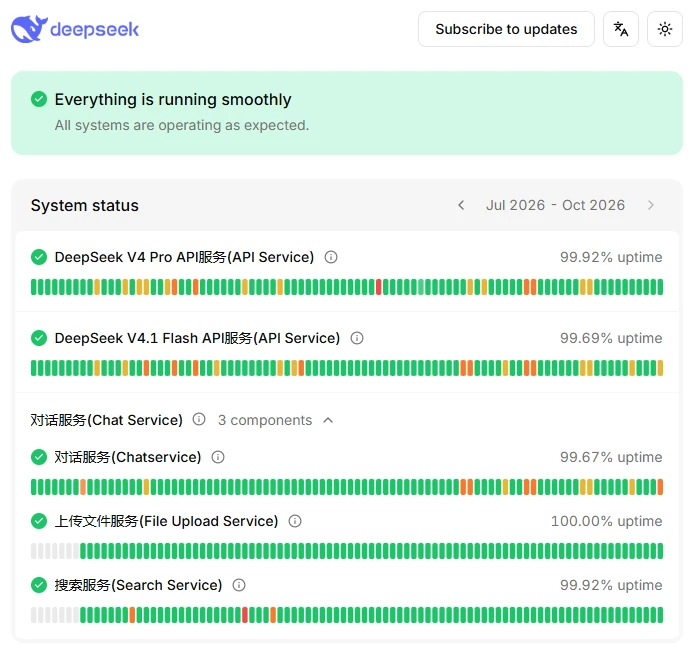
Last verified: October 9, 2026, 8:06 PM Africa/Cairo. At that time, the official DeepSeek status page reported that all listed systems were operating normally and showed Search Service as operational. A green status page does not guarantee that every account, platform, network or region is unaffected.
Evidence note: The product and policy details below were checked against current first-party DeepSeek pages. No signed-in consumer Search session was performed during preparation, so interface-specific observations, citation counts, timings and search results are not presented as firsthand tests.
DeepSeek Search in one sentence
DeepSeek Search retrieves web information for a consumer chat, then lets the model synthesize that information into an answer. It is useful for current news, product details, prices, software releases, public policies, schedules and other facts that may have changed after the model was trained.
DeepSeek first announced Internet Search on its web service in December 2024. Its January 2025 official app announcement listed Web Search and Deep-Think as separate application features. Current interfaces may use different labels, so follow the Search control visible in your official DeepSeek web or mobile product rather than an old screenshot.
| Route | Can obtain current web information? | Who supplies retrieval? | Main qualification |
|---|---|---|---|
| Official DeepSeek web or mobile assistant | Yes, when the current Search function is available and enabled | DeepSeek’s consumer Search workflow and third-party search APIs | Sources and generated conclusions still require verification. |
| Normal DeepSeek chat without Search | Not reliably | No confirmed live retrieval for that response | A recent-looking answer does not prove browsing occurred. |
| Deep Thinking alone | Not necessarily | It reasons over the context available to the model | More reasoning is not a substitute for fresh evidence. |
| Responses API | Yes, through built-in web_search with Pro | DeepSeek runs the search server-side with deepseek-v4-pro. | Flash ignores this built-in tool; a separate function or standalone retrieval route is another option. |
| Claude Code with DeepSeek | Yes, through the specifically documented integration | The official integration supports Claude Code’s Web Search workflow. | This does not establish a universal search tool across every DeepSeek API route. |
| Codex with DeepSeek | Yes, with Pro and web search enabled | The official integration supports Codex’s built-in search with deepseek-v4-pro. | The setup script defaults to disabled; select Pro and set web_search = "live". |
| Local DeepSeek model | Not by itself | The local host application must add retrieval. | A downloaded model does not automatically have internet access. |
What DeepSeek Search does—and what it does not do
Search adds retrieved online material to the context used for the answer. A typical workflow involves preparing one or more search queries, retrieving webpages or snippets, reading the returned material and synthesizing an answer. The interface may also display source markers or other signs that retrieval occurred.
Search does not guarantee that DeepSeek:
- Found the best or most recent page.
- Read every relevant page in full.
- Correctly interpreted every retrieved passage.
- Attached each source to the correct claim.
- Distinguished a current page from an outdated launch announcement.
- Separated an event date from the date an article was published.
- Found information behind a login, paywall or geographic restriction.
- Resolved genuine disagreement among credible sources.
- Returned information suitable for a high-stakes decision without human review.
The current DeepSeek Terms of Use explicitly warn that Search can improve an answer only “to some extent” and that incorrect AI-generated content remains possible.
DeepSeek Search vs normal chat vs Deep Thinking
| Mode | Primary job | Best for | Does it prove live retrieval? |
|---|---|---|---|
| Normal chat | Generate an answer from the model’s training, conversation and supplied files | Writing, rewriting, explanation, brainstorming and stable knowledge | No |
| Search | Retrieve current webpages or web evidence | News, current prices, public records, product availability, software releases and source-dependent facts | Only when the interface indicates that Search ran |
| Deep Thinking | Spend more computation analysing the available context | Planning, mathematics, debugging, trade-offs and complex synthesis | No |
| Search plus a thinking mode | Retrieve evidence, then analyse it more deeply | Complex current questions with competing sources | Retrieval must still be visibly confirmed |
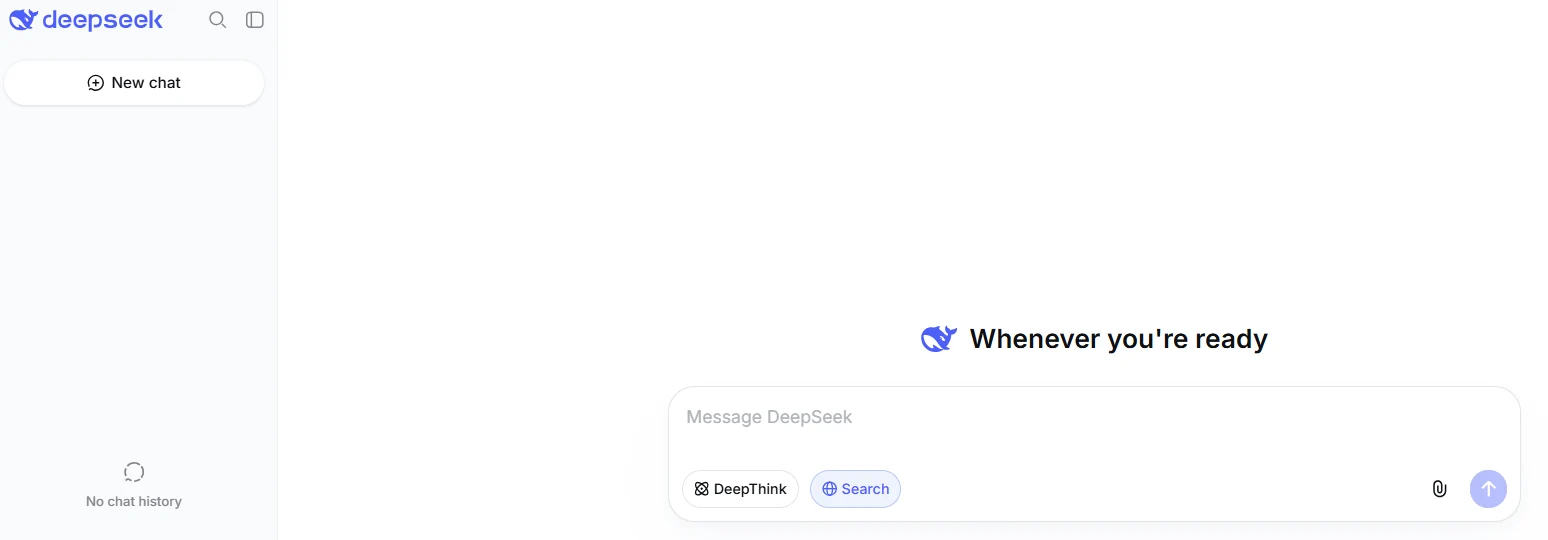
Search solves an evidence-freshness problem. Deep Thinking solves a reasoning-depth problem. A model can reason carefully over stale evidence, and it can retrieve current sources but interpret them poorly. The strongest workflow combines appropriate retrieval with careful verification.
Use both controls together only when the current interface actually allows it. Product labels and combinations can vary by platform, account and rollout. More reasoning cannot repair a missing primary source or a webpage about the wrong product.
How to use DeepSeek Search
- Open an official product. Use the official DeepSeek web application or install the verified iOS or Android app from the official download page.
- Sign in when required. Feature availability can depend on the account, platform, region or current rollout.
- Start a fresh conversation. This reduces the chance that unrelated earlier instructions influence the research.
- Locate the current Search control. DeepSeek’s official materials have used terms including Internet Search, Web Search and Search. Do not rely on the button position shown in an old tutorial.
- Enable Search before sending the request. A normal answer that merely sounds current is not evidence that retrieval occurred.
- Define the time and geographic scope. Include a cutoff date, country, currency, product edition or legal jurisdiction where relevant.
- Request appropriate sources. Ask for official documentation, original data, regulators, filings, standards or peer-reviewed research where those sources exist.
- Wait for the Search workflow to finish. Do not judge a partially streamed answer or incomplete source list.
- Confirm that Search ran. Look for the selected Search state and any source, citation or retrieval indicator presented by the current interface.
- Open the sources. Read the passages that support the important claims rather than relying on the generated summary.
- Ask a focused correction. Identify the unsupported claim, supply the stronger source or require DeepSeek to state that the point remains unverified.
- Save the original links. Cite the underlying sources in your work, not the DeepSeek answer itself.
How to confirm that Search actually ran
Interface presentation can vary, but useful evidence may include:
- A visibly selected Search control.
- A retrieval or searching progress state.
- A source list or numbered source markers.
- Links that open the webpages used in the answer.
- A visible count or summary of pages consulted, where the current interface provides one.
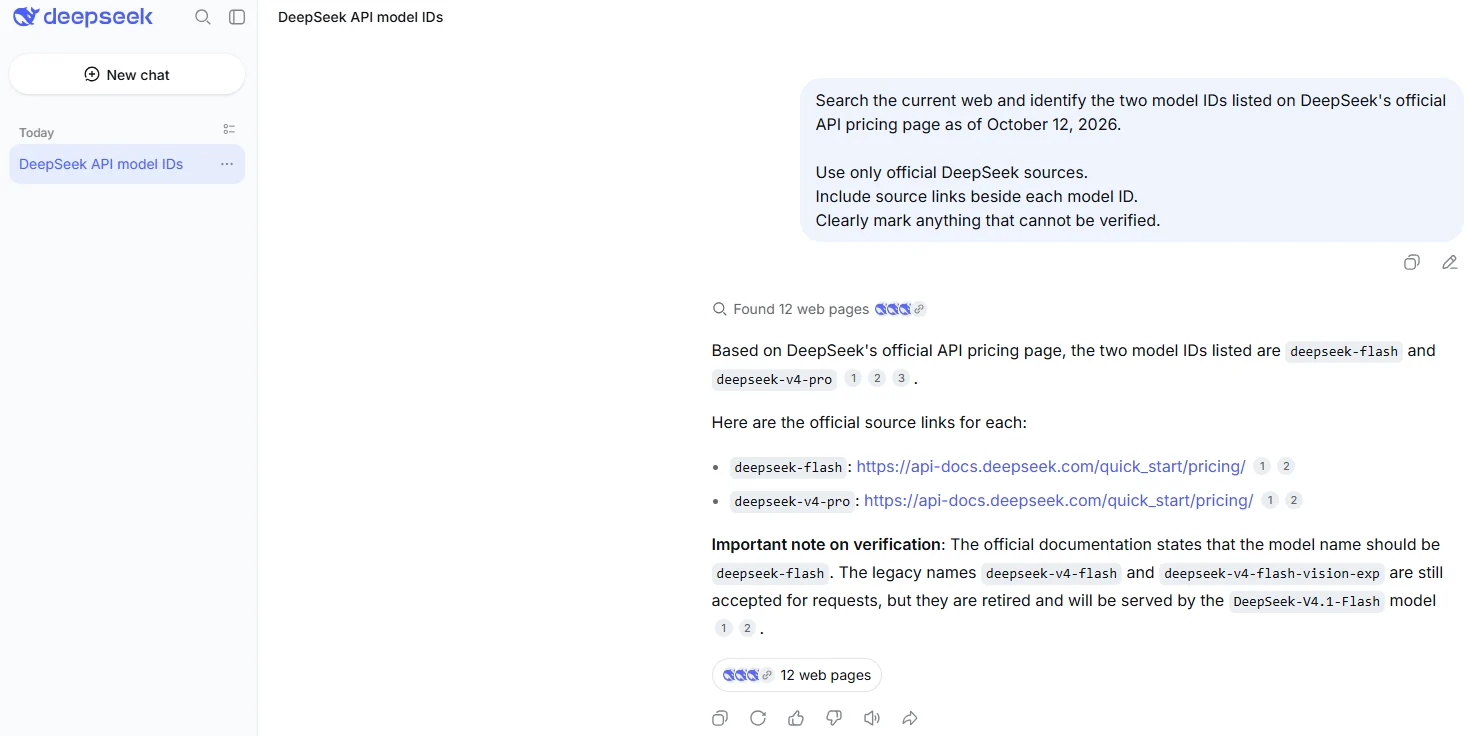
If none of these signals appears, do not claim that the response was web-grounded. Ask again with the current Search function explicitly enabled or verify the information independently.
Use a source-aware Search prompt
A vague question such as “What is the best laptop?” gives DeepSeek little guidance about country, price, date, evidence or evaluation criteria. A stronger prompt defines the decision and the evidence needed to support it.
Search the current web and answer the question below.

Question:
[Write the precise research question.]

Freshness:
Use information available as of [Month Day, Year].
Separate the date an event happened from the date each page was published.

Scope:
- Country or region: [location]
- Currency: [currency]
- Product edition or plan: [edition]
- Audience: [intended reader]

Source rules:
- Prefer current primary and official sources.
- Use reputable independent sources for interpretation or testing.
- Do not treat repeated articles based on one original source as independent confirmation.
- Identify sources that support and challenge the main conclusion.
- Do not fill missing evidence with assumptions.

Output:
1. Direct answer
2. Evidence table
3. Important disagreements
4. Unverified points
5. Source links beside the claims they support
Prompt for current product information
Search the current web for the official specifications, price and availability of [product] as of [date].

Use the manufacturer’s current documentation and official store first.
Keep regions, currencies, plans and model versions separate.
For each material claim, provide the source and its update date.
Mark any detail that could not be verified.
Prompt for checking a news event
Investigate [event or claim].

Separate:
- When the event occurred
- When each source was published
- The original announcement
- Later updates, corrections or reversals
- Confirmed facts
- Allegations or estimates
- Important credible disagreement

Prefer the original record and current reputable reporting.
Do not describe an old development as new merely because a recent article mentions it.
Prompt for auditing a claim
Check whether this claim is supported:

"[Insert exact claim.]"

Find:
1. The original source
2. Evidence supporting the claim
3. Evidence challenging it
4. The relevant date, geography, units and definitions
5. Any missing qualification

Conclude with one label:
Supported, Partly Supported, Misleading, False or Unverified.

Do not choose a label unless the cited evidence supports it.
How to verify DeepSeek Search sources
A citation is a route to evidence—not a guarantee that the sentence is correct. Use the following process for every claim that affects a decision, publication or purchase.
- Identify the consequential claims. Focus on prices, dates, legal requirements, safety claims, statistics, product limits and conclusions.
- Open the attached source. Do not rely on the title or search snippet.
- Find the supporting passage. Confirm that the page states the claimed fact rather than merely discussing a related topic.
- Check the whole sentence. One source marker at the end of a sentence may support only the first clause.
- Check the publisher. Distinguish an official record, original dataset or research paper from a press release, commentary or aggregator.
- Check publication and event dates separately. A new article can describe an old event.
- Check scope. Confirm the country, currency, time period, sample, model, product edition, plan and units.
- Find the original evidence. Follow a news report or blog to the filing, law, dataset, paper or vendor documentation it cites.
- Look for later changes. Search for updates, corrections, deprecations, court decisions or replacement policies.
- Seek credible disagreement. A reliable research answer should identify important contrary evidence rather than conceal it.
- Recalculate numbers. Verify totals, percentages, exchange rates and unit conversions independently.
- Cite the original source. Your final work should reference the evidence, not DeepSeek’s summary.
Common citation failures
- The page exists but does not contain the claimed fact.
- The citation supports one number but not the conclusion built around it.
- An outdated announcement is used instead of the current product page.
- US pricing is combined with European availability or tax rules.
- A forecast is presented as an actual result.
- A company press release is described as an independent evaluation.
- Several articles repeating one press release are counted as separate confirmation.
- A search snippet hides a geographic, plan or beta restriction found on the full page.
- A translated source changes the meaning of a legal or technical term.
- A quotation cannot be found on the linked page.
When DeepSeek Search is useful
| Task | Why Search helps | Required verification |
|---|---|---|
| Current news | Retrieves recent announcements and reporting | Separate event date, publication date, allegation and confirmed fact. |
| Product specifications | Finds current official documentation and regional product pages | Check exact model, edition, country and update date. |
| Prices and plans | Locates current pricing pages and checkout information | Confirm currency, tax, billing cycle, promotion and region. |
| Software documentation | Finds current versions, APIs and migration notices | Prefer official documentation and confirm the version used. |
| Laws and public policy | Can locate statutes, regulations and official notices | Read the original legal text and obtain professional advice where needed. |
| Travel planning | Finds current schedules, closures and entry rules | Verify with the operator, government or venue immediately before travel. |
| Academic discovery | Helps locate papers and research topics | Verify DOI, authors, journal, method, sample and peer-review status. |
| Public claim checking | Collects supporting and contradictory evidence | Use the original record and state uncertainty honestly. |
When Search is not enough
Search can help locate evidence, but it should not be the sole basis for a consequential medical, legal, financial, engineering, security, employment, housing, insurance, credit or compliance decision.
- Medical: confirm information with current clinical guidance and a qualified healthcare professional.
- Legal: read the controlling law, regulation, contract or judgment and consult qualified counsel.
- Financial: verify filings, fees, tax treatment and calculations independently.
- Academic: read the complete paper and follow institutional rules on AI assistance.
- Engineering: use current standards, approved calculations and professional review.
- Security: do not execute searched commands, scripts or configurations without reviewing their source and effects.
DeepSeek Search is not chat-history search
In this guide, DeepSeek Search means retrieving information from the public web. It should not be confused with finding an old conversation in your account history or using the browser’s find command within one open page.
A universal full-text search feature across all old DeepSeek conversations was not confirmed from the current first-party sources checked for this article. Review the history controls shown in your current account rather than assuming that the web Search control searches past chats.
Does the DeepSeek API include web search?
There is no accurate brand-level yes-or-no answer. Search support depends on the API protocol and the integration being used.
API search update: October 16, 2026. The current Search and Fetch endpoints are billed separately at $0.75 per 1,000 successful requests that return usable results. Search through Claude Code and Codex has an announced Search request-fee waiver during the first two weeks after the Search API launch, followed by standard Search pricing; the official guide says the billing start date will be announced separately. Model tokens used to process results still affect the bill. Consumer Search allowances are a different product.
| Developer route | Current Search behavior | What the developer must do |
|---|---|---|
| Responses API | Built-in web_search runs server-side with deepseek-v4-pro; Flash ignores it. | Choose Pro for this built-in route, verify the returned sources, and check applicable search and token charges. |
| Chat Completions with Tool Calls | The model can request a developer-defined search function. | Validate the query, call a search provider and return normalized results. |
| Claude Code integration | The official DeepSeek integration currently documents support for Claude Code’s Web Search feature. | Follow the exact current integration guide and applicable billing terms. |
| Codex integration | Built-in search is available with deepseek-v4-pro; the setup script disables it initially. | Select Pro, set web_search = "live", restart the client, and follow the current official integration guide. |
| Local model | No automatic browsing | The host must connect a search engine, crawler, database or internal index. |
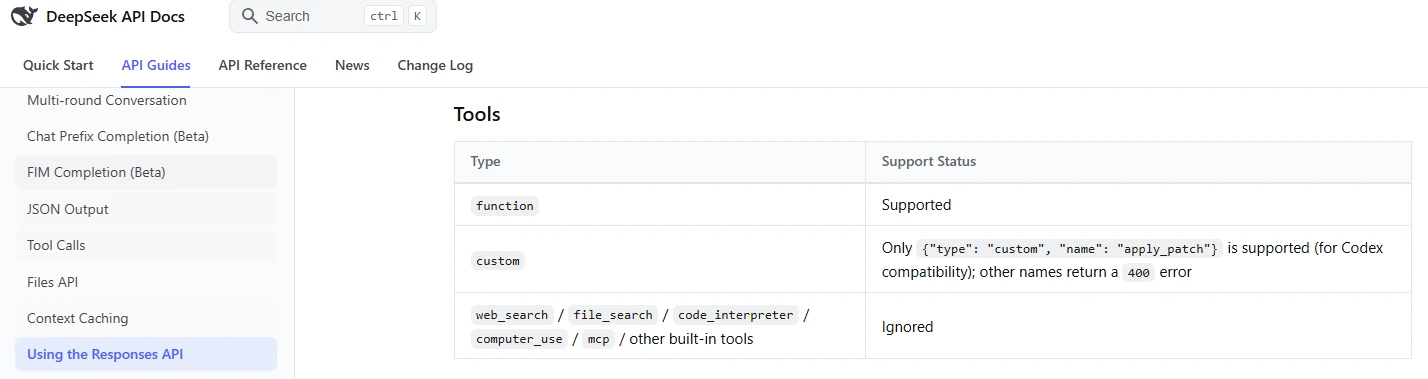
The current Responses API compatibility guide supports function tools and built-in web_search with Pro. Flash ignores web_search; file_search, code_interpreter, computer_use, and mcp remain ignored. For retrieval outside the built-in workflow, the standalone Search and Fetch guide documents separate endpoints using the DeepSeek API key.
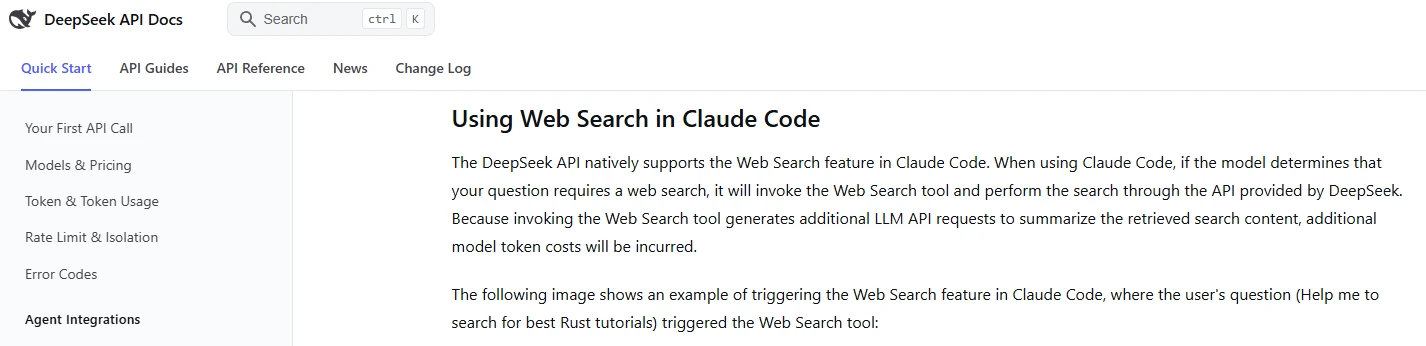
web_search with Pro; Flash ignores it. The current official guide takes precedence over the older screenshot.DeepSeek’s Tool Calls guide describes the general execution boundary: the model proposes a function and arguments, while the application executes that function. A custom web-search integration follows the same pattern.
A reliable custom search loop
- Define a
search_webfunction with query, domain, language and date-range fields. - Validate the model-generated query and reject unexpected parameters.
- Send the query to the selected search provider or approved internal index.
- Return a compact structure containing title, URL, publisher, date, excerpt and source type.
- Sanitize retrieved text and defend against instructions embedded in webpages.
- Require the model to answer only from the returned evidence.
- Map each material claim to one or more source URLs.
- Return an explicit “insufficient evidence” result when retrieval is weak.
- Log the retrieval provider, query, result IDs and dates for reproducibility.
- Apply the external search provider’s own pricing, rate limits and privacy terms.
Calling a DeepSeek model does not prove that the model browsed. The application must expose, execute and document the retrieval tool unless the exact integration explicitly supplies one.
DeepSeek Search privacy
Search changes the data path. DeepSeek’s current Privacy Policy says that the company integrates third-party APIs to provide search services and shares input keywords with those services.
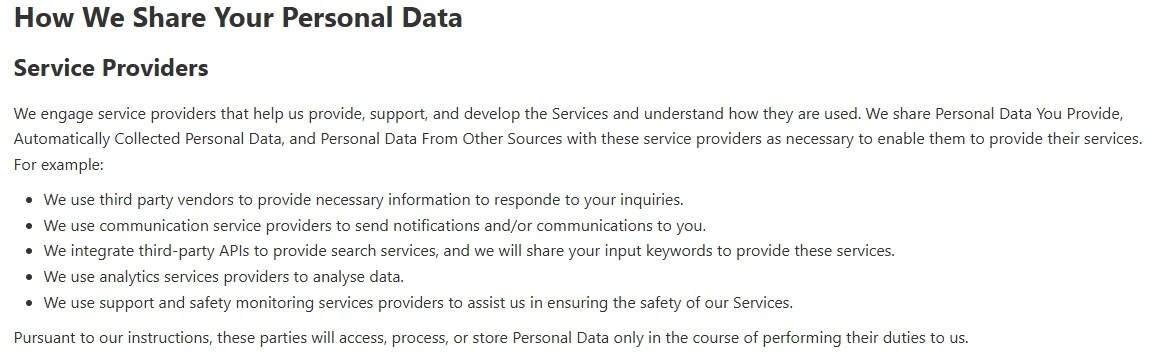
The policy does not identify one universal search provider. Do not state that DeepSeek always uses Google, Bing, Baidu or another specific engine unless DeepSeek publishes product-specific evidence.
The current policies also state that DeepSeek can use personal data and interactions to develop, improve and train its technology. The Terms describe an account control named Improve the model for everyone for opting out of the specified improvement use. Review the live setting and policy applicable to your region rather than relying on an old screenshot.
DeepSeek’s English Privacy Policy currently says that personal data it collects is directly processed and stored in the People’s Republic of China. Regional supplementary terms may also apply.
Do not place sensitive information in Search queries
- Passwords, verification codes, API keys or private access URLs
- Confidential customer, employee or company information
- Private medical, biometric, identity or financial data
- Unreleased financial results or product plans
- Privileged legal strategy or confidential contracts
- Trade secrets, proprietary code or internal incident details
- Personal information about another person without authorization
Rewrite sensitive research questions using public entities, generalized facts and non-confidential terms. For organizational research, use an approved service with appropriate contractual, security and data-governance controls.
Is DeepSeek Search free?
The current official iOS and Android listings describe the DeepSeek consumer application as free. However, the first-party sources checked for this article do not establish a permanent universal numeric Search allowance for every account, platform and region.
- Do not describe Search as unlimited unless the live product explicitly says so.
- Consumer Search and first-party API usage are separate billing routes.
- An external search provider connected to an API may charge separately.
- Availability can vary by jurisdiction, account, platform and service conditions.
- Check the current interface for an account-specific limit or availability notice.
DeepSeek Search not working or missing
Search is monitored as a separate component, so ordinary chat may still work during a Search Service problem.
For wider account, network or service checks, use our DeepSeek troubleshooting guide.
- Confirm the official product. Test DeepSeek’s official web application rather than only an extension, bot or third-party client.
- Check Search Service status. Open the official status page and inspect the Search component.
- Confirm sign-in state. The feature may not appear in the same way for every signed-out or account state.
- Start a fresh conversation. Test one simple current-information request.
- Inspect the current mode or tools area. Labels and placement can change between versions.
- Update the official mobile app. Use the verified App Store or Google Play listing.
- Try another official platform. Compare web and mobile behavior where both are available.
- Try another trusted network. This can isolate a firewall, proxy, workplace or school restriction.
- Check account and regional differences. Do not infer global feature removal from one account.
- Contact DeepSeek support. Report the time, platform, version, account state, exact symptom, status-page result and safe troubleshooting already completed.
If an official Search incident is active, preserving the query and waiting for restoration is more useful than clearing all browser data or reinstalling the application. Do not repeatedly submit the same query during an outage.
Sources are missing from the answer
- Confirm that the current Search control was enabled before the prompt was sent.
- Ask explicitly for current web research and sources beside each factual paragraph.
- Start a fresh conversation rather than relying on a long unrelated thread.
- Do not assume browsing occurred because the answer contains a recent date.
- If Search visibly ran but source presentation failed, save the query and report the reproducible issue.
The answer is stale despite Search
- Add a strict cutoff date.
- Require sources updated after a specified date.
- Ask for the current official page rather than a launch announcement.
- Specify the country, currency, product edition and model version.
- Ask DeepSeek to identify superseded or conflicting sources.
- Verify the conclusion manually before using it.
Frequently asked questions
Can DeepSeek search the live web?
Yes. The official consumer product includes an optional Search function for retrieving web information. Search must be available and enabled for the relevant conversation; the underlying model does not automatically browse in every response.
How do I enable DeepSeek Search?
Open the official DeepSeek web or mobile product, start a fresh conversation and use the current Search control shown around the composer, tools or response-mode area. DeepSeek has changed product labels over time, so follow the live interface rather than an old screenshot.
How do I know DeepSeek searched the web?
Confirm that the Search control was active and look for retrieval progress, source markers, webpage links or other evidence presented by the current interface. A recent-looking answer by itself is not proof of browsing.
Is DeepSeek Search the same as Deep Thinking?
No. Search retrieves external information. Deep Thinking increases reasoning over the information available to the model. Deep Thinking alone does not guarantee current web evidence.
Can I use Search and Deep Thinking together?
Use both only when the current interface makes the combination available. Search can supply fresh evidence, while a thinking mode can help compare and synthesize it. Availability can vary by platform, account and product version.
Does DeepSeek Search always show sources?
Do not assume that every searched answer will present sources identically. Citation and source presentation can depend on the product version, response and retrieval result. Verify that Search ran, then open every source used for an important claim.
Are DeepSeek citations reliable?
They are useful starting points, not automatic proof. A real source may be outdated, irrelevant, attached too broadly or inconsistent with the generated conclusion. Verify the exact passage, date, scope and original evidence.
Which search engine does DeepSeek use?
DeepSeek’s current Privacy Policy says it integrates third-party APIs for search and shares input keywords with them, but the policy does not identify one universal provider. Claims that it always uses Google, Bing, Baidu or another named engine remain unverified without a current product-specific disclosure.
Does DeepSeek share my full prompt with a search provider?
The current policy specifically says that input keywords are shared with third-party APIs to provide search. It does not fully explain every transformation from a complete prompt to the keywords supplied externally. Do not place sensitive data in a search-enabled prompt.
Does DeepSeek use Search queries for training?
DeepSeek’s current policies describe using personal data and interactions to improve and train its technology. The Terms also describe an Improve the model for everyone control for opting out of the specified improvement use. Review the current account setting and regional policy.
Is DeepSeek Search free?
The official consumer mobile applications are currently listed as free. A permanent universal Search quota was not confirmed from the first-party sources checked here, and API or external search-provider usage follows separate billing rules.
Can DeepSeek Search my old conversations?
Web Search and conversation-history search are separate functions. The Search control discussed in this guide retrieves online information. Check the current history interface in your account for any conversation-search capability.
Can DeepSeek Search an uploaded PDF?
File upload and web Search are separate product capabilities. Where the current interface allows both in one conversation, require DeepSeek to distinguish facts taken from the uploaded file from facts retrieved from the web. Verify both against their original sources.
Does the DeepSeek API search automatically?
Search support is route-specific. Responses supports server-side web_search with Pro, while Flash ignores it. Codex can enable the Pro route with web_search = "live". Applications can also use DeepSeek’s standalone Search/Fetch APIs or a developer-defined retrieval function. Follow the exact route’s current documentation and billing rules.
Is DeepSeek Search suitable for academic research?
It can help discover papers and research topics, but it does not replace academic databases, reading the complete study or evaluating methodology. Verify DOI, authors, journal, date, sample, method and peer-review status, then cite the original paper.
Sources checked
The following primary DeepSeek sources were checked on October 9, 2026:
- Official DeepSeek web application
- Official DeepSeek website
- Official DeepSeek download page
- Official Internet Search launch announcement
- Official DeepSeek app announcement
- Official DeepSeek status page
- DeepSeek Terms of Use
- DeepSeek Privacy Policy
- Official DeepSeek App Store listing
- Official DeepSeek Google Play listing
- Official Responses API compatibility guide
- Official Tool Calls guide
- Official Claude Code integration guide
- Official Codex integration guide