
Is DeepSeek safe to use? For public information, fictional writing, and other low-sensitivity tasks, cautious use can be reasonable if you accept the service’s data practices. For confidential work, identifiable personal records, passwords, or API keys, the practical recommendation is different: do not submit them to ordinary consumer chat. Use an approved environment with appropriate controls instead.
The distinction matters because privacy, software security, and answer reliability are separate issues. A model can produce a useful answer while the service retains information you would rather not share. A locally running model can avoid hosted processing while still giving incorrect answers or operating through insecure software.
This assessment examines published policies, original security research, and practical safeguards. It is not a hands-on security audit of your account or device.
Last checked: October 9, 2026.
Decide based on what you plan to share
Start with the consequences of disclosure, not the chatbot’s popularity. The following recommendations apply to ordinary consumer use, not a separately assessed enterprise deployment. They are decision guidance, not measured risk scores.
| Your task | Practical recommendation | Important limit |
|---|---|---|
| Explain a public concept or brainstorm fictional content | Cautious use may be reasonable. Keep the prompt free of unnecessary personal details. | A harmless prompt does not make your account anonymous or the answer automatically correct. |
| Improve a résumé or personal letter | Share only the passage needed, removing contact details and identifying context where possible. | Replacing a name alone may not make the text anonymous. |
| Analyze client records, employee information, or confidential business documents | Use an organization-approved service and data-handling process. | A personal privacy setting is not a substitute for organizational approval. |
| Debug code containing passwords, tokens, or production credentials | Replace secrets with clearly fictional values before sharing. | Deleting the conversation later does not revoke an exposed credential. |
This approach follows the principles in the Australian Signals Directorate’s AI guidance for small businesses: review the provider’s data practices, define what information may be shared, and maintain human oversight.
What information does DeepSeek collect?
The consumer DeepSeek Privacy Policy, updated February 10, 2026, lists account information; submitted prompts, files, photos, voice input, and chat history; and device, network, diagnostic, and usage information. It describes approximate location derived from IP addresses and says precise geolocation requires explicit consent.
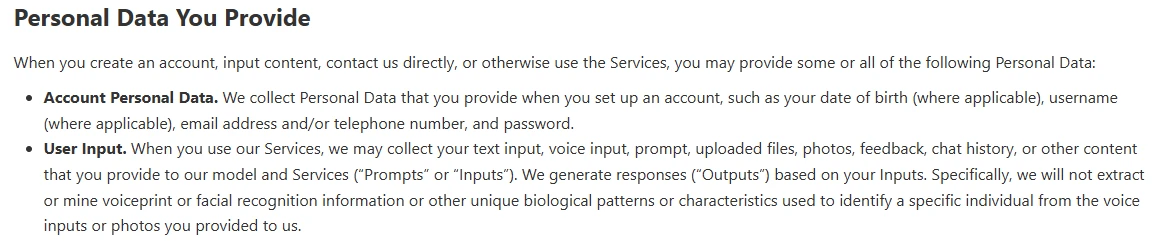
The policy states that personal data is processed and stored in the People’s Republic of China. It describes sharing with service providers and corporate-group entities, including sending search keywords to search providers, and disclosures under specified legal circumstances. It also states that DeepSeek does not sell personal data.

These are the provider’s stated practices, not independent verification of every implementation detail. Storage location is relevant to your privacy requirements; it is not, by itself, proof that every conversation is sent to government officials. Likewise, listing uploaded photos as a data category does not establish unrestricted access to your entire photo library.
Encryption does not answer every privacy question
HTTPS protects communication between a client and server. That is different from encryption of stored records, and different again from end-to-end encryption that excludes an intermediary from reading content.
For hosted AI, do not interpret an encrypted connection as meaning the service cannot process your prompt. Ask separate questions: who receives the content, who can access stored records, how long is it retained, and can it be used for another purpose?
Can DeepSeek use your chats for training?
DeepSeek’s model-training disclosure says a small portion of optimization-training examples may be based on user input, subject to its stated de-identification and other safeguards. It also acknowledges an opt-out. Those statements should not be rewritten as either “every conversation is used” or “conversations are never used.”
The Terms of Use, updated March 27, 2026, identify the control as “Improve the model for everyone.” They describe turning it off to decline the specified input-and-output processing for service or technology improvement.
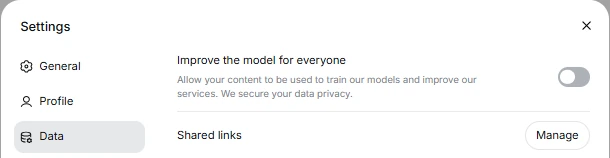
Review that control in your account before submitting anything you would not want used for improvement. An exact menu path should not be assumed across every interface. If the option is unavailable or its scope is unclear, seek clarification rather than assuming your preference is already applied.
Training opt-out, chat deletion, and account deletion are different
Turning off training is not the same request as deleting data. The existence of an opt-out does not establish immediate removal of stored conversations, reversal of earlier training, or zero operational logging. Do not treat it as a complete confidentiality agreement.
The privacy policy provides chat-history management and deletion options, but describes retention according to service needs and other obligations rather than one universal deadline. Account deletion is irreversible for the user.
Choose the control that matches your objective: an improvement preference concerns that use of data; conversation deletion concerns stored history; account deletion ends account access; and a privacy request asks the provider to exercise a particular right. Do not assume completing one automatically completes the others.
What the reported security problems actually establish
Documented findings deserve attention, but their dates, affected systems, and remediation matter. A historical vulnerability is not proof that the same weakness remains exploitable today—and a reported fix is not a security certification for the whole service.
Wiz found an exposed database, which DeepSeek subsequently secured
On January 29, 2025, Wiz disclosed an unauthenticated DeepSeek database containing sensitive logs, including chat history and secret keys. Wiz reported more than a million log entries and said DeepSeek promptly secured the exposure after disclosure.
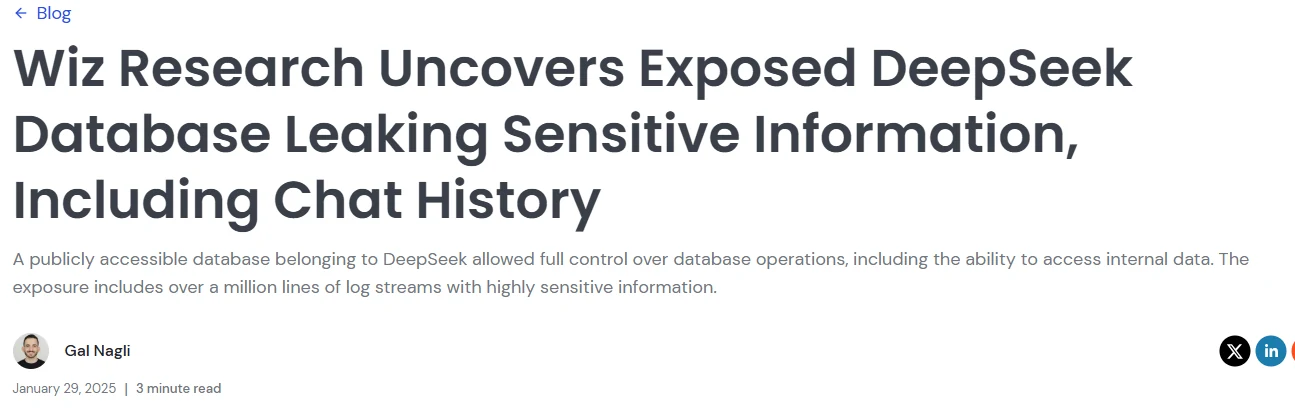
This was a significant infrastructure-security failure. However, a million log entries is not a verified count of a million affected people. The report also does not establish that every user’s data was stolen by malicious actors or that the database remains publicly accessible.
NowSecure’s findings concerned the iOS app assessed in 2025
NowSecure’s February 6, 2025 assessment identified problems including transmission of some registration and device data without encryption, insecure handling of credentials, and third-party data flows. Its conclusions concerned the iOS application examined at that time.
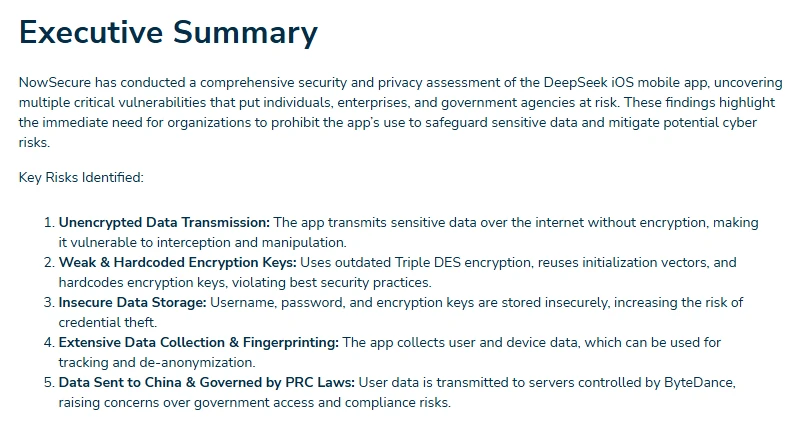
The present status of those specific issues was not independently verified for this guide. The historical report does not establish that every current iOS release, the Android app, or the website has the same defects. Nor does observing some unencrypted traffic prove that every conversation was transmitted in plaintext.
Wiz and NowSecure are security vendors reporting original research. Their technical observations are useful evidence, but their commercial recommendations are separate from the findings themselves.
The Korean regulator documented both problems and corrections
The Korean Personal Information Protection Commission’s April 2025 examination identified transparency and cross-border transfer problems, including transfer of user input to Volcano. It reported that DeepSeek had blocked that input transfer from April 10, 2025 and recommended deletion of previously transferred input.
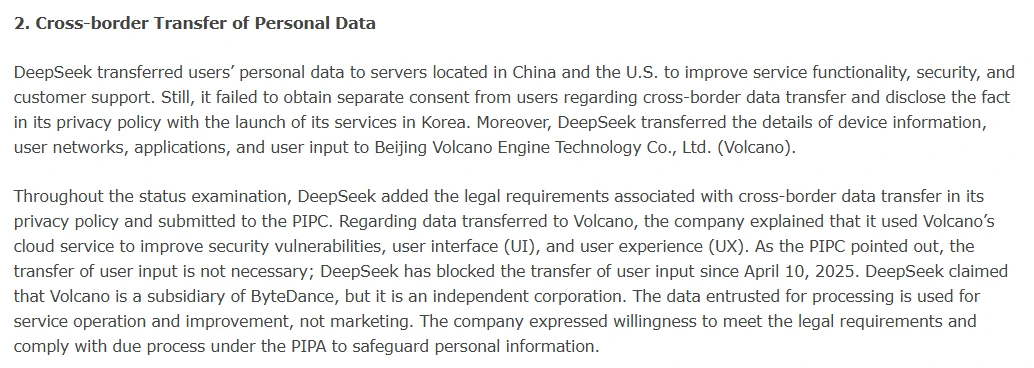
The same examination addressed a widely repeated claim about keystrokes. Although an earlier policy mentioned keystroke patterns, DeepSeek said it had not collected them, and the regulator reported confirming that explanation. It is therefore inaccurate to turn the old wording into an established claim that DeepSeek records everything typed across a device.
These corrections matter, but they do not certify every later product or deployment. Read the finding and the follow-up together, rather than preserving only the most alarming sentence.
Is the website, API, or local version safer?
The website avoids installing an app, not hosted processing
Using a browser can avoid installing a particular mobile application and granting that app permissions. It does not remove the remote processing involved in sending a prompt to a hosted service. Browser access is a different software route, not an automatic privacy exemption.
Private browsing is not anonymous AI use. Mozilla’s Private Windows documentation explains that it primarily limits information left on the device; websites can still observe activity. Signing into a service also identifies the account you are using.
A VPN changes the network route and can mask the originating IP address, as illustrated by Mozilla’s explanation of its VPN. It does not hide a message from the AI service to which you deliberately send that message. Neither a VPN nor private browsing should be used to bypass workplace restrictions.
Paying for the API does not automatically provide zero retention
DeepSeek’s Open Platform Terms are a specific agreement for developer services. They also place responsibilities on developers operating downstream applications, including explaining personal-data processing to their users and maintaining security measures.
Do not infer from payment, input ownership, or the absence of a clause in one document that API requests are never retained or used for improvement. Likewise, do not assume a consumer-account toggle controls all API processing.
Before sending business data, obtain clear answers for the actual endpoint: training use, retention, processing location, deletion, access controls, and contractual protections. A third-party service may host the model itself or forward requests elsewhere; verify the route and applicable agreements rather than transferring DeepSeek’s consumer-policy claims to it.
Genuine local inference changes the data flow
Running downloaded weights on your own computer can keep inference away from DeepSeek’s hosted service. But the relevant question is whether the entire selected workflow is local—not whether the application has a desktop icon.
To try a smaller checkpoint on Windows, follow our local DeepSeek R1 guide, then verify the complete workflow’s network behavior.
For example, Ollama’s documentation distinguishes local models from cloud-hosted models. It documents a local-only configuration, including OLLAMA_NO_CLOUD=1, and requires restarting Ollama after configuration changes. Using a cloud model through a local application still involves remote processing.
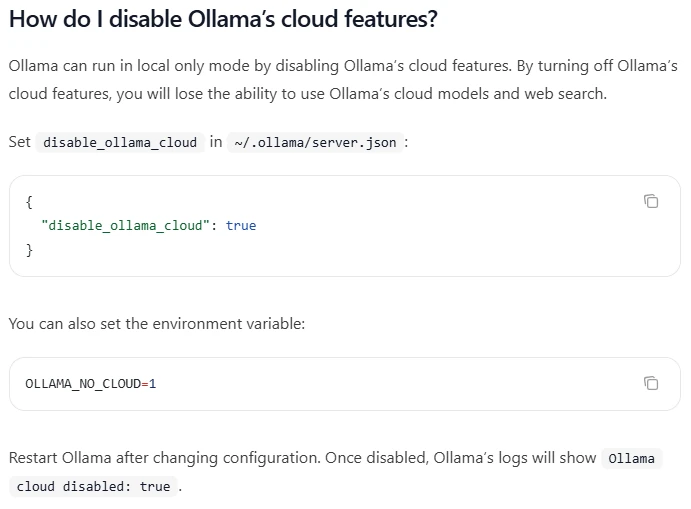
Check the configured endpoint, external tools, logging, and backups. A successful offline conversation is useful evidence that a particular workflow runs offline; it is not a full audit of every component’s network behavior.
Local deployment also leaves you responsible for software updates, trusted model sources, file permissions, and access to the inference service. Follow secure AI deployment guidance, and avoid exposing a local endpoint publicly without appropriate protection. Open weights do not automatically provide secure software or reliable answers.
Can you trust DeepSeek’s answers or let it use tools?
A convincing answer is not a verified answer
DeepSeek’s model-limitations disclosure acknowledges that responses can contain errors, omissions, or invented information. It does not guarantee that retrieval-based techniques eliminate those problems, and it cautions against treating outputs as professional advice.
For important claims, open the cited source and check whether it actually supports the answer. For generated commands or code, review what will execute and test in a restricted environment. Do not make medical, legal, financial, or other high-stakes decisions solely from the chatbot’s response.
Jailbreak results are not probabilities of account theft
Cisco’s January 31, 2025 R1 evaluation used an automated jailbreaking method against 50 sampled HarmBench prompts and reported success against all 50. That concerns bypassing the tested model’s safeguards; it is not a 100% probability that an ordinary user’s account will be hacked.
Later evaluations also need their own scope. NIST’s September 2025 assessment reported agent-hijacking weaknesses, including for R1-0528, in simulated environments. Its May 2026 V4 Pro report assessed another model’s capabilities. Neither should be presented as a current security audit of the consumer app or a later model release.
Tool permissions determine how far a mistake can spread
OWASP describes indirect prompt injection as instructions arriving through external content, such as a website or file, that alter the model’s behavior. The stakes increase when the surrounding application can execute commands, modify files, or send information.
Give an agent only the access its task requires. Use a limited working folder and require confirmation before consequential actions, such as deleting files or sending messages. OWASP recommends least privilege and human approval for high-risk operations; a prompt telling the model to “ignore malicious instructions” is not a sufficient security boundary.
DeepSeek Harness has its own data-handling rules. Its September 20, 2026 privacy policy distinguishes official-model services from custom-model services. For custom models, it says input goes directly to the chosen model provider rather than being processed on Harness’s servers. It separately warns about third-party tools and plugins. That arrangement does not mean a custom endpoint is local or that connected tools cannot receive data.
What about workplace restrictions and children?
A government-device restriction is not a worldwide consumer ban
Australia’s published PSPF Direction 001-2025, dated February 4, 2025, requires Australian Government entities to prevent access, use, or installation of DeepSeek products and services on government systems and devices, and remove existing instances. Its stated scope concerns those government systems—not every private individual worldwide.
For work, the relevant question is whether your organization permits the particular service and data. A tool working on your computer is not evidence of approval. Have the responsible security or privacy team assess the arrangement before uploading confidential material. The ICO’s AI security guidance emphasizes reviewing risk management and data minimization, rather than relying on a product label.
Eligibility does not guarantee child-appropriate answers
DeepSeek’s account terms describe the service as primarily intended for adults and require guardian involvement and consent for users under 18 or the applicable national minimum age. That condition is not a guarantee of suitable responses. Check applicable requirements and supervise age-appropriate use rather than relying on an app-store rating alone.
Reduce risk before your next prompt
Start from the official source. Follow the links on DeepSeek’s download page rather than trusting an advertisement, unofficial installer, or extension with a similar name. Confirm the destination and publisher before installing or signing in. Official distribution helps establish origin; it does not certify the absence of vulnerabilities.
Minimize the material you send. Ask for a structure or fictional example before uploading a real document. Removing names alone may be insufficient: the ICO explains indirect identification, where combinations of details still identify someone.
For a fictional customer-service exercise, instead of uploading a real support conversation, you could ask:
Write a polite response to a fictional customer whose delivery arrived late. Acknowledge the delay and ask what resolution they would prefer. Do not invent a refund policy or promise compensation.
This preserves the writing task without needing an actual customer’s name, address, order number, or complaint history. Where the real details are essential, move the task into an approved process rather than repeatedly adding identifying information to the prompt.
Review sharing separately. DeepSeek’s sharing terms say anyone with a conversation link can view its contents and warn about public reposting and crawling. Do not share a conversation link containing information you would not share directly.
Protect the surrounding account and software. Keep software updated, use a unique password, and use additional authentication protections where your sign-in method supports them. For developers, the Open Platform Terms specifically warn against exposing API keys publicly or in browser-side code. These precautions reduce particular risks; they do not change the provider’s data policy.
What to do if you already shared sensitive information
Respond to what was disclosed, rather than assuming that using DeepSeek means your device was compromised.
- For a password, token, or API key, revoke or rotate it through its issuer. Review relevant account activity and update legitimate applications that used the old credential. GitHub’s secret-handling guidance explains why exposed credentials require this response. Removing the chat does not invalidate the secret.
- For work or client information, stop further sharing and notify the appropriate internal contact. Record what was sent, when, through which service, and whether it was shared publicly. Follow the organization’s incident and evidence-preservation process before deleting records it may need.
- Use the available deletion and privacy-request routes. Remove public posts containing conversation links where you control them, and request help with remaining copies. DeepSeek’s privacy contact is [email protected]; rights and exceptions depend on the applicable circumstances.
A deletion request cannot establish that an exposed credential was never used or that nobody copied a public conversation. Match the response to the exposure: revoke access credentials, involve the responsible people for confidential records, and use privacy controls for the data still held by the service.