
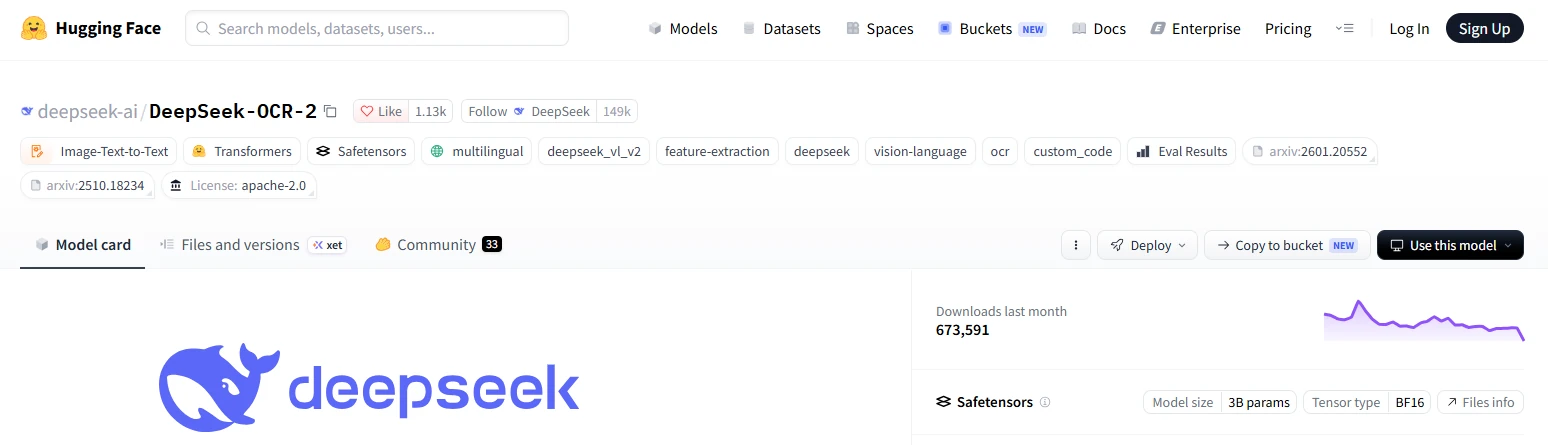
DeepSeek-OCR 2 is DeepSeek’s open-weight, 3B-parameter vision-language model for turning document images into plain text or layout-aware Markdown. Its main architectural change over the original DeepSeek-OCR is DeepEncoder V2, which attempts to reorder visual information according to the document’s semantic reading flow before the language decoder produces text. It is primarily a downloadable checkpoint for local or self-hosted use—not a model currently exposed through DeepSeek’s first-party hosted API—and every important value, table, formula and page sequence still requires verification against the original document.
Independent-site disclosure: This is an independent guide and is not affiliated with DeepSeek.
Last verified: October 9, 2026. Model repositories, runtime support, benchmark leaderboards and hosted API catalogs can change. Recheck the official repository and runtime documentation before installing or deploying the model.
Testing note: No local inference session was run for this article. Installation commands and model behavior were checked against current official documentation and source code, but no OCR output, processing time, memory result or accuracy figure is presented as a firsthand test.
DeepSeek-OCR 2 at a glance
| Question | Current answer | Important qualification |
|---|---|---|
| What is it? | A specialized image-to-text and document-parsing vision-language model | It is not a complete document-management or business-data extraction system. |
| Official checkpoint | deepseek-ai/DeepSeek-OCR-2 | Use the verified DeepSeek organization on Hugging Face or the official GitHub repository. |
| Release date | January 28, 2026 | The repository announcement appeared on January 27; the research index and paper use January 28. |
| Model size | 3B parameters; BF16 checkpoint | The full model repository is approximately 6.79 GB, but runtime memory must also cover activations, images, crops and generated tokens. |
| Primary inputs | Document or general images plus a text prompt | The official PDF workflow first renders PDF pages as images. |
| Primary outputs | Plain OCR text or layout-aware Markdown with grounding tags | JSON, DOCX, searchable PDF and database records require additional processing. |
| Official prompts | <image>\nFree OCR. and <image>\n<|grounding|>Convert the document to markdown. | The two prompts serve different output goals. |
| License | Apache License 2.0 | The license does not grant rights to process copyrighted, private or regulated source documents. |
| First-party DeepSeek API | No DeepSeek-OCR 2 endpoint is currently listed | DeepSeek’s hosted deepseek-flash model can analyze images, but it is a different model and service. |
| Current benchmark position | Strong but no longer the top result on the latest OmniDocBench leaderboard | Do not mix the launch paper’s v1.5 score with the later v1.6 leaderboard. |
What is DeepSeek-OCR 2?
DeepSeek-OCR 2 is a specialized vision-language model designed to recognize text and reconstruct document structure from page images. DeepSeek released its code, checkpoint and research paper under the title DeepSeek-OCR 2: Visual Causal Flow.
It can be useful for tasks such as:
- Converting scanned pages into text.
- Producing Markdown from academic papers, reports and books.
- Recovering the approximate reading order of multi-column pages.
- Transcribing tables and mathematical formulas.
- Extracting figures from document pages through the repository’s grounding post-processor.
- Preparing document text for search, indexing or a later RAG pipeline.
It should not be confused with:
- The ordinary DeepSeek web or mobile chat application.
- The hosted
deepseek-flashvision API. - A finished invoice-processing or form-automation product.
- A PDF viewer or document-management system.
- A complete retrieval-augmented generation system.
- A guaranteed structured-data extraction API.
How Visual Causal Flow works
Traditional vision encoders generally flatten image patches into a fixed sequence, commonly following a top-left-to-bottom-right raster order. That ordering is convenient for the model, but it does not always match the logical structure of a document containing multiple columns, sidebars, captions, tables or diagrams.
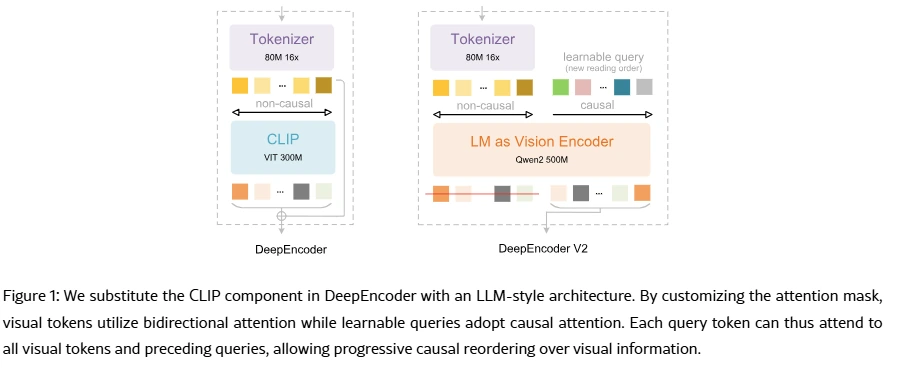
DeepSeek-OCR 2 introduces DeepEncoder V2 to make the initial visual sequence more sensitive to document semantics. Its main stages are:
- Visual tokenization: an 80M-parameter image compressor converts page regions into a smaller visual-token representation.
- Bidirectional visual attention: the original visual tokens can attend across the page to retain global visual context.
- Causal flow queries: learnable query tokens attend to all visual tokens and to earlier query tokens.
- Semantic reordering: those queries are intended to arrange page information according to a more useful reading flow.
- Language decoding: only the reordered causal-query outputs are passed to the DeepSeek MoE decoder, which generates text or Markdown autoregressively.
The LM-style part of DeepEncoder V2 was initialized from Qwen2-0.5B, while the final decoding system uses DeepSeek’s approximately 3B-parameter Mixture-of-Experts decoder with about 500M active parameters. This initialization detail does not make DeepSeek-OCR 2 a Qwen model.
The model uses a global 1024 × 1024 view and zero to six local 768 × 768 crops. Depending on the page, it sends between 256 and 1,120 reordered visual tokens to the language decoder.
“Visual Causal Flow” is an architectural proposal, not proof that the model literally reads documents like a person or performs flawless general two-dimensional reasoning.
DeepSeek-OCR 2 vs the original DeepSeek-OCR
| Area | DeepSeek-OCR | DeepSeek-OCR 2 | Practical meaning |
|---|---|---|---|
| Encoder | DeepEncoder with a CLIP-style vision component | DeepEncoder V2 with an LM-style causal-flow component | OCR 2 is designed to improve semantic ordering before decoding. |
| Maximum visual-token budget in the paper | 1,156 in the compared nine-crop setup | 1,120 | OCR 2 improved the reported score without increasing the maximum token budget. |
| OmniDocBench v1.5 overall score | 87.36 | 91.09 | Vendor-reported improvement of 3.73 points. |
| Text edit distance | 0.073 | 0.048 | Lower is better. |
| Formula edit distance | 0.236 | 0.198 | OCR 2 improved but did not eliminate formula errors. |
| Table edit distance | 0.123 | 0.096 | Table structure and cell content still require validation. |
| Reading-order edit distance | 0.085 | 0.057 | This is the clearest published benefit of the new encoder. |
| Repetition in DeepSeek’s online image logs | 6.25% | 4.17% | Repetition fell but remained observable. |
| Repetition in DeepSeek’s PDF data pipeline | 3.69% | 2.88% | Long outputs still need loop and duplication checks. |
These results come from DeepSeek’s own paper. They do not establish equivalent improvement for every language, handwriting style, invoice format or low-quality scan.
What DeepSeek-OCR 2 can output
Plain text with the Free OCR prompt
Use the plain OCR prompt when the main objective is readable text rather than layout reconstruction:
<image>
Free OCR.
This route is more appropriate when headings, coordinates, extracted figures and page layout are not needed.
Layout-aware Markdown with grounding
Use the official document prompt when the page’s structure matters:
<image>
<|grounding|>Convert the document to markdown.
This can produce Markdown together with grounding tags in a format similar to:
<|ref|>title<|/ref|><|det|>[[x1, y1, x2, y2]]<|/det|>The official post-processing code interprets coordinates on a normalized 0–999 scale, draws layout boxes and can crop detected image regions. This is useful grounding information, but it is not a documented business-ready JSON schema or character-level bounding-box API.
Outputs the model does not create by itself
- A searchable PDF with an embedded invisible text layer.
- A validated JSON invoice schema.
- ALTO XML or hOCR.
- An editable Word document.
- A populated database record.
- Guaranteed confidence scores for every recognized element.
Those outputs can be built around the OCR result, but they require separate conversion, validation and error-handling layers.
Can DeepSeek-OCR 2 read PDF files?
Yes, through the repository’s PDF-processing pipeline—but the model itself works on page images. The official run_dpsk_ocr2_pdf.py script opens a PDF with PyMuPDF, renders each page at 144 DPI, converts the rendered pages into PIL images and submits those images to the model.
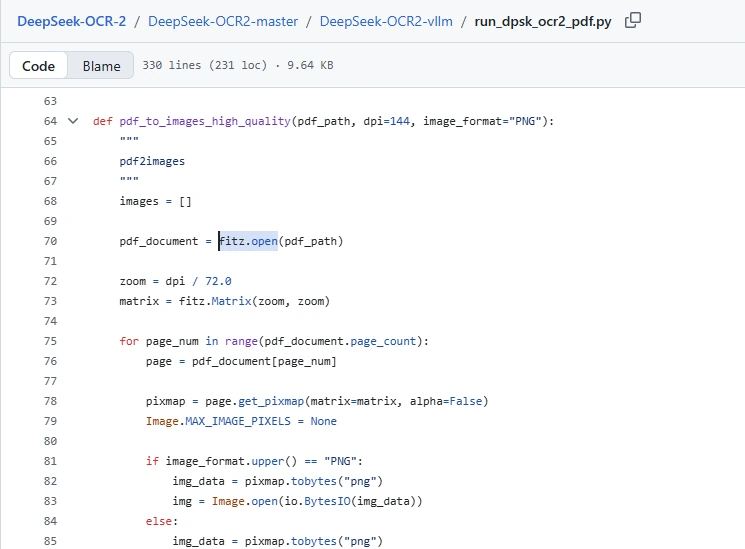
The official script can then create:
- A grounded
_det.mmdoutput containing raw detection tags. - A cleaned
.mmdMarkdown output. - An
_layouts.pdfvisualization containing rendered pages with detected layout boxes. - Extracted page-image regions saved in an
imagesfolder. - Page separators inserted between generated page outputs.
The generated layout PDF is a visualization reconstructed from page images. It should not be described as a searchable PDF with a verified text layer.
Choose the right inference route
| Route | Best for | Main advantage | Main limitation |
|---|---|---|---|
| Official Transformers script | One-page tests and direct checkpoint evaluation | Closest to the model repository’s reference implementation | Linux- and NVIDIA-oriented environment with pinned dependencies |
| Official PDF vLLM script | Batch conversion of multi-page PDFs | Page concurrency, Markdown assembly and layout visualizations | The original repository uses a specially documented vLLM 0.8.5 environment. |
| Current upstream vLLM | Offline batches or a local API service | Current official recipe and OpenAI-compatible local serving | Requires careful configuration, especially the no-repeat logits processor. |
| vLLM Ascend | Huawei Ascend deployments | Official vLLM-Ascend documentation supports OCR 2 from version 0.16.0 | Separate hardware and software stack |
| Third-party hosted API | Users who do not want to manage GPUs | Provider handles infrastructure | It is not the first-party DeepSeek API; price, privacy and model revision depend on that provider. |
| Community conversion | CPU, Apple Silicon or reduced-memory experimentation | May expand hardware access | Quantization and custom code can change quality, speed and supported features. |
Official Transformers quickstart
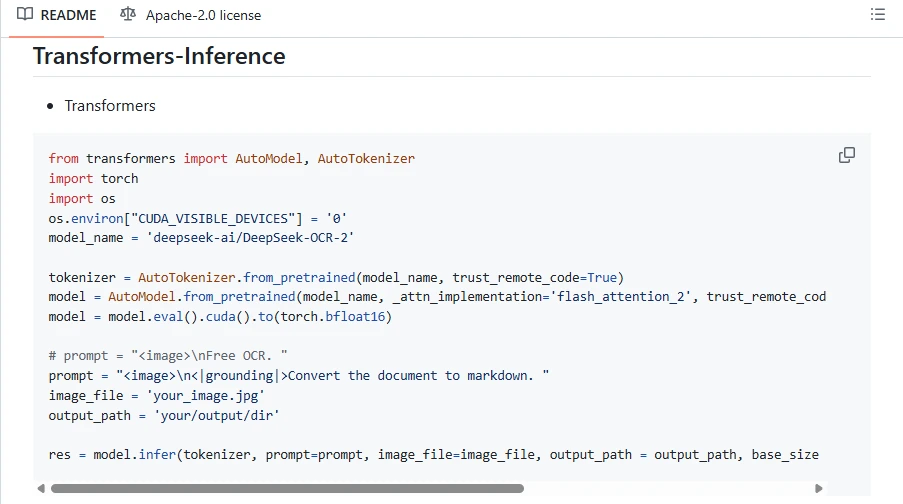
The official repository’s tested environment uses Python 3.12.9, CUDA 11.8, PyTorch 2.6.0, Transformers 4.46.3, Tokenizers 0.20.3 and FlashAttention 2.7.3. The following route targets an NVIDIA CUDA environment.
git clone https://github.com/deepseek-ai/DeepSeek-OCR-2.git
cd DeepSeek-OCR-2

conda create -n deepseek-ocr2 python=3.12.9 -y
conda activate deepseek-ocr2

pip install torch==2.6.0 torchvision==0.21.0 torchaudio==2.6.0 \
  --index-url https://download.pytorch.org/whl/cu118

pip install -r requirements.txt
pip install flash-attn==2.7.3 --no-build-isolation
Next, edit:
DeepSeek-OCR2-master/DeepSeek-OCR2-hf/run_dpsk_ocr2.pySet:
image_fileto a test image that contains no confidential information.output_pathto a writable directory.promptto either the plain OCR or Markdown prompt.
cd DeepSeek-OCR2-master/DeepSeek-OCR2-hf
python run_dpsk_ocr2.py
The reference code loads the model with trust_remote_code=True, enables FlashAttention 2, moves the model to CUDA and converts it to BF16.
Security note:
trust_remote_code=Trueexecutes Python code supplied by the model repository. Review the code, pin a trusted revision and run it in an isolated environment rather than importing an unknown fork into a sensitive system.
Serve DeepSeek-OCR 2 with current vLLM
The current upstream vLLM recipe supports offline batching and an OpenAI-compatible local server.
uv venv
source .venv/bin/activate
uv pip install -U vllm --torch-backend auto
Start a local server with the OCR-specific repetition processor:
vllm serve deepseek-ai/DeepSeek-OCR-2 \
  --logits_processors vllm.model_executor.models.deepseek_ocr:NGramPerReqLogitsProcessor \
  --no-enable-prefix-caching \
  --mm-processor-cache-gb 0
This creates a self-hosted OpenAI-compatible endpoint, normally at http://localhost:8000/v1. It is not the official DeepSeek cloud API.
The current vLLM recipe recommends:
- Using the custom n-gram logits processor to reduce repetitive OCR output.
- Disabling prefix caching for the standard OCR workflow.
- Disabling the multimodal processor cache when image reuse is not useful.
- Using simple OCR prompts rather than wrapping them in a long chat instruction format.
- Adjusting batch-token limits according to real hardware capacity.
How to process a PDF with the repository
- Preserve the original PDF. Work from a copy, especially when the file is legally or operationally important.
- Check whether OCR is necessary. If the PDF already contains accurate selectable text, direct extraction may be faster and more faithful.
- Inspect the pages. Look for rotation, skew, low resolution, password protection, complex tables and mixed scanned/digital content.
- Install the repository’s vLLM requirements. Follow the exact current repository instructions rather than combining random package versions.
- Edit
config.py. SetMODEL_PATH,INPUT_PATH,OUTPUT_PATH, the prompt and appropriate concurrency. - Lower concurrency when memory is limited. The example config uses
MAX_CONCURRENCY = 100, which is a configurable example—not a universal safe value. - Run the PDF script. The script renders the pages and submits them as image inputs.
- Inspect the grounded and cleaned outputs. Keep both until validation is complete.
- Compare every consequential value with the source PDF. Recalculate totals and verify table associations manually.
cd DeepSeek-OCR2-master/DeepSeek-OCR2-vllm
python run_dpsk_ocr2_pdf.py
How to validate the OCR result
A clean-looking Markdown file can still contain wrong values, reordered paragraphs or invented text. Validate the output according to the document’s purpose.
Text validation
- Compare names, dates, identifiers and numbers character by character.
- Check punctuation, symbols, superscripts and subscripts.
- Look for omitted lines at page boundaries.
- Search for duplicated paragraphs or repeated phrases.
- Confirm that text was not invented where the scan is unreadable.
Layout and reading order
- Confirm the order of columns, sidebars, captions and footnotes.
- Check that headings remain attached to the correct section.
- Verify that figure captions are not inserted into the main paragraph flow.
- Inspect magazine and newspaper pages especially carefully.
Tables and calculations
- Check row and column headers.
- Check merged cells, blank cells and repeated headings.
- Verify decimal separators, minus signs, percentages and currency symbols.
- Recalculate subtotals, discounts, taxes and totals independently.
- Confirm that a value belongs to the correct row and column.
Formulas
- Render the generated LaTeX rather than checking the source string only.
- Compare operators, indices, brackets and equation numbering.
- Check inline and display formulas separately.
- Do not assume mathematical equivalence from visual similarity.
DeepSeek-OCR 2 benchmark results
The launch paper evaluated DeepSeek-OCR 2 on OmniDocBench v1.5, a 1,355-page benchmark covering nine document categories in Chinese and English.
| OmniDocBench v1.5 metric | DeepSeek-OCR | DeepSeek-OCR 2 | Direction |
|---|---|---|---|
| Overall score | 87.36 | 91.09 | Higher is better |
| Text edit distance | 0.073 | 0.048 | Lower is better |
| Formula edit distance | 0.236 | 0.198 | Lower is better |
| Table edit distance | 0.123 | 0.096 | Lower is better |
| Reading-order edit distance | 0.085 | 0.057 | Lower is better |

These figures demonstrate improvement over the original model under DeepSeek’s published v1.5 setup. They do not establish that the model remains first on a current leaderboard.
The current OmniDocBench v1.6 full-page leaderboard lists DeepSeek-OCR 2 with:
- Overall score: 90.25
- Text edit distance: 0.050
- Formula CDM: 91.84
- Table TEDS: 83.89
- Reading-order edit distance: 0.144
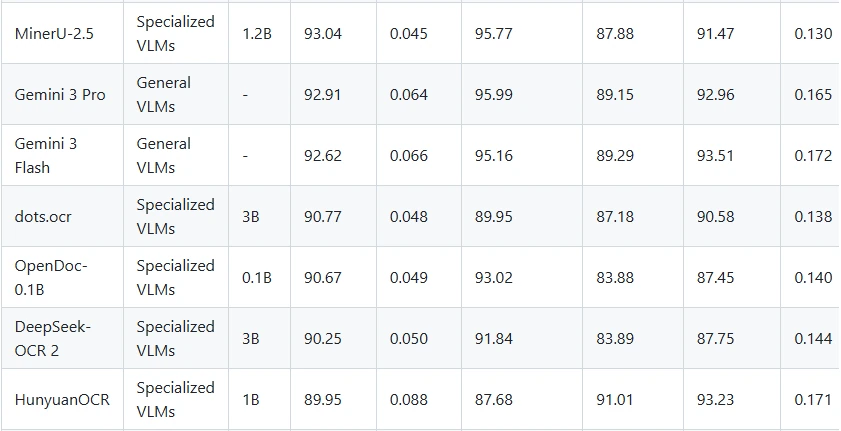
Several newer specialized systems rank above it on that later leaderboard. The v1.5 and v1.6 results use different benchmark versions and metrics, so their overall figures should not be treated as a direct decline from 91.09 to 90.25.
DeepSeek-OCR 2 was a strong and efficient document parser at release, but “current state of the art” is no longer an accurate universal description based on the latest OmniDocBench table.
Known limitations
- Dense newspapers: DeepSeek’s paper reports weaker text recognition on text-heavy newspaper pages, with a text edit distance above 0.13.
- Repetition: duplicated phrases or looping generation remain possible despite improvement over the original model.
- Long output: Markdown can be truncated when the generation limit is too low.
- Small text: visual-token compression can discard fine detail, especially on dense or low-resolution pages.
- Complex tables: cell associations, merged cells and numerical signs can still be wrong.
- Formula errors: operators and indices require mathematical validation.
- Pipeline complexity: PDF rendering, image preprocessing, inference, cleanup and validation are separate stages.
- Environment sensitivity: FlashAttention, CUDA, PyTorch, Transformers and vLLM compatibility can change between versions.
- No confidence layer: the official reference workflow does not provide calibrated per-field confidence suitable for automatic approval.
- No automatic business validation: plausible output can still contain materially incorrect values.
Languages, handwriting and Arabic documents
The official model card is tagged multilingual, while the launch paper’s principal OmniDocBench evaluation covers Chinese and English documents. This does not prove equal performance across all languages, scripts or document types.
No current first-party benchmark establishes a universal accuracy level for:
- Arabic documents.
- Right-to-left reading order.
- General handwriting.
- Historical scripts.
- Low-quality fax documents.
- Mixed Arabic-English tables.
For any language beyond the documented benchmark coverage, build a representative evaluation set containing the exact fonts, scans, tables, formulas and writing styles used in the intended application.
Hardware and memory requirements
The official BF16 weights occupy approximately 6.78 GB, but that is not a complete VRAM requirement. Runtime memory also depends on:
- Model and vision activations.
- The number of local image crops.
- Input resolution.
- Batch size and concurrent pages.
- Maximum generated output.
- Runtime and attention implementation.
- CUDA graphs and framework overhead.
- Quantization, if a community conversion is used.
The official Transformers reference targets NVIDIA CUDA. No single official VRAM figure applies to every page, runtime or batch configuration. A system that can load the weights may still fail during large-page or concurrent inference.
Reduce memory pressure by testing one page at a time, lowering PDF concurrency, limiting output length and using representative rather than maximum-resolution documents. Quantization may help, but it can change OCR quality, grounding output and runtime compatibility.
Is there an official DeepSeek-OCR 2 API?
No first-party hosted DeepSeek-OCR 2 endpoint is currently listed in the official DeepSeek API model catalog. The current hosted catalog exposes deepseek-flash and deepseek-v4-pro.
The hosted deepseek-flash model accepts image input and can read screenshots or analyze charts, but it is not the DeepSeek-OCR 2 checkpoint and should not be described as the same model.
A vLLM server running at http://localhost:8000/v1 is an OpenAI-compatible local API. Its operator, hardware, files and data remain under the self-hosted workflow. It is not https://api.deepseek.com.
If a commercial provider advertises a DeepSeek-OCR 2 API, verify:
- The company operating the service.
- The exact checkpoint revision.
- Whether weights are quantized or modified.
- Accepted input formats and page limits.
- Pricing unit and minimum charge.
- Storage and retention policy.
- Processing region.
- Deletion controls and support.
Using DeepSeek-OCR 2 in a RAG pipeline
DeepSeek-OCR 2 can supply document text or Markdown to a retrieval system, but it is only one component. A reliable pipeline normally requires:
- File validation and malware scanning.
- PDF page rendering or native text extraction.
- OCR or Markdown conversion.
- Removal of repeated or malformed output.
- Preservation of page and source metadata.
- Chunking based on document structure.
- Embedding and indexing.
- Retrieval.
- Answer generation with citations.
- Human verification of consequential claims.
Preserve page numbers and the link between every chunk and its original file. Treat text found inside an uploaded document as untrusted content; a malicious page can contain instructions intended to manipulate a downstream language model.
Privacy and security
Local inference can reduce the need to upload documents to a third-party OCR service, but “local” does not automatically mean fully offline or private. The complete workflow may still contact the internet for:
- Model and package downloads.
- Container images and updates.
- Telemetry from surrounding software.
- Remote storage or backup.
- External embeddings or RAG services.
- Web search or connected tools.
For sensitive documents:
- Use an isolated account, container or virtual machine.
- Pin reviewed repository and dependency versions.
- Do not run the service as root.
- Restrict network access when it is unnecessary.
- Encrypt source files, rendered pages and outputs.
- Delete temporary page images according to an approved retention policy.
- Minimize logs containing document content.
- Restrict access to the local HTTP endpoint.
- Do not expose a development vLLM server directly to the public internet.
License and commercial use
The official repository and checkpoint identify the Apache License 2.0. That license generally permits use, modification, redistribution and commercial deployment subject to its conditions, including preserving the license and applicable notices when distributing the work or derivatives.
Apache 2.0 does not guarantee:
- That a source document may lawfully be copied or processed.
- That personal information may be processed without consent or another lawful basis.
- That OCR output is accurate enough for a regulated workflow.
- That a third-party dependency uses the same license.
- That a community fine-tune or quantization preserves the original licensing terms unchanged.
- That model output does not infringe intellectual-property or privacy rights.
Review the exact model, code, dependency and document rights applicable to the intended deployment.
Common problems and safe first checks
| Symptom | Likely cause | Safe first check |
|---|---|---|
flash-attn will not install | Unsupported compiler, CUDA, PyTorch or GPU environment | Compare the environment with the exact official tested versions before trying random downgrades. |
| CUDA out of memory | Weights plus crops, activations, batch or output exceed available VRAM | Run one image, reduce PDF concurrency and shorten maximum output. |
| The model loads on CPU | CUDA is unavailable or the installed PyTorch build does not match the system | Confirm torch.cuda.is_available() and the active Python environment. |
| Output repeats indefinitely | Generation loop or missing repetition processor | Use the current vLLM n-gram logits processor and inspect the maximum-token setting. |
| Output stops before the page ends | Generation limit is too low | Increase output cautiously and check for repetitive text before accepting the longer result. |
| Columns are mixed | Dense layout, weak crop coverage or incorrect reading order | Inspect the grounded layout output and test the page separately at an appropriate resolution. |
| A table looks plausible but totals are wrong | Cell association or character-recognition error | Compare every numerical row with the original and recalculate totals independently. |
| PDF script cannot open the file | Corruption, encryption, permissions or unsupported file state | Open the PDF normally, work from a copy and check password protection. |
| vLLM server starts but image requests fail | Incorrect request shape, runtime version or multimodal configuration | Follow the current DeepSeek-OCR 2 vLLM recipe rather than a text-only completion example. |
| Markdown contains raw grounding tags | The raw detection output has not been cleaned | Use the repository’s post-processing step or parse the tags deliberately. |
Who should use DeepSeek-OCR 2?
DeepSeek-OCR 2 is worth evaluating when you need:
- An open-weight document parser that can run on controlled infrastructure.
- Markdown reconstruction rather than plain character recognition alone.
- Better handling of multi-column reading order than the original DeepSeek-OCR.
- A research-friendly checkpoint with code and an Apache 2.0 license.
- A local component for document ingestion or RAG experiments.
- A model that can be served through current vLLM tooling.
Test alternatives as well when you need:
- The highest current OmniDocBench score.
- A fully managed first-party OCR API.
- Reliable character-level boxes and confidence scores.
- Certified extraction for invoices, identity records or regulated forms.
- Strong evidence for a language not covered by the published evaluation.
- A polished no-code user interface.
- Native searchable-PDF or office-document export.
Frequently asked questions
Is DeepSeek-OCR 2 an OCR engine or a vision-language model?
It is a specialized vision-language model optimized for OCR and document parsing. It recognizes page content by generating text or Markdown rather than using only a traditional character-classification pipeline.
Is DeepSeek-OCR 2 open source?
DeepSeek publishes the code and model weights under the Apache License 2.0. “Open-weight model with released source code” is the most precise description.
Can DeepSeek-OCR 2 be used commercially?
Apache 2.0 generally permits commercial use subject to its conditions. Commercial deployment still requires review of source-document rights, privacy obligations, dependencies and output accuracy.
Is DeepSeek-OCR 2 available in DeepSeek Chat?
No first-party documentation checked for this article confirms it as a selectable model or mode in the ordinary DeepSeek consumer application.
For ordinary consumer document questions, use our DeepSeek Chat PDF guide; this is a different workflow from running OCR 2.
Is DeepSeek-OCR 2 available through the official DeepSeek API?
No. The current first-party API model list does not include DeepSeek-OCR 2. You can run it locally or use a clearly identified third-party host.
Can DeepSeek-OCR 2 process a PDF directly?
The official repository provides a PDF workflow, but its script renders each PDF page as an image before inference. The model’s direct input in that pipeline is the page image.
Does it create Markdown?
Yes. The official grounding prompt asks the model to convert a document image to Markdown and can include layout-grounding tags that the repository post-processes.
Can it create a searchable PDF?
Not by itself. The reference PDF script creates Markdown and a visual layout PDF. Building a searchable PDF requires another step that embeds a verified text layer.
Can it return bounding boxes?
The grounding output can contain normalized element coordinates, and the official post-processor uses them to draw boxes and extract image regions. This is not documented as a stable character-level bounding-box API.
How much VRAM does DeepSeek-OCR 2 need?
No single official VRAM number applies to every configuration. The BF16 weight file is approximately 6.78 GB, but real memory use also includes image crops, activations, output length, runtime overhead and concurrency.
Can it run on Windows or macOS?
The primary official Transformers instructions target an NVIDIA CUDA environment and are Linux-oriented. Community ports may support Windows, CPU or Apple Metal, but they should not be presented as the reference DeepSeek setup without separate testing.
Does DeepSeek-OCR 2 support Arabic?
The model is tagged multilingual, but its main published benchmark is Chinese and English. No official Arabic quality guarantee was confirmed. Evaluate it on representative Arabic, right-to-left and mixed-language pages before adoption.
Does it read handwriting?
The available evidence does not justify a universal handwriting claim. Handwritten formulas or examples in a benchmark do not establish reliable general handwriting transcription. Use a dedicated handwriting test set.
Is DeepSeek-OCR 2 still state of the art?
No universal current state-of-the-art claim is supported. It performed strongly in DeepSeek’s OmniDocBench v1.5 evaluation, but several newer systems rank above it on the current v1.6 leaderboard.
Can it be used for RAG?
Yes, as the OCR or document-parsing stage. Chunking, embeddings, indexing, retrieval, citations, access control and answer validation must be implemented separately.
Is there an official fine-tuning guide?
The official repository checked for this article focuses on inference and does not provide a complete production-ready fine-tuning recipe. Community adaptations should be evaluated separately.
Sources checked
The following primary sources were checked on October 9, 2026:
- DeepSeek Research & News index
- Official DeepSeek-OCR 2 GitHub repository
- Official DeepSeek-OCR 2 model card
- DeepSeek-OCR 2: Visual Causal Flow paper
- Original DeepSeek-OCR repository
- Original DeepSeek-OCR paper
- Current vLLM DeepSeek-OCR 2 recipe
- vLLM-Ascend DeepSeek-OCR 2 documentation
- Current OmniDocBench repository and leaderboard
- Current first-party DeepSeek API model list
- Current DeepSeek hosted Vision API guide
- DeepSeek-OCR 2 Apache 2.0 license