
DeepSeek Harness is an open-source agent runtime and workspace from DeepSeek, not a foundation model. It connects a selected AI model to workspaces, files, commands, tools, plugins and delegated agents for coding, document work, research and automation. The simplest official starting route is the packaged desktop application on a supported Mac or Windows computer; technical users can instead run the local Web UI with npx @deepseek-ai/dsh web. The most important qualification is that Harness remains preview software: it can modify files and execute model-generated commands, and DeepSeek’s official safety notice says it has not undergone a security audit and should not be treated as production-ready.
Independent-site disclosure: This guide is not affiliated with DeepSeek.
Last verified: October 9, 2026. DeepSeek Harness is changing quickly. Check the current download page, repository releases, package metadata and plugin documentation before following version-specific instructions.
Evidence note: This article was researched from current first-party product pages, documentation, policies and source repositories. No firsthand Harness task was executed during preparation, so no installation result, generated file, benchmark, completion time or model cost is presented as a direct test.
DeepSeek Harness at a glance
| Question | Current answer | Important qualification |
|---|---|---|
| What is it? | An extensible agent harness and workspace built on the Cordis plugin architecture | It needs a separate model service or compatible local model endpoint. |
| Is it an official DeepSeek product? | Yes | Use the official DeepSeek product page, download page and deepseek-ai repository. |
| Current maturity | The product page calls it Public Preview; the repository and safety notice use Developer Preview or experimental language. | Breaking changes remain possible, especially across prerelease channels and plugins. |
| Software licence | MIT | Models, plugins, dependencies and connected services can use different licences and terms. |
| Official desktop platforms | Apple-silicon Macs running macOS 13 or later, and 64-bit Windows | The current official download page does not list a packaged Linux desktop application. |
| Linux and advanced access | Local Web UI, source checkout or Python SDK | Requirements differ by route. |
| Default Web UI address | http://127.0.0.1:3080 | The host process must continue running. |
| Model options | Official DeepSeek services, built-in third-party providers, custom compatible endpoints and potentially local model servers | Each route has separate credentials, prices, capabilities and data terms. |
| Is it free? | The Harness software has no MIT licence fee. | Hosted model usage, external tools, plugins, infrastructure and local compute can cost money. |
| Is it secure or production-ready? | Not according to the current official safety notice | Use a copied workspace, least privilege, backups and a disposable environment. |
What is DeepSeek Harness?
DeepSeek Harness is the software layer that lets a language model operate through a structured agent loop. The model supplies reasoning and proposed actions; Harness provides the surrounding workspace, sessions, tools, permissions, file access, command execution, plugins, delegation and interface.
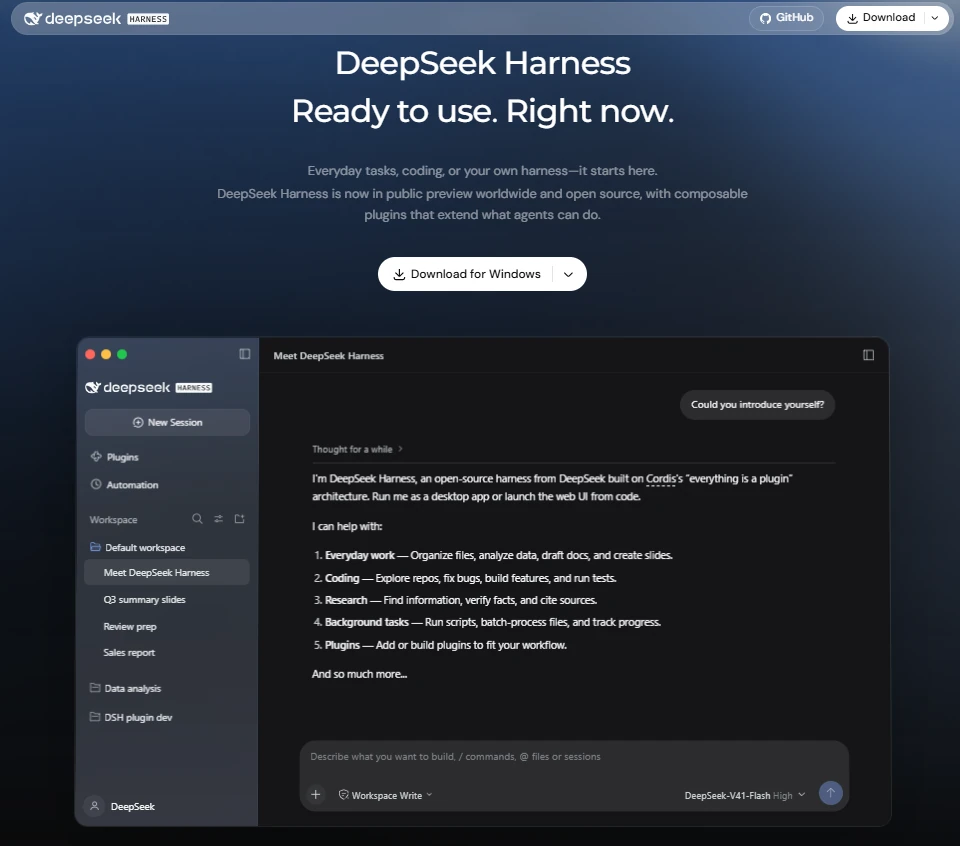
Its architecture is based on Cordis. Rather than reserving a large privileged core, the system represents major components—including model adapters, tools, session logging and the agent loop—as composable plugins. This is why the product describes itself around the idea that nearly every capability can be extended or replaced.
| DeepSeek route | What it is | Typical use |
|---|---|---|
| DeepSeek Chat | Hosted consumer assistant | Interactive questions, search, reasoning and supported file or media workflows |
| DeepSeek API | Hosted model service for developers | Calling DeepSeek models from an application or script |
| DeepSeek Harness | Agent runtime, workspace and extensibility layer | Giving a selected model controlled access to files, commands, tools and delegated work |
| Open-weight DeepSeek model | Downloadable model checkpoint | Self-managed local or server inference |
A model connected to Harness does not automatically gain every capability advertised on the product page. The final behaviour depends on the selected model, protocol, plugins, tools, permissions, workspace, operating system and provider configuration.
Current preview status and release channels
The official product page currently presents DeepSeek Harness as a worldwide Public Preview. The official repository and its safety notice use stronger Developer Preview or experimental wording and warn that compatibility-breaking changes can occur.
This distinction matters because the desktop application, GitHub prereleases and npm package may not carry identical version numbers at the same moment. A feature visible on the repository’s default branch may also be newer than the latest packaged desktop release.
- Check the GitHub releases page for the latest packaged release and prerelease notes.
- Check the official npm package before running an npm-specific command.
- Do not assume a plugin built against the repository’s newest code is compatible with an older desktop build.
- Record the Harness version, model, provider and plugin versions when documenting a workflow.
- Back up workspaces and configuration before upgrading a preview build.
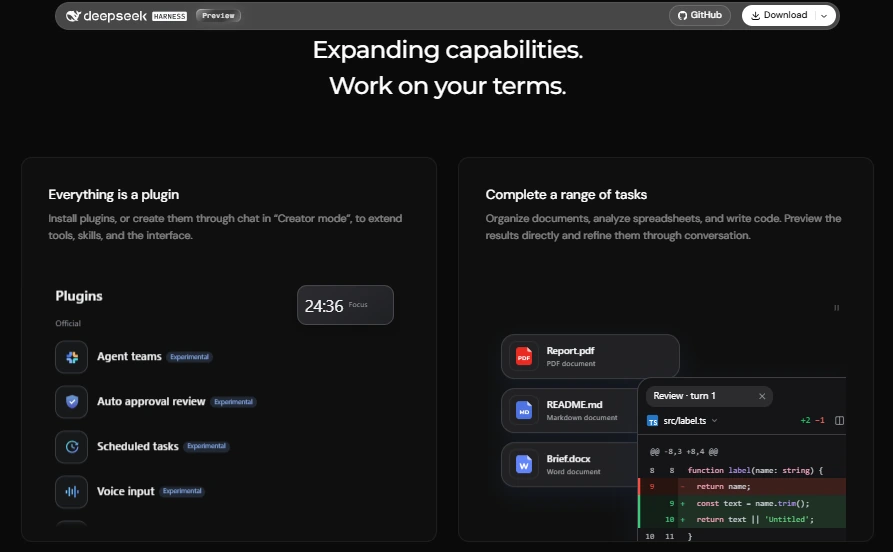
The product page currently marks Agent Teams, automatic approval review, scheduled tasks and voice input as experimental. Treat those labels as capability notices—not promises of long-term interface stability or production reliability.
Which DeepSeek Harness route should you use?
| Route | Best for | Setup level | Main limitation |
|---|---|---|---|
| Official desktop app | Most individual users on a supported Mac or Windows computer | Lowest | Only the operating systems and architectures listed on the current download page are supported. |
| Local Web UI | Developers who want a browser interface, Linux access or command-line control | Moderate | Requires a supported Node.js environment and a running local host process. |
| Run from source | Plugin developers, contributors and users evaluating unreleased code | High | Greater breakage and dependency-management risk |
| Python SDK | Applications that need to create and control Harness sessions programmatically | Moderate to high | Not a replacement for understanding workspaces, permissions, plugins and provider configuration |
| Another agent product | Teams requiring audited controls, contractual support or a narrower coding-only workflow | Varies | May provide less Harness-level extensibility or use another model ecosystem. |
Use the desktop app when the goal is to evaluate Harness rather than develop Harness itself. Use the Web UI when you need a local browser interface or an officially documented route on Linux. Run from source only when access to the newest code or plugin-development workflow is worth the additional maintenance risk.
How to install and start DeepSeek Harness
Option 1: install the official desktop app
The packaged desktop application is the simplest route for ordinary users.
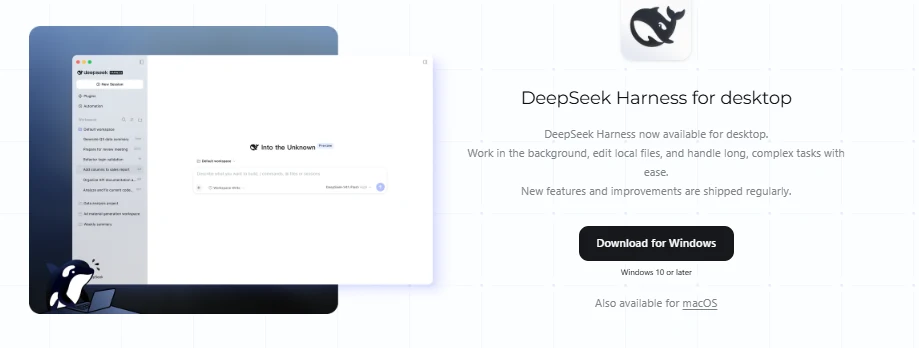
- Open the official DeepSeek download page.
- Select the Harness desktop build—not an unrelated community wrapper.
- On macOS, confirm that the computer uses Apple silicon and runs macOS 13 or later.
- On Windows, use the current official 64-bit installer.
- Install and open the application.
- Configure a model route before starting meaningful work.
- Select a copied, disposable or otherwise low-risk workspace for the first session.
Do not install an unofficial desktop application merely because its name or icon includes DeepSeek Harness. Confirm that the download is linked from a DeepSeek-controlled page or the official repository.
Option 2: run the local Web UI
The current repository declares Node.js ^22.19.0 or >=24.0.0. Verify the current package metadata before installation because preview requirements can change.
npx @deepseek-ai/dsh web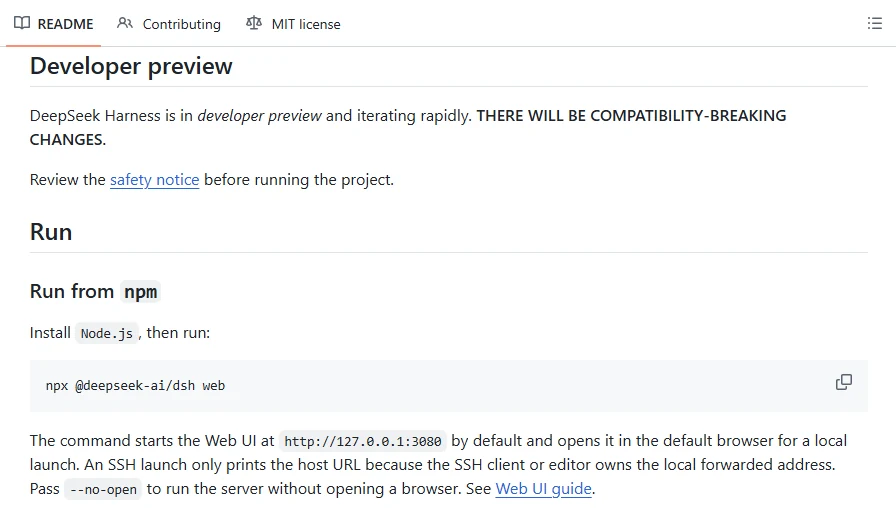
The command starts the local Web profile and normally opens http://127.0.0.1:3080. To start the server without automatically opening a browser, use:
npx @deepseek-ai/dsh web --no-openThe directory from which the command is launched affects the initial working context. The interface still requires an explicit workspace selection before the Agent can operate on files.
Option 3: run the repository from source
Use this route for contribution, plugin development or investigation of code that has not reached a packaged release.
git clone https://github.com/deepseek-ai/deepseek-harness.git
cd deepseek-harness
pnpm install
pnpm run build
pnpm dsh web
Install the Node.js and pnpm versions specified by the current repository rather than substituting versions from an older tutorial. Source builds can change ahead of the desktop or npm release channel.
Option 4: use the Python SDK
The official Python SDK guide currently requires Python 3.10 or later and supports Linux on x64 or arm64, macOS 14 or later on Apple silicon, and Windows x64. Its packaged runtime means an ordinary SDK launch does not require a separate system Node.js installation.
python -m pip install deepseek-harness-sdkThe SDK is appropriate when another application needs to create sessions, configure an isolated Harness home, choose a workspace and consume events programmatically. Keep every automated session constrained to a deliberate workspace and permission policy.
Configure a model provider
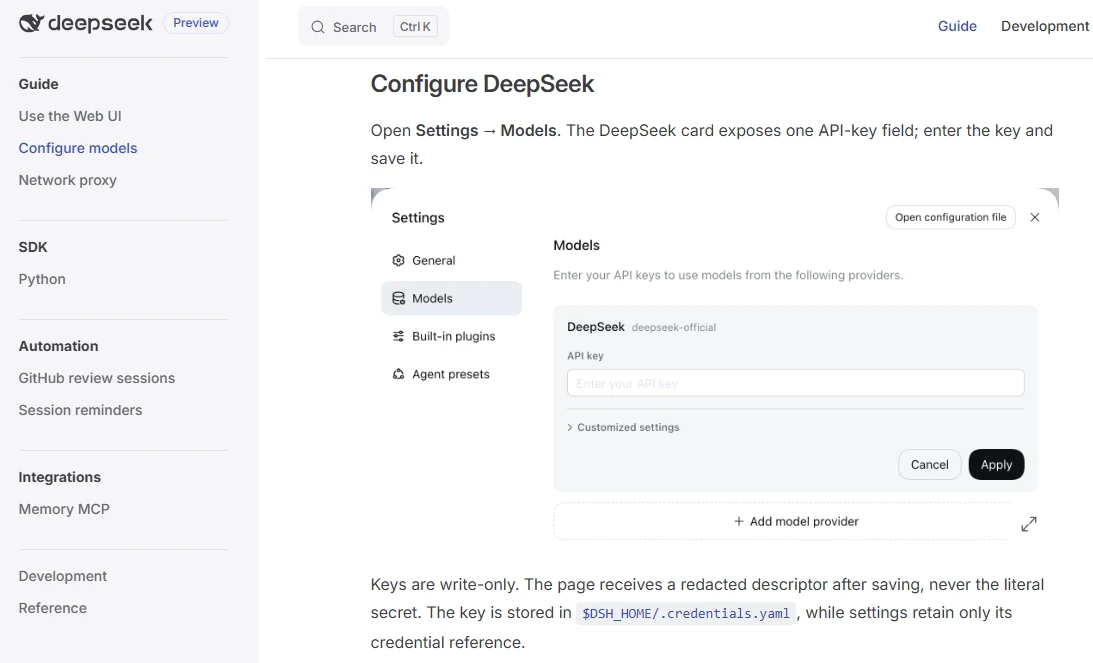
Harness does not contain its own foundation model. It must connect to a provider or compatible model server. Current official documentation supports DeepSeek and several built-in provider types, plus custom endpoints using OpenAI Chat Completions, OpenAI Responses or Anthropic Messages formats.
Using DeepSeek as the model provider? Follow our DeepSeek API setup guide for the API key and endpoint.
| Model route | Credential and cost | Data path | Best fit |
|---|---|---|---|
| Official DeepSeek account service | DeepSeek account and sufficient official service allowance or prepaid balance | Session and model data use the official DeepSeek route | Simplest DeepSeek-managed experience |
| DeepSeek API key | First-party DeepSeek API key and API billing | Requests go to the configured DeepSeek endpoint | Users who already manage DeepSeek API access |
| Built-in third-party provider | That provider’s account, key and prices | Inputs and outputs are processed under that provider’s rules | Using Anthropic, OpenAI, Moonshot/Kimi, GLM or another currently documented route |
| Custom compatible provider | Provider-specific key, Base URL and model ID | Directly to the chosen provider | Gateways, corporate endpoints and other supported services |
| Local compatible endpoint | Local server and hardware rather than hosted token billing | Model inference can remain local | Testing local models or controlling infrastructure |
Important provider rules
- A provider configuration speaks one protocol. Do not mix OpenAI Chat Completions, Responses and Anthropic Messages settings.
- Use the key, Base URL and model ID issued by the same provider.
- If automatic model discovery returns nothing, add the documented model ID manually only after checking the provider’s model catalog.
- Selecting a new default model normally affects new sessions; existing sessions can retain their original model.
- A claimed capability such as image input is configuration metadata, not proof that the endpoint implements it correctly.
- OpenAI-compatible gateways can still reject roles, parameters, tool structures or reasoning fields.
According to the current provider guide, credentials are stored separately from ordinary settings. DeepSeek API keys are write-only in the interface and stored under $DSH_HOME/.credentials.yaml, while configuration refers to the credential rather than embedding the secret directly.
Never place a permanent model-provider key in a prompt, project file, plugin README, screenshot, public issue, repository or browser-side script.
A safe first DeepSeek Harness workflow
The best first task is small, reversible and easy to verify. Use a copied repository or a folder containing fictional documents—not production code or confidential client material.
- Create a disposable workspace. Copy a small project into a new folder and confirm that Git or another backup method can restore it.
- Configure the model. Confirm the provider, model, protocol, billing route and privacy policy.
- Start a fresh session. Select only the copied workspace.
- Begin with inspection. Ask the Agent to read the workspace without changing files or running commands.
- Request a plan. Require a list of proposed files, commands, tests and risks before modification.
- Review permissions. Approve only the actions required for the bounded task.
- Make one small change. Avoid migrations, deployments, package upgrades and destructive operations.
- Run a defined check. Use an existing unit test, linter, file comparison or manual acceptance criterion.
- Inspect the result. Review every changed file and command result.
- Accept, correct or revert. Do not keep a change merely because the Agent reports success.
First inspection prompt
Inspect this workspace without modifying files or running commands.

Return:
1. The project or document structure.
2. The likely entry points.
3. The files relevant to the task below.
4. Any missing information.
5. A proposed plan.
6. The commands and permissions you would need.

Task:
[Describe one small, reversible task.]

Do not make changes until I approve the plan.
Controlled implementation prompt
Implement only the approved change.

Constraints:
- Do not modify unrelated files.
- Do not install or update dependencies.
- Do not access files outside the selected workspace.
- Ask before running a command that writes data.
- Run only the agreed validation.
- Show the final changed-file list and any remaining uncertainty.
What can DeepSeek Harness do?
| Task | What Harness contributes | What the user must verify |
|---|---|---|
| Explore a codebase | Workspace access, planning, search, tools and delegated investigation | Whether the model correctly identifies architecture and dependencies |
| Edit code and run tests | File modification, command execution and session history | The diff, test quality, security and unintended changes |
| Work with documents | Plugins and tools for reading, writing or transforming supported files | Facts, formatting, file integrity and actual editability |
| Analyze spreadsheets | File access, calculation tools and repeatable workflows | Source rows, formulas, units, exclusions and totals |
| Create presentations or reports | Model-guided structure plus file-generation plugins | Slide accuracy, native editability, citations and visual consistency |
| Research public information | Search or browser plugins, files and report-generation workflows | Whether each source supports the attached claim |
| Run background work | Background commands, workflow execution and scheduled tasks where enabled | Host availability, completion evidence, cost and failure recovery |
| Delegate to subagents | Child contexts and experimental multi-agent coordination | Duplicated work, conflicting changes, cost and merged results |
| Build new capabilities | Creator Mode and the Cordis plugin system | Code safety, dependencies, permissions, update behaviour and data access |
A capability shown in Harness may come from a plugin rather than the core application. Its quality can also change when the model or provider changes. Record the complete configuration before treating a result as reproducible.
Plugins, Skills, MCP, Hooks and subagents
These extension mechanisms are related but not interchangeable.
| Mechanism | Practical role | Main risk |
|---|---|---|
| Plugin | Adds or replaces Harness services, tools, model adapters, interfaces or background behaviour | Can execute code, access files, communicate over the network or introduce vulnerable dependencies |
| Skill | Packages reusable task instructions, procedures or specialised knowledge | Can steer the Agent toward unsafe or incorrect steps if not reviewed |
| MCP server | Exposes external tools or resources through Model Context Protocol | Provider-specific authentication, storage, permissions and prompt-injection exposure |
| Hook | Runs logic at selected lifecycle or execution points | A hook is not automatically a permission boundary or security gate |
| Workflow | Coordinates a repeatable sequence of tools or agent steps | Loops, hidden side effects and repeated cost |
| Subagent | Delegates part of a task into another agent context | Additional model calls, context loss and conflicting output |
| Agent Team | Coordinates several agents where the current experimental feature is available | Preview behaviour, higher cost and a larger review surface |
Review a plugin before enabling it
- Confirm whether it is official, experimental or community-maintained.
- Inspect the source repository and release history.
- Review package dependencies and installation scripts.
- Identify every file, network, process and credential permission it can reach.
- Check which data is sent to external services.
- Pin versions where practical rather than automatically taking every update.
- Test in a copied workspace or disposable virtual machine.
- Disable or remove the plugin if its behaviour cannot be explained.
A repository tagged as a DeepSeek Harness plugin is not automatically reviewed, endorsed or operated by DeepSeek. For MCP integrations, the current official guide similarly makes the external provider responsible for identity, authentication, model behaviour, storage and licensing.
Automation and scheduled tasks
DeepSeek Harness currently documents one-time, interval, daily, weekly and cron-style schedules. The feature remains part of a rapidly changing preview product and is marked experimental on the main product page.
- Scheduled work runs only while the relevant Harness host remains active.
- Closing a desktop window can differ from fully quitting the desktop host; quitting stops local scheduling.
- Restart behaviour can catch up an overdue one-time task or the latest recurring occurrence.
- A delivery record is not proof that the underlying task completed correctly.
- Exactly-once execution is not guaranteed.
- Do not assume a task will run while the computer is powered off.
- Each automated run can create additional model, tool and provider charges.
Use scheduled work for low-risk reminders, monitoring or bounded report tasks before considering file modification, external publication, deployment or other high-impact automation.
How much does DeepSeek Harness cost?
The Harness software is released under the MIT licence, but that does not make every Harness workflow free.
| Cost source | What can create the cost? |
|---|---|
| Official DeepSeek models | Account allowances, prepaid platform balance or API usage under current DeepSeek terms |
| Third-party models | That provider’s subscription, credits or pay-as-you-go API charges |
| Local models | Hardware, cloud GPU rental, electricity, storage, administration and maintenance |
| Agent loops | Repeated planning, tool calls, corrections and long session history |
| Subagents or teams | Several model contexts operating during one user task |
| Search and external tools | Search APIs, databases, SaaS connectors, MCP services or paid plugins |
| Always-on automation | A computer or server remaining active to run background and scheduled work |
| Human review | Checking code, sources, calculations, documents and side effects before use |
A short prompt can still trigger many model calls when planning, subagents, tools, retries or automatic review are enabled. Compare the cost of a verified finished task—not merely the advertised token price of the selected model.
Ways to control spending
- Start with one Agent rather than an Agent Team.
- Use a bounded workspace and a narrowly defined task.
- Choose the least expensive model that passes a representative evaluation.
- Limit retries, recursion and tool rounds.
- Start a fresh session when old context is no longer needed.
- Disable unused plugins and external tools.
- Review scheduled tasks to prevent forgotten recurring usage.
- Monitor provider usage and bills independently of Harness.
Privacy depends on the model route
The interface can run locally while the model request and tool data still leave the device. Identify every component in the data path before describing a Harness workflow as local or private.
| Route | Current data consideration | Practical action |
|---|---|---|
| Official DeepSeek model service | The Harness Privacy Policy says session logs can include inputs, authorised uploads, outputs, tool calls, plugin configuration and conversations. It also describes use for improving, developing and training technology. | Use non-sensitive test data and review the current training opt-out route. |
| Custom model service | DeepSeek says model inputs and outputs are sent directly to the selected provider and are not processed or stored by DeepSeek server-side for that route. | Review the selected provider’s policy and remember that local Harness session data can still exist. |
| Local model server | Model inference can remain on controlled hardware. | Audit search, plugins, telemetry, MCP servers, updates, storage and cloud fallbacks before claiming full locality. |
| Plugin or MCP service | The external component can receive prompts, files, tool arguments or results according to its own implementation. | Review every integration separately and minimise the data supplied to it. |
| Workspace files | Harness can access the files allowed by the selected workspace, permissions and plugin configuration. | Use a copied folder and exclude secrets, credentials and unrelated directories. |
The current policy states that data collected directly by DeepSeek is processed and stored in the People’s Republic of China. It also provides mechanisms for privacy requests and an opt-out relating to model training or technology optimisation. Read the policy applicable on the actual usage date rather than relying on a summary.
Do not expose API keys, passwords, customer records, health data, identity documents, employee files, confidential contracts, production credentials, trade secrets or privileged legal material to a Harness workflow without explicit authorisation and an approved data-governance basis.
Security, approvals and sandbox limits
The official DeepSeek Harness safety notice says the software is experimental, has not undergone a security audit and can execute model-generated code and commands. It can also load third-party plugins and access files, processes, networks and credentials made available to it.
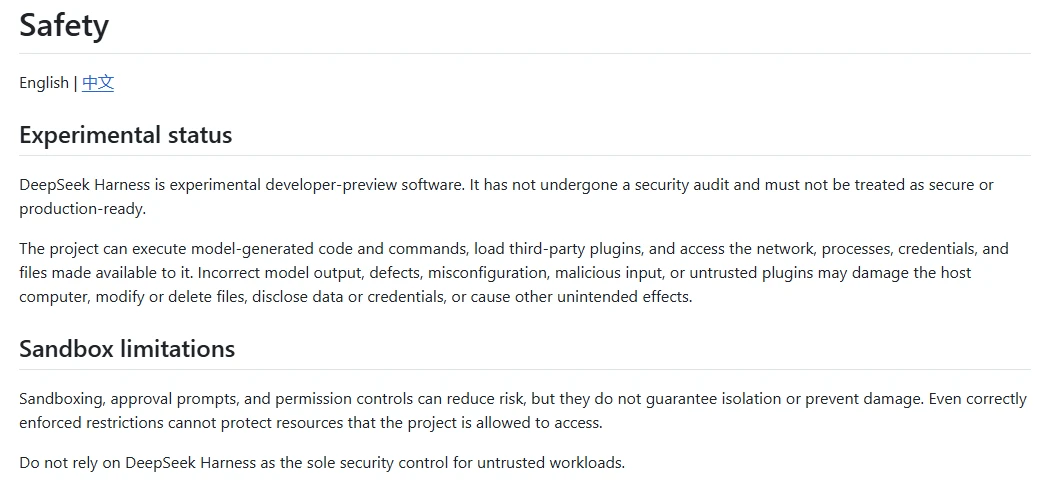
Approvals and sandboxing reduce risk; they do not guarantee isolation. DeepSeek’s sandbox vocabulary currently focuses on filesystem effects, while network and process visibility are separate concerns.
| Mode or policy | Practical meaning | Risk |
|---|---|---|
| Read-only sandbox | Restricts filesystem writes under the applicable enforcement backend | The Agent may still read permitted data or send it through an allowed model or tool route. |
| Workspace-write | Allows writes within the selected workspace and normally pairs with approval requests | Incorrect or malicious changes can still damage workspace files. |
| Danger-full-access | Removes normal filesystem restrictions | Highest risk; inappropriate for ordinary experimentation |
| Ask approval | Prompts the user before covered actions | The user can approve a misleading or misunderstood action. |
| Never ask | Allows covered actions without interactive confirmation | Unsafe unless the environment is deliberately isolated and the task is tightly bounded |
| Automatic approval review | Experimental assistance for reviewing proposed actions | Another model decision is not a substitute for a human security boundary. |
Minimum safety controls
- Use a disposable virtual machine, container or dedicated development environment for unfamiliar workflows.
- Work from a copy rather than the only copy of important files.
- Use the smallest possible workspace.
- Start in read-only or workspace-write mode with approval prompts.
- Remove production credentials and sensitive environment variables.
- Restrict outbound network access when it is not required.
- Inspect commands before execution.
- Review plugin source and dependencies.
- Limit subagent depth, tool rounds and retries.
- Inspect every changed file, not only the Agent’s summary.
- Keep backups and a tested rollback path.
- Do not use Harness as the sole security control for untrusted workloads.
Is DeepSeek Harness production-ready?
Not under the current official safety guidance. A successful installation or small coding task does not establish that the system is suitable as a production control plane, multi-user service or security boundary.
A contained internal pilot can still be useful when it has:
- A disposable or isolated environment
- Non-sensitive source material
- Least-privilege model, filesystem and network access
- Reviewed and pinned plugins
- Human approval for consequential actions
- Complete file and command logging
- Provider cost monitoring
- Backups and rollback
- Defined acceptance tests
- A documented stop condition
Before wider deployment, evaluate authentication, multi-user isolation, audit logs, plugin governance, secrets handling, network policy, backup, incident response, version pinning, upgrade rollback, contractual support, data residency and the reliability of the selected model provider.
DeepSeek Harness troubleshooting
| Symptom | Likely cause | First safe check |
|---|---|---|
| Desktop installer will not run | Unsupported operating system or CPU architecture | Compare the computer with the current official download requirements. |
npx or dsh is not found | Node.js or package-runner installation problem | Check the current repository’s Node.js engine requirement and restart the terminal after installation. |
| The browser does not open | The server started with automatic opening disabled, or the browser launch failed | Check the terminal, then open http://127.0.0.1:3080 manually. |
| The composer is disabled | No workspace has been selected | Choose a permitted workspace in the current interface. |
| No models appear | Provider discovery is unsupported, authentication failed or the endpoint returned no list | Verify provider, protocol, key and Base URL; then add a documented model ID manually if required. |
| Authentication fails | Wrong key, wrong endpoint, wrong account route or missing balance | Confirm that the key and Base URL belong to the same provider and plan. |
| A model rejects requests | Unsupported roles, parameters, tools, images or reasoning fields | Review the provider’s protocol compatibility and disable unsupported settings. |
| A tool is blocked | Approval policy or sandbox mode denies the action | Review the requested effect before changing the policy. |
| A plugin fails after an update | Preview-version or dependency incompatibility | Disable the plugin, check its supported Harness version and restore the prior known-good configuration. |
| A scheduled task did not run | The host was fully stopped, the task was disabled or the schedule was invalid | Confirm that the Harness host remained active and inspect the task’s current status. |
| Model costs are unexpectedly high | Long history, repeated tool loops, subagents, retries or recurring tasks | Inspect provider usage, session length, tool rounds and active schedules. |
| A generated file looks correct in preview but fails elsewhere | The preview hid structural or compatibility problems | Open the actual exported file in its target application and inspect its objects, formulas and metadata. |
Who should use DeepSeek Harness?
DeepSeek Harness is worth evaluating for:
- Developers who want an inspectable, open-source agent runtime rather than a single locked model product
- Plugin authors exploring the Cordis architecture and Creator Mode
- Technical users who want to switch among hosted and compatible local model endpoints
- Individuals experimenting with coding, documents, research and automation in disposable workspaces
- Teams running a contained pilot with backups, security review and human approval
Choose another route, or postpone adoption, when you require:
- An audited security boundary
- A mature production SLA
- Turnkey multi-user administration
- Guaranteed plugin compatibility
- Unsupervised operation on sensitive or production systems
- A simple consumer chatbot without workspace or command access
Frequently asked questions
Is DeepSeek Harness an official DeepSeek product?
Yes. It has an official DeepSeek product page, download page, documentation site and repository under the deepseek-ai GitHub organisation.
Is DeepSeek Harness a model?
No. It is an agent runtime and workspace that connects a selected model to files, commands, tools, plugins and delegated agents.
Is DeepSeek Harness free?
The Harness software is released under the MIT licence. Hosted model usage, third-party APIs, search tools, plugins, servers and local hardware can still create costs.
Does DeepSeek Harness support Windows and macOS?
The current official download page lists a 64-bit Windows build and a macOS build for Apple-silicon Macs running macOS 13 or later.
Does DeepSeek Harness support Linux?
The current download page does not list a packaged Linux desktop application. Linux users can evaluate the documented Web UI, source or Python SDK routes; the SDK currently supports Linux on x64 and arm64.
Does the desktop app require Node.js?
The packaged desktop application should be treated separately from the npm and source routes. Node.js is required for the current npx or source workflow, while the Python SDK supplies a bundled runtime for ordinary SDK execution.
Does DeepSeek Harness require a DeepSeek API key?
Not in every configuration. Harness can use an official DeepSeek account or API route, supported third-party providers, custom compatible endpoints and potentially local model servers. Each route has its own authentication and billing requirements.
Can DeepSeek Harness use local models?
It can connect to a compatible locally hosted endpoint when the server implements a supported protocol and the selected model can handle the required tools or modalities. A local model may behave differently from an official hosted model.
Is DeepSeek Harness fully local?
Not by default. The interface may run locally while model requests, web search, MCP tools, plugins, storage or telemetry communicate with external services. Map the complete data path before making a locality claim.
Is DeepSeek Harness private?
Privacy depends on the model service, plugins, MCP servers, tools and files involved. The official DeepSeek service and a custom provider have different data paths and policies. A local model does not stop an enabled plugin from sending data elsewhere.
Is DeepSeek Harness safe?
Its approvals and sandbox modes reduce risk but do not guarantee isolation. DeepSeek’s official safety notice says the preview software has not been security audited and should not be treated as a secure execution boundary.
Is DeepSeek Harness production-ready?
No under the current official safety guidance. It is more appropriate for contained experimentation and controlled pilots with least privilege, backups, review and rollback.
What is the difference between DeepSeek Harness and DeepSeek Chat?
DeepSeek Chat is a hosted conversational product. Harness is an extensible agent workspace that can act on authorised files, commands and tools using a selected model provider.
Will scheduled tasks run while the computer is off?
Not through the documented local-host workflow. The relevant Harness host must remain active. Closing a desktop window may differ from fully quitting the application, but powering off the computer stops local execution.
Are community plugins reviewed by DeepSeek?
Do not assume so. A community plugin or repository topic is not proof of security review or endorsement. Inspect the source, dependencies, publisher, permissions and network behaviour before enabling it.
Sources checked
The following primary sources were checked on October 9, 2026:
- Official DeepSeek Harness product page
- Official DeepSeek download page
- Official DeepSeek Harness repository and README
- Official DeepSeek Harness releases
- Official
@deepseek-ai/dshnpm package - Official quickstart and Web UI guide
- Official model-provider guide
- Official Python SDK guide
- Official scheduled-task guide
- Official sandbox reference
- Official DeepSeek Harness safety notice
- DeepSeek Harness Privacy Policy
- DeepSeek Harness Terms of Use